I am sorry, the access information you have provided did not work for us:
Error: The password you entered for the username ashanjay is incorrect.
Please check them and post the correct login information as a private message, thank you!
Replies for tickets on suppota
I am sorry, the access information you have provided did not work for us:
Error: The password you entered for the username ashanjay is incorrect.
Please check them and post the correct login information as a private message, thank you!
Hello,
1. Please go to EventON Settings > Google Maps API > disable Disable Google Maps API.
2. Please add this to the shortcode:
hide_mult_occur=”yes”
This hides events from showing more than once in between months.
Now you can use Repeating Events to create a repeat for each day:
https://docs.myeventon.com/documentations/setting-up-repeating-events/
We are glad your issue is resolved, if you have any further questions or concerns please create a new ticket.
If you have a moment, we would greatly appreciate if you could kindly leave us a review at codecanyon! from your account > downloads. Cheers!
Hello,
Could you remove custom CSS, if you have one?
Please send us wp-admin access to your site as a private message for us to further assist your situation.
Yeap, I am already trying to see how we can solve the problem and even if we do not solve the problem on how we will solve it for you with a different way.
The problem is that the refactored / new versions have a lot of fixes that also take care of malware, compatibility with WordPress and PHP Versions, so I want us together to find a way how I will upgrade everything you have to the latest versions.
So sorry about the login
Username: YourCityToronto
Password: 0616YCT!1
Great
Hy Dave
Thanks for your reply !
ok.
A/ how do I create a member only calendar ? how many members wordpress userrole can I link to it ? Do I need to double create an event ? one for public (zoom link available after ticket purchase) / one for members only (how to I do that, I don’t see anything that allows this in the ADD EVENT (zoom link available directly)
B/ I’m willing and ready to try now also the rsvp. How can I download RSVP for free to try ?
C/ how many wordpress userole can I attribute to rsvp ? Only one or many ? His there a limit ?
After writing all this below, I kind understand now that My question is :
D/ how can I use Weeklyview Event On Calendar, using both :
D1/ one time bought ticket on the Weeklyview Event On (where zoom link is being shown only after they bought the ticket / on a page open to all – no restrictions to see that page) (www.mieux-etre.tv/activites-en-direct)
AND (+)
D2/ + unlimited access to all the event on the weeklyview calendar (Page shown to members (9 types) only once logged in – weekly calendar that shows only events targeted to members – link to zoom is being shown directly without paying anything)
(www.mieux-etre.tv/something-like-membersonly-monthly-membership-live-yoga-classes) (this link is not working!)
I have alot of wordpress member role types. In total I have 9.
I know it is a lot, but it is the only I have found to have them receiving a custom email campaign throughout 9 months
To make it simple, people go the landing page www.yogaavecmarco.com to buy their membership to have unlimited access to my yoga/meditation classes, being offered in community centers around here, in North of France. They pay there around 22€ /month and they come to whatever class they want (1 classe a week)
But now, our country is confined again.
Everything is shutting down.
I cannot hold my yoga classes in the community centers anymore.
I kind felt that our country was going to shutdown again.
So I created (I’m not using yet) this virtual live yoga classes webpage where people can buy accès to live virtual classes (one time ticket – where zoom link if shown after they purchase ticket) with the use of your Event On wordless plugin : https://mieux-etre.tv/activites-en-direct/
I need to start using this website now.
But I need to find a way, to have my actual wordpress users (my yoga students who comes to my classes in my community centers), who are already member of the same wordpress, who pays around 22€/month, to be able to have access to a page where, once logged in, they can click the event, and attend it with zoom. AND I need to have also the regular buy-one-time ticket weekly calendar to work too.
By default, I planned to have my events zoom link being shown to the client AFTER she/he have bought the class, for the people who buy the one-time-ticket.
Any hint on how to achieve this ?
Thank you so much for your time Dave.
Marc.
Awesome thank you that worked! Much appreciated for the prompt reply!
Have a great day!
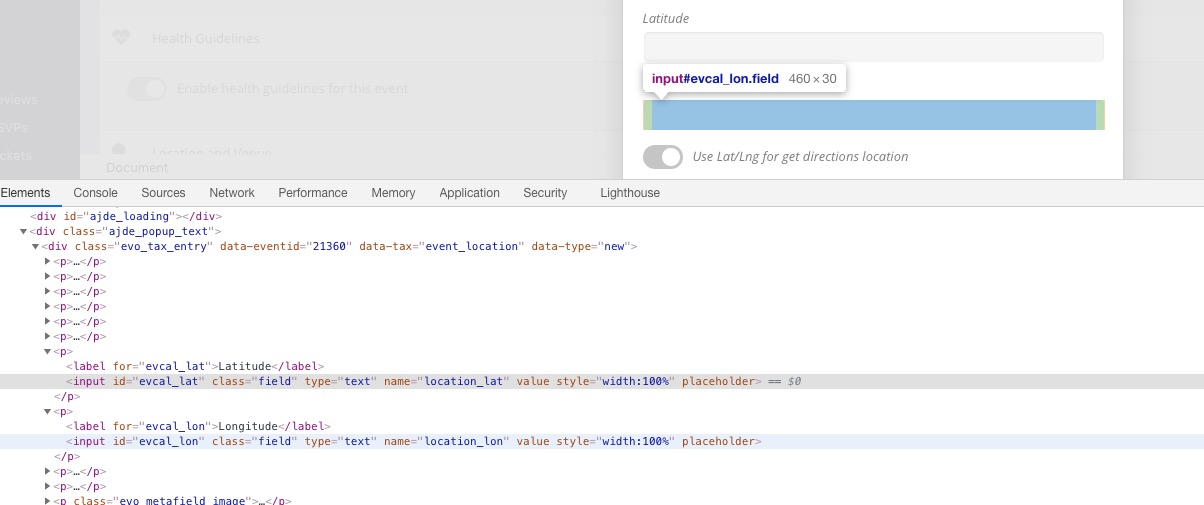
Please go to EventON > CSV Import > check GUIDE FOR CSV FILE. As you can see location_latitude and location_longitude cannot be imported by default. Please follow this guide and add the necessary functionality: https://docs.myeventon.com/documentations/import-additional-fields-using-hooks/
Please also note that these fields named differently:
You can also send us a customization job request by creating a new ticket in here and selecting Customization Request as the category.