user: ashanjay
pw: eventonFIX333
Replies for tickets on suppota
user: ashanjay
pw: eventonFIX333
what e-mail address?
Hello,
Please check Event API add-on: https://www.myeventon.com/addons/event-api/
Try on http://dev.myeventon.com/wp-admin/
You can also try following https://docs.myeventon.com/documentations/show-calendar-another-site-via-iframe/
Hello,
Unfortunately, automatic update isn’t available for FullCal. I can update it, the only problem is that login info isn’t correct. Could you check?
Hello,
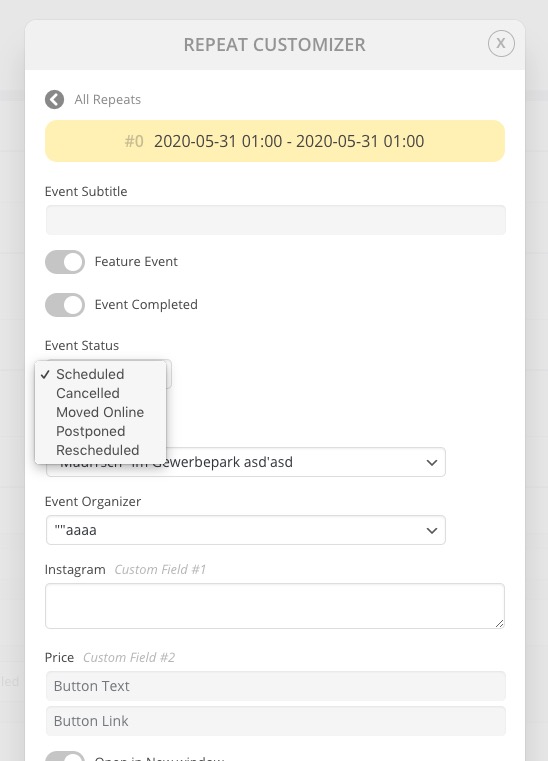
Please check Repeat Customizer: https://www.myeventon.com/addons/repeat-customizer/.
You can change Event Status of each repeat:
Hello,
Please send us wp-admin access to your site as a private message for us to further assist your situation.
Hello,
Could you update EventON to 3.0.2?
To update eventon to latest version: If you are unable to do autoupdate, you can go to codecanyon your account > download and get the latest eventon version as zip file. Then you can go to your website, deactivate old eventon, activate (Do not delete eventon settings & data when EventON is uninstalled) from eventon settings, delete old eventon, install new one and activate. This link will further explain the process it. Also you can follow us on twitter to get real-time announcements on updates!
please refund back my money what I paid for customisation, I am really annoyed so slow progress and updates. It’s been more than a week and still my work is not finished.
Hi –
Adding that shortcode helped somewhat but still does not show the absolute full image. If there are best practices for image size – please let me know.
Also, adding the shortcode made the mobile view look worse – image is even more cropped than before. Please advise on this responsiveness issue as well.
Here is wp-admin access:
username: EventON Helpdesk
PW: uME^4c0Z*4fFO93K