Hello again. I tried debugging, but it seems are no issues being reported (see attachment).
Could you please have a look again? Thank you. 🙂
Replies for tickets on suppota
Hello again. I tried debugging, but it seems are no issues being reported (see attachment).
Could you please have a look again? Thank you. 🙂
Hello,
Great! If you have any further questions or concerns please create a new ticket.
Hello,
Please try this shortcode instead:
[add_eventon_el el_type=”dr” start_range=”01/01/2019″ end_range=”today” number_of_months=”12″ event_count_list=”no” event_type=”251″ show_et_ft_img=”yes” tiles=”yes” tile_count=”4″]
It uses Select Event List Type: Date Range.
Hello,
We are very sorry for the inconvenience. Please send us wp-admin access to your site as a private message for us to further assist your situation.
Hello,
Please add this CSS code to EventON > Styles (If you don’t see any change, EventON > Scripts & Styling > turn off Write styles to header > save settings > turn on Write styles to header):
.ajde_evcal_calendar.miniSlider .eventon_events_list .eventon_list_event .evo_below_title, .ajde_evcal_calendar.miniSlider .eventon_events_list .eventon_list_event .evo_above_title { display: block !important; }
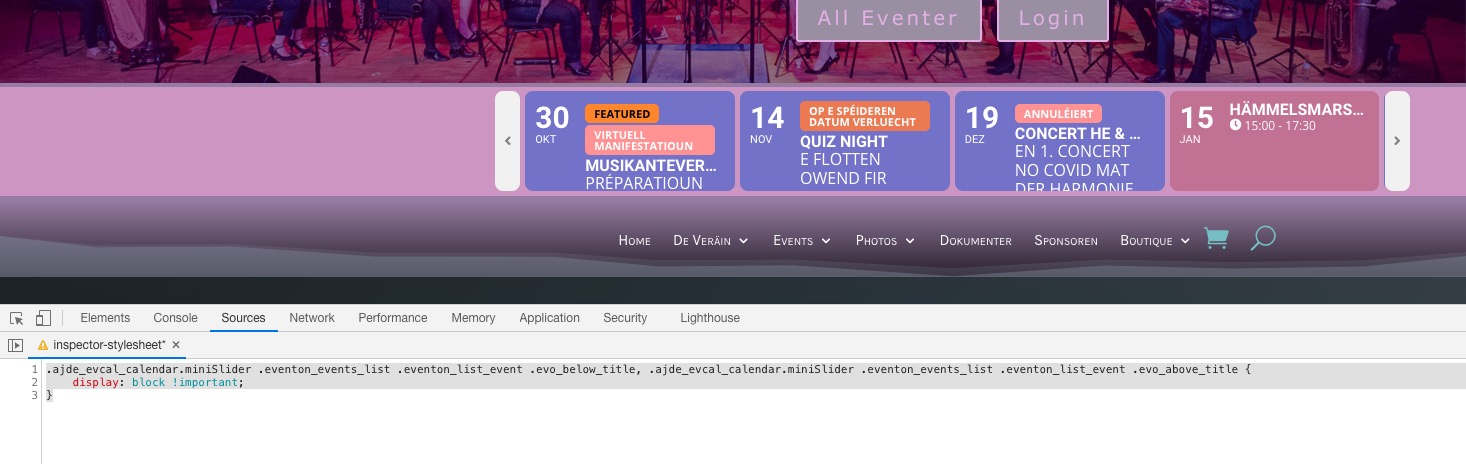
OK, solve. thanks for your help.
Regards.Pedro.
Hello,
Please go to EventON > EventTop > enable Hide live event progress bar with time remaining.
Hey Helen,
Any other question?
Όχι συγνώμη λάθος, είναι στο functions.php ο κώδικας, μπορείς να τον βρείς εκει πέρα!
yes, I mean from last update
Before this last update i have never seen “Live now”.. and i want to deleve though css.
i write in my child css
span.evo_event_progress { display: none !important; }..
but it doenst work…