We are glad your issue is resolved, if you have any further questions or concerns please create a new ticket. If you have a moment, we would greatly appreciate if you could kindly leave us a review at codecanyon! from your account > downloads. Cheers!
Archives: Replies
Replies for tickets on suppota
Reply to: tickets(202242)
I have resolved this issue. It was user error. The admin had not edited the settings for Action User.
It is working as expected now.
You can mark this ticket as closed.
Reply to: tickets(201749)
Am i not able to use elementor on the page that my calendar is being shown?
Reply to: tickets(202427)
Sorry for bothering you..
Thank you very much for your answer
Best regards
Reply to: tickets(201649)
Hi Artem,
Thanks for your reply. I see that there has been an update which I have installed and has meant that the calendar is now displaying correctly. However, when you click on one of the events, the event pop up does not appear to be working.
I have reverted the calendar back to just displaying the current month for now as the pop up seems to work fine in that instance. I’ll wait to hear from Ashan for any updates.
Thanks for your continued help.
Reply to: tickets(202144)
I updated the plugin (it’s ver 3.0.2 now), but I still can’t see any events when searching/filtering. Could you please check again? Or send me a screenshot how it should look like?
Thanks!
Reply to: tickets(198816)
Hey Patrick,
Let me see what I can do for you about that 🙂
Reply to: tickets(199517)
from what i can see is now after your fix today the word “time” is not in the same span as before it has changed.
Reply to: tickets(202404)
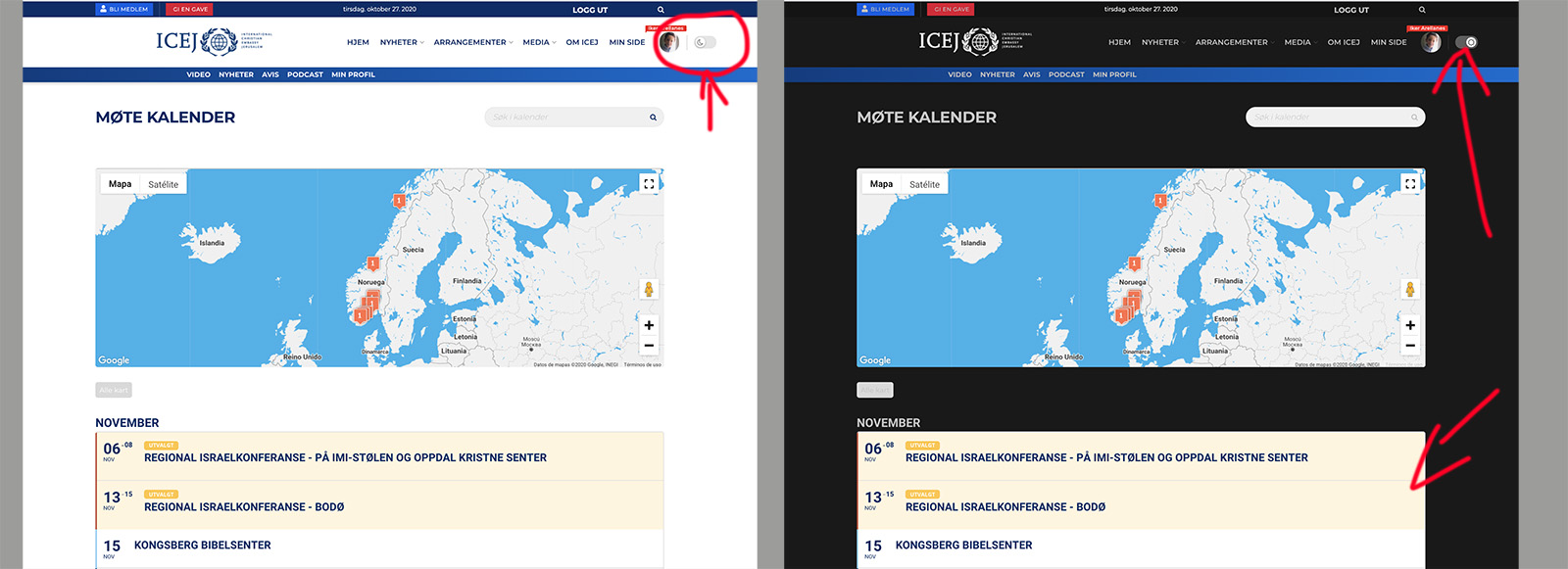
I’ve done this before but it’s not what I’m looking for. My template, has the option to switch to dark mode in the header, is there any way that this plugin automatically recognizes when the user switches to dark mode?
Reply to: tickets(199517)
but I haven’t made any change today, can you please look into it and fix it.