see video below
Archives: Replies
Replies for tickets on suppota
Reply to: tickets(199517)
Yes the code was there from before 😉
Reply to: tickets(202300)
currently the timezone switch isn’t taking into account daylight saving (we are working on it) so in myeventon>>>>settings>>>>time settings choose something that is +2
the location name doesn’t matter only the gmt + insert number
colors at this time can be changed with CSS
this will change it on the pop up event
this is text color
.eventon_list_event .evcal_desc em.evo_mytime >*, .eventon_list_event .evcal_evdata_cell .evo_mytime >* {
color: #fff !important;
}
this is button color
.eventon_list_event .evcal_desc em.evo_mytime, .eventon_list_event .evcal_desc em.evo_mytime.tzo_trig:hover, .eventon_list_event .evcal_desc em.evo_mytime, .eventon_list_event .evcal_evdata_cell .evo_mytime, .eventon_list_event .evcal_evdata_cell .evo_mytime.tzo_trig {
background-color: #2eb22e !important;
}
on event top text color
.eventon_list_event .evcal_desc em.evo_mytime.tzo_trig b {
color: #b86060;
}
and this is the background color
.eventon_list_event .evcal_desc em.evo_mytime, .eventon_list_event .evcal_desc em.evo_mytime.tzo_trig:hover, .eventon_list_event .evcal_desc em.evo_mytime, .eventon_list_event .evcal_evdata_cell .evo_mytime, .eventon_list_event .evcal_evdata_cell .evo_mytime.tzo_trig {
background-color: #2eb22e;
}
paste those codes into Appearance>>>>customize>>>>additonal css
Reply to: tickets(202242)
Please send us wp-admin access to your site as a private message for us to further assist your situation.
Reply to: tickets(202272)
I noticed that after updating eventon on our staging site: https://stage.meltonlearning.com.au/ , the event details page styling changed. Instead of running a white background which we customised, it has now changed to a dark grey?
Is there any styling updates that have come with this update that we may need to be aware of?
Also, is it possible to just do the settings > general > timezone update on the live site without updating the plugin just yet? We want to make sure everything is working correctly on the staging site first before updating the eventon plugin on the live site. But we do need a fix on the timezone calendar thing..
Reply to: tickets(202354)
I just fixed the bullet point number 2)
yuppie! sorry!
Reply to: tickets(202242)
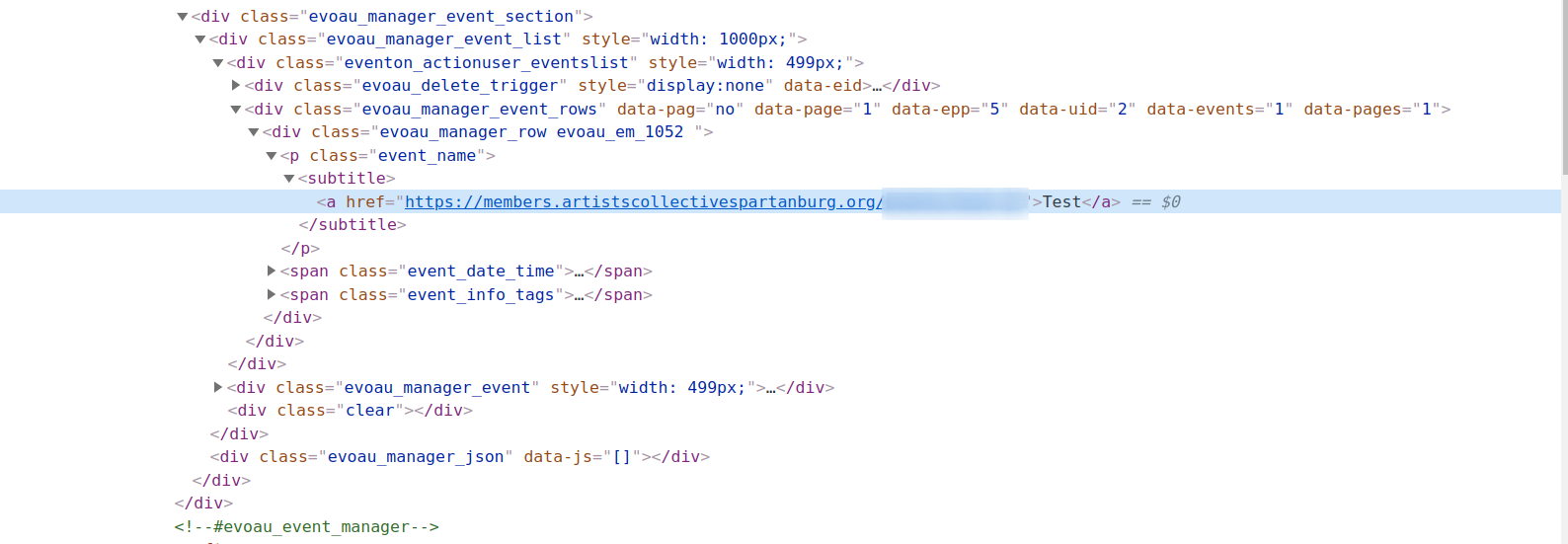
I added the above css, but it made no change in the issue. I have attached a screenshot of the html output.
This issue is occurring even for the administrator. There is no edit link or icon. There is no way to edit the events from the event manager on the front end.
Reply to: tickets(202354)
Thank you for the quick reply! I will try to create a staging site.
I think I still have the old Zip of the addons in case, yes.
I’m just soooo worried about losing the rsvps in the update.
For now the plugin works pretty good. I mean there are few issue…
For example the action user: the organizer cannot see the waitlist (!!!)
Here in Italy you can no longer do “presential events” so they will be practically transferred ALL ONLINE. So some small bugs aren’t that urgent to fix.
I still have a couple of questions:
1) online events: I have set that users will be able to see the link 30 minutes before. Will they also receive an email with the code to log in?
2) booking confirmation email: I can’t figure out where to change it, apparently “my last post” it’s automatically. I deleted “the post” and took a test again but when I book or sign up I don’t receive any confirmation email. Any help? Where I can configurate that?
Thank you sooo much for your support!
Reply to: tickets(201754)
Sorry about changing the username and password that I originally sent. Here is the new temporary login info:
Username: EventON
Password: cwT6@3S1m^!HD*0S5Zev9DDv
Here is a screenshot of the shortcode we have set up on the Events page: https://prnt.sc/v7ufyt
Reply to: tickets(193006)
Hi, ok.