Perfect! If you have any further questions or concerns please create a new ticket.
Archives: Replies
Replies for tickets on suppota
Reply to: tickets(202144)
Hello,
Could you update EventON to 3.0.1?
To update eventon to latest version: If you are unable to do autoupdate, you can go to codecanyon your account > download and get the latest eventon version as zip file. Then you can go to your website, deactivate old eventon, activate (Do not delete eventon settings & data when EventON is uninstalled) from eventon settings, delete old eventon, install new one and activate. This link will further explain the process it. Also you can follow us on twitter to get real-time announcements on updates!
Reply to: tickets(202019)
Thank you for your messages, I am going to assign this ticket to Ashan. Please allow some time for him to get back to you, we greatly appreciate your patience and thank you for being a eventon customer!
Reply to: tickets(202125)
Hello,
It seems that there is some kind of issue in Divi Edit Mode. If you’ll look at this published page https://opencampus.uni-koeln.de/1374-2/ you’ll see that everything seems to be working correctly.
Please check and let me know.
Reply to: tickets(202061)
If you’ll look at this Google’s testing tool: https://search.google.com/structured-data/testing-tool/u/0/#url=https%3A%2F%2Fwww.foodsorcery.co.uk%2Fevents%2Fcooking-together-with-a-pinch-of-christmas-8%2F, you’ll see that everything seems to be correct:
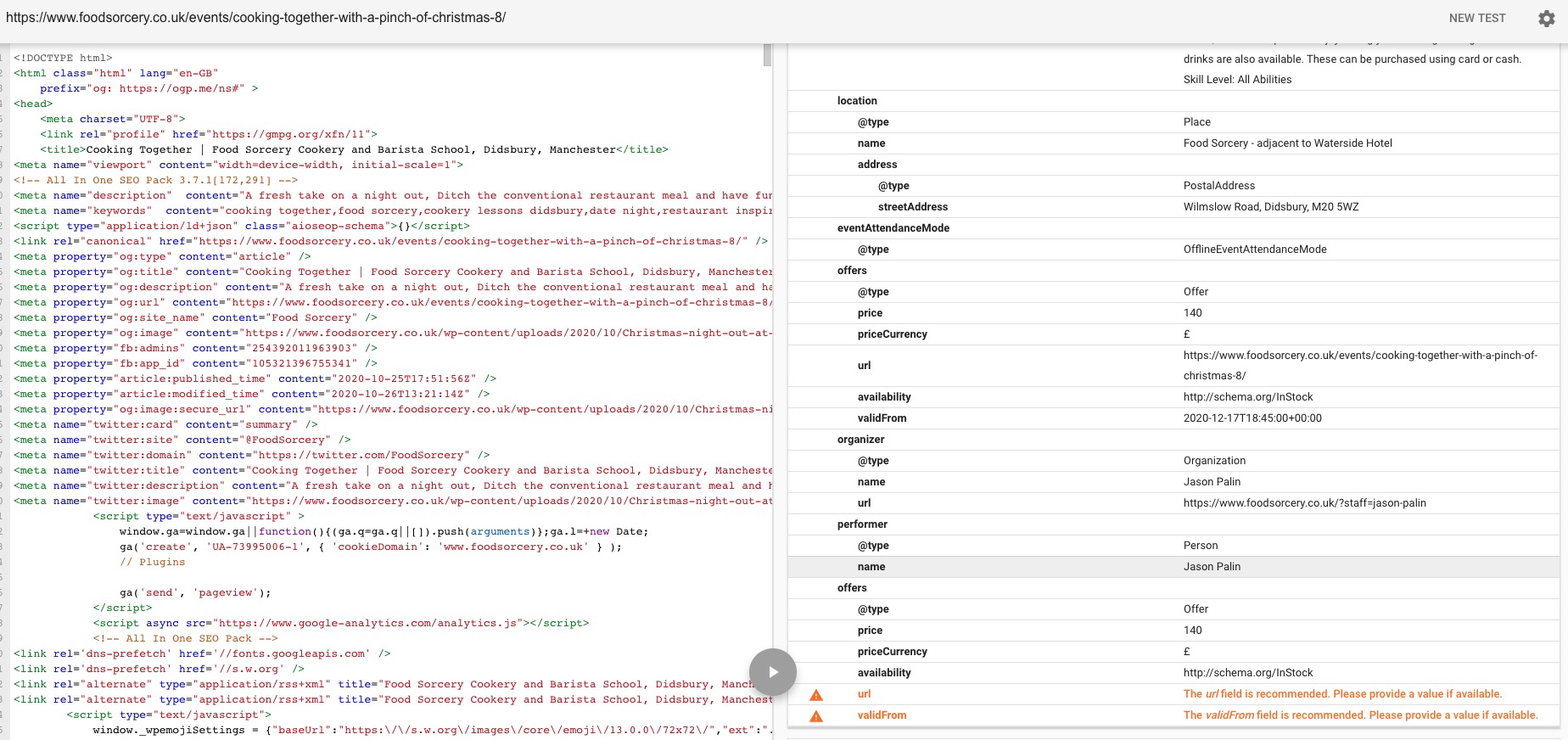
As you can see there are only two warning and no errors.
It seems that Google decided to show your events instead of EventON’s simply because.
Reply to: tickets(202125)
Thanks for checking! The calender is on this (not yet published) website: https://opencampus.uni-koeln.de/wp-admin/post.php?post=134&action=edit
To see it, you’ll have to activate the Divi builder.
Thanks. 🙂
Reply to: tickets(198259)
I have not changed anything, however, the UK moved to the UTC time this weekend, maybe this has affected something.
Reply to: tickets(198259)
Just saw your question above, the timing in the database was set as you requested, to UTC
Reply to: tickets(201655)
More, the dashboard invites me to update from 2.9.1 (image attached)… why so?
It seems that since you have two versions of EventON it thinks that your still has 2.9.1.
Reply to: tickets(201655)
Please follow the instruction from this message:
If you want to install multiple version on the same server all you need to do is to deactivate EventON, connect to the server using FTP and go to wp-content/plugins and find eventon folder. Now you need to change it’s name to _eventon or similar. Now you can install a new version of the plugin.