oh, that’s really a problem for us. 🙁
isn’t there a way to simulate a payment for this month?
The thing is, if I do not get the invoice, I will have to pay the whole thing myself, which would be very bad, as I’m not the riches guy….
Please, can you find a way to get around this issue?
That would very be much appreciated.
Thanks

Thank you for the reply.
It says “You have version 3.0 installed. Update to 3.0.2”
When I try to update it goes through the process then still stays in my “Update Plugins” area with no change. (see attached photo)
It will keep going through that process. Even after cleaning cache.
Any suggestions?
Thank you.
Thanks
we can help ourselves quite well.
You can close the topic
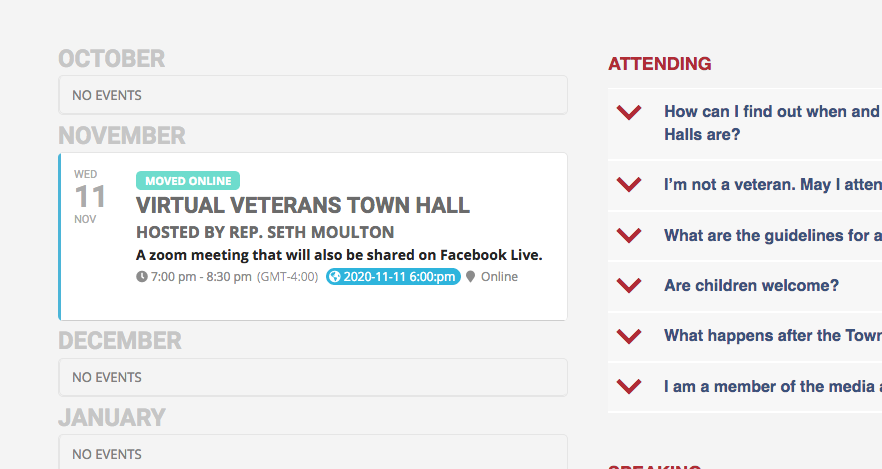
Hello! Here’s a screenshot from my browser. EST will be UTC-5 on 11/11, but right now we’re in daylight savings time, so right now in the timezone section when editing the event Eastern Time is listed as UTC-4. Or specifically it’s listed as “(GMT-4.00) Eastern Time (US and Canada)”
Hello,
If you want to show any calendar: Main Calendar, WeeklyView, FullCal and so on, you need to use Shortcode Generator.
Please follow this guide: https://docs.myeventon.com/documentations/shortcode-generator/. For example, if you purchased and installed WeeklyView add-on, you should be able to see on “How to use SG” step in the shorcode generator.
Thanks @Ashan, appreciate your feedback. I’m looking forward to it, it is an amazing feature. I’m still testing but I think there might be an issue with the daylight time. When klick on the button “show in my timezone” I get incorrect information. However I will do some more testing before creating a ticket
Hello,
The main issue is that Edit Event > Tickets > Ticket SKU (Required*) is the same for each duplicate. Plus if you’ll go to Edit Event > Ticket and check ASSIGN DIFFERENT WC PRODUCT AS TICKET PRODUCT, you’ll see that it’s the same for each duplicate as well.
In order to fix this issue you need to change SKU, update the event and assign a new product if the same.
Hello,
Thank you for letting us know. Here is the patch fix for this issue:
 It was a minor math issue

Hi there thank you for the message michael, we have not gone through with full integration with eventON addons, and we are planning to add the timezone feature to tickets and other addon 🙂
I cannot login to your website. Could you send us the shortcode you are using?