I don’t see that I can see the latest information. Did you out put or am i missing where I can find the list of registrants? I assumed I had to ask you to send me the output .. is that incorrect?
Archives: Replies
Replies for tickets on suppota
Reply to: tickets(200666)
Yes correct. These will be default values, and these fields will be hidden from the user on the front end.
Reply to: tickets(200591)
Thank you.
Reply to: tickets(200732)
we have cleared browser cache, and we have tried using:
Windows 10: Edge, Chrome and firefox
mac : Chrome
iOs: default browser and chrome
Everywhere it is the same result: the browsers are crashing.
We try to access the event trough admin page -> events -> “Mandag 12.30-14.00 Yogamiks (blandet nivå)“
If I start chrome dev console I get the following errors:
“VM256 post.php:1 Failed to set referrer policy: The value ” is not one of ‘no-referrer’, ‘no-referrer-when-downgrade’, ‘origin’, ‘origin-when-cross-origin’, ‘same-origin’, ‘strict-origin’, ‘strict-origin-when-cross-origin’, or ‘unsafe-url’. The referrer policy has been left unchanged.
[Violation] Forced reflow while executing JavaScript took 30ms
13[Violation] Added non-passive event listener to a scroll-blocking <some> event. Consider marking event handler as ‘passive’ to make the page more responsive. See <URL>”
Reply to: tickets(201197)
Hello,
Please follow this guide: https://docs.myeventon.com/documentations/change-events-slug/. Make sure that you save Permalinks, otherwise it may not work.
Reply to: tickets(199517)
hey, will you be able to fix it today? It’s a bit urgent for me now.
Reply to: tickets(200666)
You want these customization on the default Add Event post right in the backend?
// Hide these fields, and set options automatically where specified with “=”
- show remaining = yes
- GEO my WP location = populate field gmw-lf-address with Location address
- Latitude & Longitude fields for event location (Nothing to do here. These will be populated automatically)
- Show a message if a logged in customer has purchased a ticket already = yes
- Allow customers to submit inquiries = Yes
- Override Default Subject for Inquiries Email = will inherit global settings
- Featured image alt desc: use fifu_image_alt, make this field hidden and auto-populate with event name
- Sell Price Options as Separate Tickets = no
- Hide variations that are out of stock = no
- Other ticket options/ Troubleshoot button
- Generate Google Map from the address = Yes, except for events in Virtual Events category
- SEO: Use organizer information to also populate performer schema data for this event. = Yes
- User Interaction for event click = (popup window) ux_val=3
- ‘Learn more about event’ link
- SEO Additions for Event = use Ticket price & currency fields
- Ticket Reminders = yes for all event reminders (currently I am only 1 pre and 1 post event reminder)
- Banner: Need more cool features?
- Show guest list for event on eventCard = no
- Hide Location Name from Event Card = no
- Event image
- Post attributes
- Event color
- Event options (shown in sidebar when editing event in Dashboard)
- Event completed
- Only for logged in users
- Action User
- Document Status and visibility
- Permalink
- Further Edit
- Wishlist Count (this will be moved to event-manager)
- Make location information only visible to logged-in users = no
- Show location information over location image (If location image exist) = yes
- Override Default Email Address to receive Inquiries = auto-populate with Organizer’s email
- Override default inquires email = auto-populate with global option
- Related Events = auto-populate with events from same organizer and same venue
- Assign Different WC Product as Ticket Product
Reply to: tickets(200922)
Yes, when disabling BuddyBoss Platform (not “Pro”, but the regular platform), Countdown works.
I will update you of course. But please, if you have any sense why the JS scripts might not load when BuddyPress (the basis of BuddyBoss) is called, this will help the BuddyBoss people. Conversely, perhaps you might be able to think of a workaround (or an improvement to the code) of Countdown that does not lead to this strange repetition of the numbers which I showed above.
Reply to: tickets(198259)
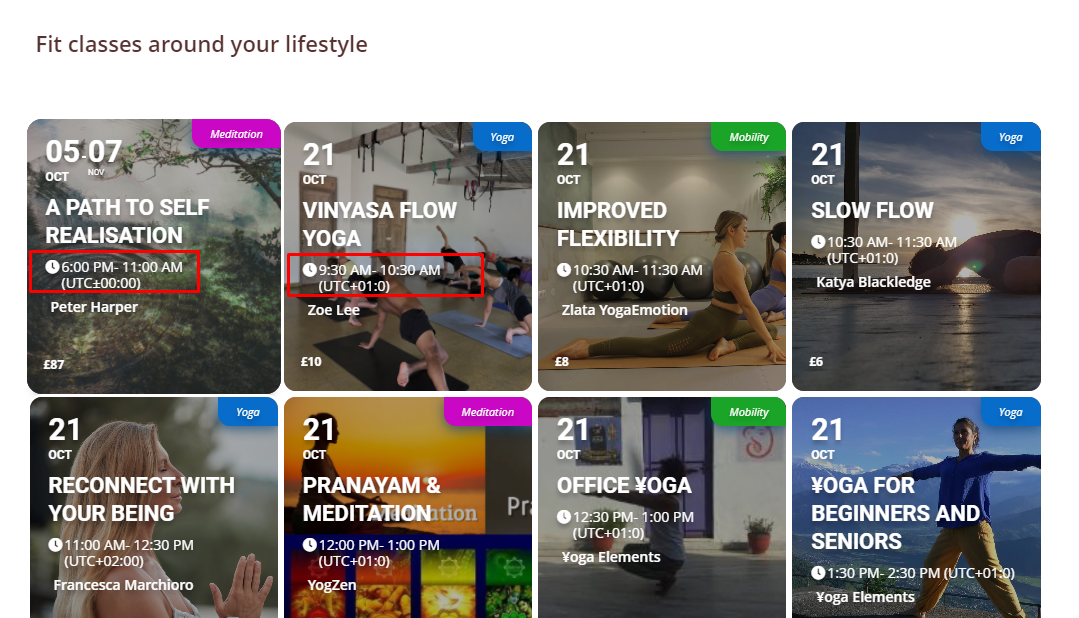
Thank you. Will check today from different time zones to make sure it works correctly.
The time on the event cards on the main page https://foogin.com/ still displays the time like event local time + time zone
Reply to: tickets(200922)

So when you disable BuddyBoss Platform, Countdown starts working?
[Replyto/201153]
Great! Please keep us updated.