Hi Ashish,
Here are the revised requirements. Let me know if you have questions and please also provide a timeline for delivery along with your estimate.
As a note, if there is some feature that I have described that you would consider for a future commercial release, I am open to discussing this if it can get me some cost savings on this development.
Thanks,
Vinay
===============
Current: Event organizer is able to submit event using /submit-event form. This has some only essential fields for creating event. Event is submitted for approval to WP admin. Following approval, user can edit details and change status of event (cancelled, rescheduled, etc) using WP dashboard. User is able to access basic event details in /events-manager page when logged in.
Target:
1. Event organizer is able to submit event using /submit-event form.
2. Organizer will be able to access and edit all event details using Edit function in /events-manager page when logged in, and will have no access to WP dashboard.
3. Some fields from the event post type will be hidden from Organizer and preset values will be used.
Requirements
// Add to event submit form
- Event desc
- Event Subtitle
- Event location
- Event organizer (choose logged in user by default), and allow to create new, or select from Organizers they have created previously.
- Event timezone (make required field)
- Time and Date
- All day event option
- Repeating event option
- This is a virtual (online) event
- Activate tickets for this Event
- Ticket Price
- Sale price
- Short ticket detail
- Enable name your price option
- Total tickets stock (make required field)
- Sold Individually
- Featured image: use field fifu_image_url from Featured Image By URL plugin, and remove Evo event /WP featured image field
- Location and Venue: change dropdown menu to search, or add search field similar Organizers field
- Organizers (allow create new)
- Event Type (Category 1)
- Sub-type (Category 2)
- Place ticket on out of stock
- Enable ticket variations & options
- Stop selling tickets X minutes before event start
- Buttons for ticket variations displayed in this order:
- Add new ticket variation type
- Add new ticket variation
- Add new ticket price option
- link to article about how to setup variable prices: I will provide a link for this.
- Other ticket options = hide Troubleshoot button
- Event Status options
- Hide End Time from calendar
- Month Long Event – Show this event for the entire start event Month
- Year Long Event – Show this event for the entire start event Year
- This event is effected by day light savings time
- Repeating event
- Tags
- Additional Information visible to customer after ticket purchase
- all Help bubbles
// Hide these fields, and set options automatically where specified with “=”
- show remaining = yes
- GEO my WP location = populate field gmw-lf-address with Location address
- Latitude & Longitude fields for event location (Nothing to do here. These will be populated automatically)
- Show a message if a logged in customer has purchased a ticket already = yes
- Allow customers to submit inquiries = Yes
- Override Default Subject for Inquiries Email = will inherit global settings
- Featured image alt desc: use fifu_image_alt, make this field hidden and auto-populate with event name
- Sell Price Options as Separate Tickets = no
- Hide variations that are out of stock = no
- Other ticket options/ Troubleshoot button
- Generate Google Map from the address = Yes, except for events in Virtual Events category
- SEO: Use organizer information to also populate performer schema data for this event. = Yes
- User Interaction for event click = (popup window) ux_val=3
- ‘Learn more about event’ link
- SEO Additions for Event = use Ticket price & currency fields
- Ticket Reminders = yes for all event reminders (currently I am only 1 pre and 1 post event reminder)
- Banner: Need more cool features?
- Show guest list for event on eventCard = no
- Hide Location Name from Event Card = no
- Event image
- Post attributes
- Event color
- Event options (shown in sidebar when editing event in Dashboard)
- Event completed
- Only for logged in users
- Action User
- Document Status and visibility
- Permalink
- Further Edit
- Wishlist Count (this will be moved to event-manager)
- Make location information only visible to logged-in users = no
- Show location information over location image (If location image exist) = yes
- Override Default Email Address to receive Inquiries = auto-populate with Organizer’s email
- Override default inquires email = auto-populate with global option
- Related Events = auto-populate with events from same organizer and same venue
- Assign Different WC Product as Ticket Product
// Other enhancements
- hide option to add active links in event desc editor (currently I am using simple editor)
- when creating ticket variations (variation, type, and price), change save button label in popup from “Add new” to “Save”. (can be done in Language settings?)
- make ‘Update Event’ button floating in top right corner of Event Submission form. Make this persistent as page is scrolled.
- In email that organizers are able to send users using “Emailing” button, add this text to footer of email:
- This message was sent by <organizer name> via Shomee. For questions, contact the organizer directly at <organizer email>. Do not reply to this message.
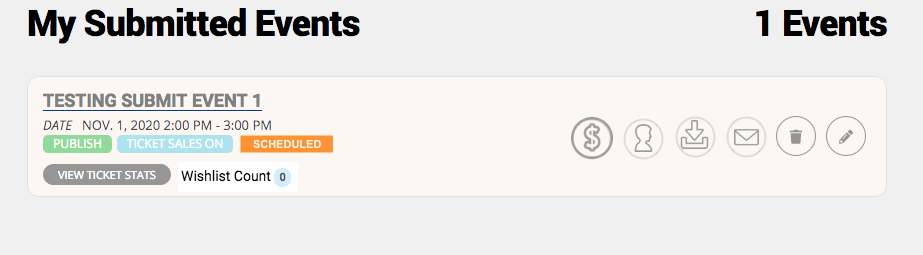
- Add the following action buttons (which launch popup windows) in events-manager screen with each event entry. See screenshot example. Please use similar icons to those represented, or if you prefer, I can provide the graphics. Use the labels provided as hover message.
- Sales Insights
- View attendees
- Download attendees list
- Email attendees
- Feature this event = this will launch the Featured Event workflow to purchase featured events credits. Ideally, this should be launched from this same screen without open the event post in edit mode.
- Add the following status boxes in events-manager screen with each event entry. See screenshot example.
- Event Status (Scheduled, postponed, cancelled, etc.)
- Wishlist count
- In Event edit screen, change taxonomies
- —Rename Download (CSV) button to Download attendees list
- Rename Sales Insight button to Sales Insights
- Rename Emailing button to Email attendees
- Test to ensure timezone is being used with iCal and Googlecal
// Business rules for events editing
- Upon submit, make default post status “Pending Review”
- If event status changes (postponed, cancelled, moved online, rescheduled, etc), require Reason field to be completed and send emails to ticket holders automatically. I will provide the textual content for the email.
- If date or time has changed, automatically set status to Rescheduled, make reschedule notice required, and send out email to all attendees.
- Submission confirmation page. Add a link to go back to Events Manager page (whatever page has events_manager shortcode). Link text “Return to Events Manager”.
// End