Hi, this seems to have done it! Thank you!
I only notice two other things that I cannot explain that have been off since installation (a pink line in the dropdown selection and not centered dropdown arrows on mobile).
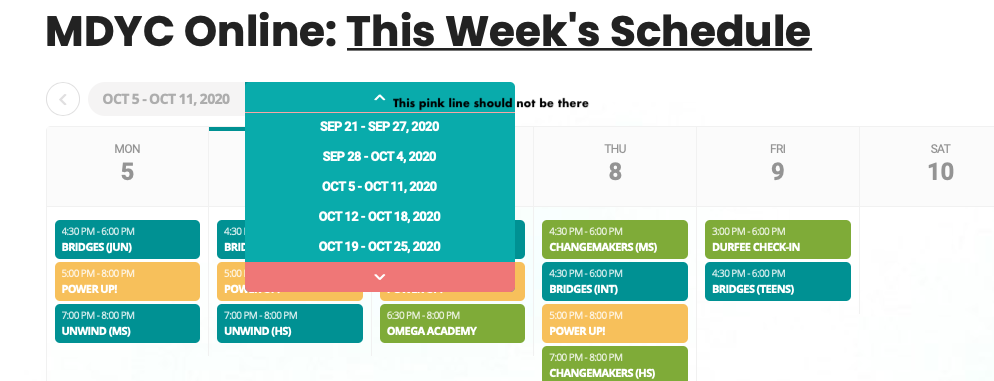
I have a question about the dropdown menu to go forward or back weeks. I have changed the styling to match my site, changing the red/pink colors to a teal type of color. However, there is a remnant of the pink line that you can see in the attached image. You can see the border line above the Sep 21 – Sep 27 row. I do not see that color listed anywhere in my styling, I have changed them all, and I have cleared cache and yet see that pink border line. Can you please help me fix this?
Lastly, the dropdown menu on mobile does not have the arrows centered in its box (will attach image in next message because I can only attach one at a time per response). The arrows not even look a bit odd this unbalanced. On the desktop, it is centered in the box, but can we look into why they are not centered on mobile. It was this way since installing the plugin but a minor thing that I wanted to wait on addressing until the more major stuff was addressed. Thank you.
You are never wasting our time- If you have an issue- never be afraid to ask us, we love helping especially when its an easy fix- sometimes we get issues where we have to go line by line through code- we do it- but we don’t enjoy it as much 🙂
We are glad your issue is resolved, if you have any further questions or concerns please create a new ticket.
If you have a moment, we would greatly appreciate if you could kindly leave us a review at codecanyon! from your account > downloads. Cheers!
Thank you. For some reason I got stuck in my head that I needed the [code][/code] tags based on some documentation I saw. I should have just tried the shortcode itself as I have used others from other plugins. Thanks also for guidance on putting it in a text element. Sorry for wasting your time.
Sorry Arten, but in penacerrada-urizaharra.eus if you click EU you see the post in ES. The problem is still the same.
This is not a customization request, this is a bugfixing issue. Eventon is not working as it is supposed to work when building a custom single event page.
Thanks for your prompt reply Artem, I tried to created a event type and Assign it to the event, but how can I then implement the event type ID to my single listing in order for it to show on the single listing page page that I want it to show?
before one of the developer help me to generate a shortcode and use it in the listing type box , then in the single listing field he inputed the event type number which actually work.
can you try it out because I have been stuck on this stage for a while , million thanks
1. Enabled “Enable language corresponding events” on https://www.arabakomendialdea.eus/wp-admin/admin.php?page=eventon;
2. Selected L2 language on https://www.arabakomendialdea.eus/wp-admin/post.php?post=10038&action=edit&lang=es&classic-editor=1;
3. The event is visible on https://www.penacerrada-urizaharra.eus/3335-2/?lang=eu.
Please check and let me know.