I will send it to you soon, I have to search the data, but don^t have the time.
How is the programming going?
Cheers
Patrick
Replies for tickets on suppota
I will send it to you soon, I have to search the data, but don^t have the time.
How is the programming going?
Cheers
Patrick
Oh, I see it now. That option only shows up after I make it repeating and save it, so I didn’t see it before. THANK YOU!
I Just activated the Twenty Twenty Theme for WordPress network wide and now Im getting a stack trace. See below and hopefully this helps you more. Note this is thrown even on the 0.5 YV Addon plugin on activate.
Warning: include_once(/var/www/cuc/wp-content/plugins/eventon-yearly-view/includes/class-shortcode.php): failed to open stream: No such file or directory in /var/www/cuc/wp-content/plugins/eventon-yearly-view-old/eventon-yearly-view.php on line 94

Warning: include_once(): Failed opening '/var/www/cuc/wp-content/plugins/eventon-yearly-view/includes/class-shortcode.php' for inclusion (include_path='.:/usr/local/lib/php') in /var/www/cuc/wp-content/plugins/eventon-yearly-view-old/eventon-yearly-view.php on line 94

Fatal error: Uncaught Error: Class 'evoyv_shortcode' not found in /var/www/cuc/wp-content/plugins/eventon-yearly-view-old/eventon-yearly-view.php:100 Stack trace: #0 /var/www/cuc/wp-includes/class-wp-hook.php(287): EVOYV->init('') #1 /var/www/cuc/wp-includes/class-wp-hook.php(311): WP_Hook->apply_filters(NULL, Array) #2 /var/www/cuc/wp-includes/plugin.php(478): WP_Hook->do_action(Array) #3 /var/www/cuc/wp-settings.php(546): do_action('init') #4 /var/www/cuc/wp-config.php(110): require_once('/var/www/cuc/wp...') #5 /var/www/cuc/wp-load.php(37): require_once('/var/www/cuc/wp...') #6 /var/www/cuc/wp-admin/admin.php(34): require_once('/var/www/cuc/wp...') #7 /var/www/cuc/wp-admin/plugins.php(10): require_once('/var/www/cuc/wp...') #8 {main} thrown in /var/www/cuc/wp-content/plugins/eventon-yearly-view-old/eventon-yearly-view.php on line 100
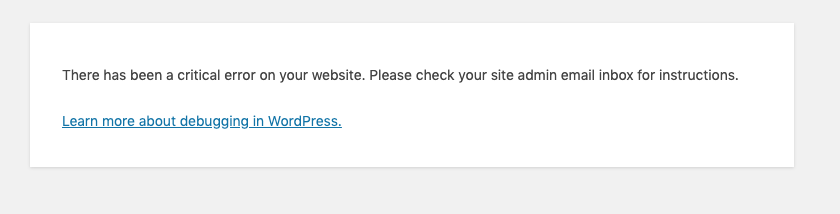
This is what Im getting on activate, note also I tried 0.5 and the same is happening on 7.4. I might need to start trying deactivating plugins to see whats causing this, or if you know another way I can get logs, because the error report im getting is useless right now. Its a 500 server crash so its got something to do with PHP. Im running wordpress 5.5.1 aswell.
I purchased event tickets but then that adds a shopping cart to my page. theres no way to do this just using paypal through your platform rather than using woocommerce?
Hi Ashan,
Thanks for looking into this. I get no error code even though I have WP-Debug set to true, its just the Error Screen that WordPress throws and says there has been a critical error on your site. All this happened when I downloaded the eventon Yearly addon, copied it into my plugins directrory and then went to Network Activate. The site shows the default error page while the plugin is activating. Note i’m not even getting an email to put the site in recovery mode the plugin crash is stopping all that.
For reference my debugging which I set from reading a post someone had written is set to the below.
Also, I received another one of these errors:
Error Details
=============
An error of type E_ERROR was caused in line 203 of the file /home/artslandia/public_html/wp-content/plugins/eventON/eventon.php. Error message: Uncaught Error: Class ‘evo_admin’ not found in /home/artslandia/public_html/wp-content/plugins/eventON/eventon.php:203
Stack trace:
#0 /home/artslandia/public_html/wp-includes/class-wp-hook.php(287): EventON->init(”)
#1 /home/artslandia/public_html/wp-includes/class-wp-hook.php(311): WP_Hook->apply_filters(NULL, Array)
#2 /home/artslandia/public_html/wp-includes/plugin.php(478): WP_Hook->do_action(Array)
#3 /home/artslandia/public_html/wp-settings.php(546): do_action(‘init’)
#4 /home/artslandia/public_html/wp-config.php(97): require_once(‘/home/artslandi…’)
#5 /home/artslandia/public_html/wp-load.php(37): require_once(‘/home/artslandi…’)
#6 /home/artslandia/public_html/wp-blog-header.php(13): require_once(‘/home/artslandi…’)
#7 /home/artslandia/public_html/index.php(17): require(‘/home/artslandi…’)
#8 {main}
thrown
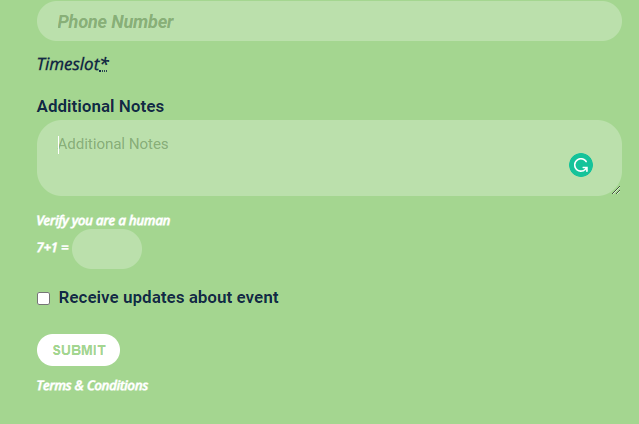
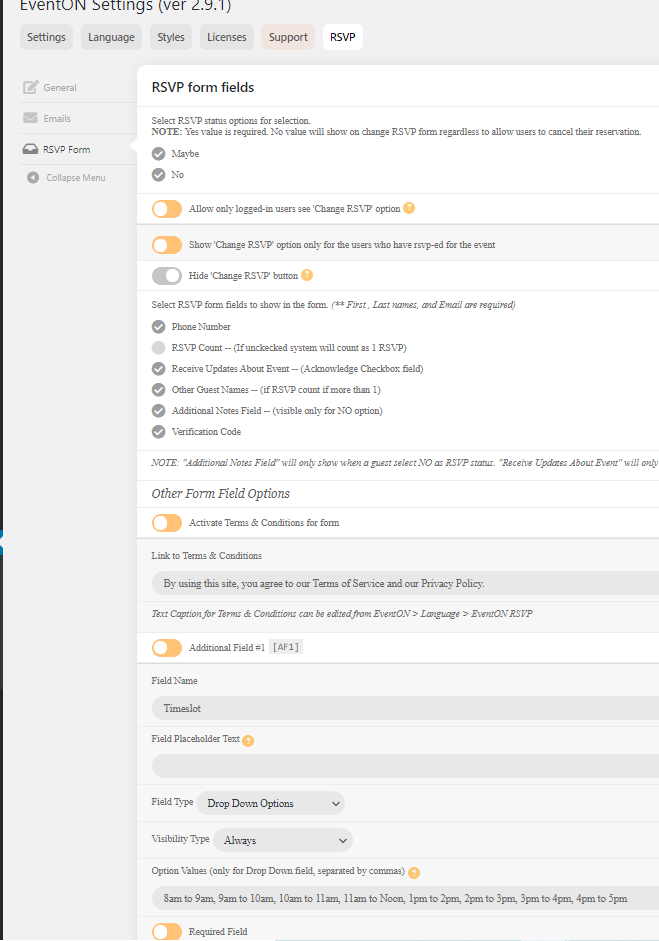
HI, Artem, I am sorry, you are right, my bad. Here it is .. I have created the timeslot. But it shows nothing except the word timeslot… after clicking the YES button on RSVP on an existing event. Kindly check if I have done it wrongly again?
Ashan,
The same on dev2: http://dev2.myeventon.com/23213-2/.
Try searching for “re” > click Load More > search for Ashan: