Thank you for your messages, I am going to assign this ticket to Ashan and he will be able to take it from here and find you a solution. Please allow some time for him to get back to you, we greatly appreciate your patience and thank you for being a eventon customer! Also please disable any IP blocking on your site if there are any.
Archives: Replies
Replies for tickets on suppota
Reply to: tickets(197121)
Hello,
Please try this shortcode:
[add_eventon_list number_of_months=”12″ hide_empty_months=”yes”]
You can also check Event Lists: Ext add-on https://www.myeventon.com/addons/event-lists-extended/. Try on dev.myeventon.com/wp-admin/
Reply to: tickets(195954)
Thanks so much 🙂 The code seems to be working great :)))) million thanks :))
Reply to: tickets(197122)
Hello,
When you enable RSVP in Repeating Event it works independently for each repeat. If you want limit the class size you can enable Edit Event > RSVP > Set capacity limit for RSVP > Manage available capacity separate for each repeating interval of this event.
Reply to: tickets(197139)
Hello,
Please check these two add-ons:
https://www.myeventon.com/addons/event-tickets/ (base plugin for selling tickets)
https://www.myeventon.com/addons/ticket-variations-options/ (for variations)
Reply to: tickets(197105)
Please also add this code:
body.single-ajde_events div#main { padding: 10px 0 10px 0 !important; }
body.single-ajde_events .evo_page_body { max-width: none !important; }
Reply to: tickets(196064)
Now you can go to Edit Event > RSVP > enable Show only certain additional fields in RSVP form (separated by commas) > update event > add AF1.
Reply to: tickets(196064)
RSVP uses different Additional Fields. Please go to EventON > RSVP > RSVP Form > Additional Field.
Reply to: tickets(176607)
And when I remove this ( event_type_2=”1370,1412″ ) still the same problem.
https://artslandia.com/test/
Reply to: tickets(196064)
Hi, Artem, thanks so much for the code and it works wonders now for the rsvp widget! :))))
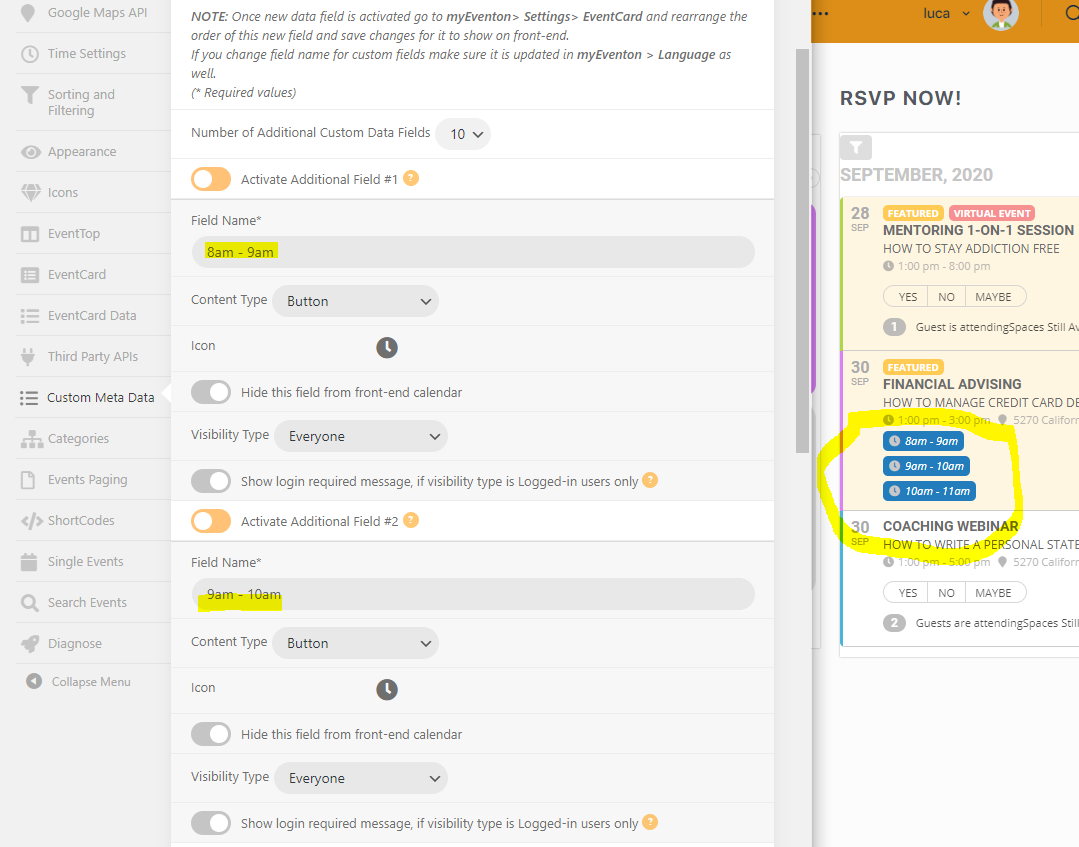
On the AF1, I am adding the fields under EVenton-> custom metadata. And yes, I have the latest version of the addon. Pls see the screenshot of the AFs I have added. It shows up on the calendar but I cannot click on it to RSVP. Maybe I did it wrongly?