Hello,
You can filter events, that are visible in calendar by following these guides: https://docs.myeventon.com/documentations/confused-event-type-categories/ and https://docs.myeventon.com/documentations/how-to-use-event-types-to-do-more/
Could you check and let me know if you have more questions?
I switched the theme and disabled plugins except UpdraftPlus – Backup/Restore, Sucuri Security – Auditing, Malware Scanner and Hardening and Classic Editor and it fixed the issue.
Could you try yourself?
But the block with September and Oktober should be switched.
September should go first or October?
That didn’t work and was breaking the homepage. Not only in this frame, but also underneath in the timeline..
Also…. the second instruction in that frame is keeping searching. Only grey search-things appear.
Could you send us screenshots? Do you see similar issue on https://practoraat-cre.nl/2050-2/?
Could you elaborate more? Where do you want to remove the time and where to leave?
Hello,
Withlist shortcode doesn’t support options from other calendars, so you cannot use event_past_future=”future”, event_type=”18,” and so on.
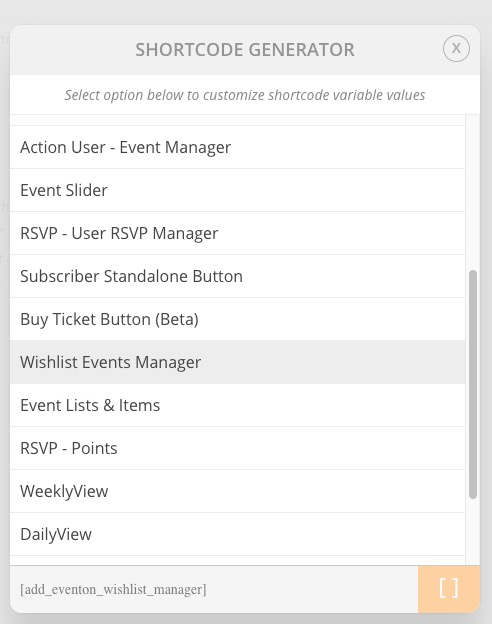
If you go to Shortcode Generator you can see that Wishlist Events Manager has no options at all:
We are glad your issue is resolved, if you have any further questions or concerns please create a new ticket.
If you have a moment, we would greatly appreciate if you could kindly leave us a review at codecanyon! from your account > downloads. Cheers!
The only solution in this case is to customize the source code. You can send us a customization job request by creating a new ticket in here and selecting Customization Request as the category.
Hello,
In this case please go to EventON > Events Paging > add “event-list” to EventOn Event Post Slug. Now go to wp-admin > Settings > Permalinks > Save.
Now your page can use /events slug.
By “events” I meant EventON’s Ticket Products.