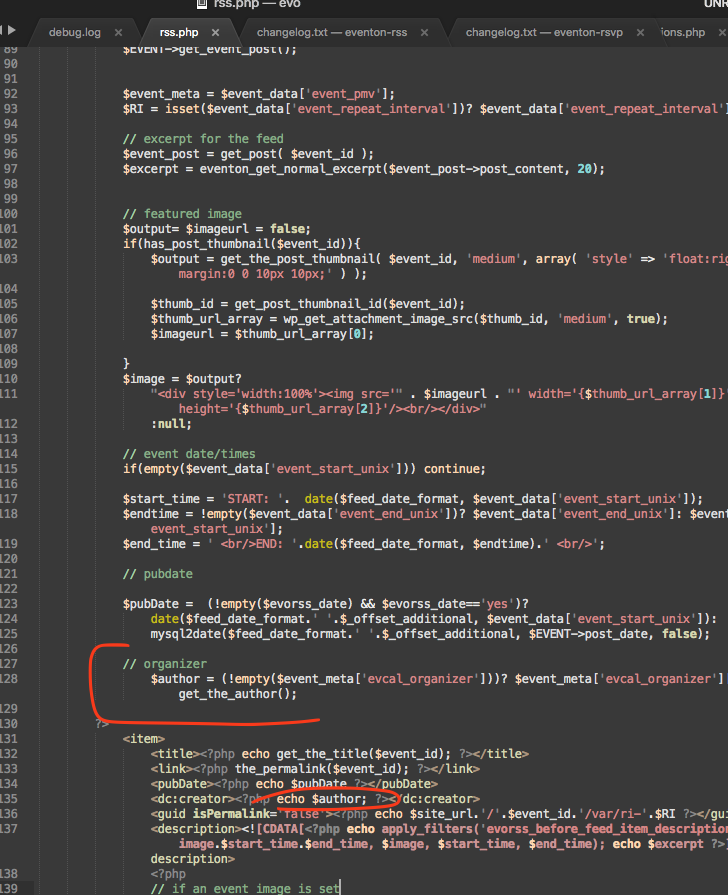
so what was the fix you used for creator field?
this is the code right now.
as for language you can use the pluggable filter https://docs.myeventon.com/documentations/how-to-customize-event-feed-with-arguments/ and pass lang value with L1 to change language.

Hi, so,
sorry to ask again,
but I want to be sure if I understand it correctly.
In the image I’m sharing here, I will be able to add as many organizers as I wish, correct?
And on the event page/card/etc. they will appear as a list.
So this is what will cost USD100$
Point 2 and 3 will not work, with your implementation?
Correct?!
How much more would it cost to have the additional organizations also listed as described in point 2?
And very important: how long would it take, once the amount payed, to get functionality 1 deployed?
Best regards
Hi Salam,
not it is not, unfortunately.
We did one exception, but we can not keep doing.
are you able to make some code change. open the file in error and comment out the line that will resolve it.
I am sorry I over looked the above tread. Ok lets see what I can do.
the get_options(‘evo_tax_meta’) runs a wp_query to database but that is cached. So once that data is fetched it should continue to use the cache data instead of running the query every time.
You have actionuser and full can enabled now and with that the site is still loading fast with calendar. Ok I see the issue with ajax.
Ok try this now https://www.williamsburgfamilies.com/ajde-test/ see if its faster for you?
Hello,
It seems that the issue is in old version of Action User:
Current plugin: EventON – Action User (version 2.0.13)
I checked and you’ve updated add-on to 2.2.1. Do you still have the issue?
Thanks Artem! Could you please try updating the fourth event down also titled Level 5 Jumper “B” Rated Hunters that has a start date of September 8, 2020 and an end date of September 8, 2020. Specifically, to replicate the issue, could you try changing the event’s end date to September 13, 2020?
There are multiple events that I cannot update. Some do update, but the problem has been persistent in many of the events randomly.
You can find the compatibility information by going to https://codecanyon.net/item/eventon-wordpress-event-calendar-plugin/1211017/comments > Compatible With and Software Version.
…(screenshot I’ve send you)…
Are you referring to https://helpdeskx.s3.amazonaws.com/wp-content/uploads/2020/09/09045722/EventOn-Woo.png. It seems that in this case WooCommerce didn’t test the plugin from their side.
Unfortunately, format “d m y” is not supported at the moment. You can check available options by going to EventON > Time Settings > WeeklyView Time/Date Settings > Select week range date form.
Please also create a new ticket and select Feature Request as category so others can vote on your idea and get it moved into development faster. OR You can send us a customization job request by creating a new ticket in here and selecting Customization Request as the category.
Thank you for your messages, I am going to assign this ticket to Ashan and he will be able to take it from here and find you a solution. Please allow some time for him to get back to you, we greatly appreciate your patience and thank you for being a eventon customer!