Ashan,
Could you check their account:
#54900 completed
Weekly View – Single Site
EVOwvf2a15467-983e-4435-8cd7-20a3ddd247b0
Activation Limit: 1
Replies for tickets on suppota
Ashan,
Could you check their account:
#54900 completed
Weekly View – Single Site
EVOwvf2a15467-983e-4435-8cd7-20a3ddd247b0
Activation Limit: 1
Yes. Please add it like this:
{Uhr}
Hi, thanks! I will ask the owner of the calendar.
The new date/time format looks fine, thanks! Is it possibe to add the word “Uhr” after the time?
Hello,
Please note that you can RSVP and other add-on on our demo server: http://dev.myeventon.com/wp-admin/
1. If they are logged-in they can press “Can not make it to this event? RSVP OPTIONS: CHANGE MY RSVP” and change their response.
2. You can disable all notifications from EventON Settings > RSVP > Emails > Disable sending all emails.
3. You can use Edit Event > RSVP > Set capacity limit for RSVP and Manage available capacity separate for each repeating interval of this event.
3. You can set this from EventON > RSVP > RSVP Form.
4. Unfortunately, this is not possible.
Hello,
I added “Test” to event’s details: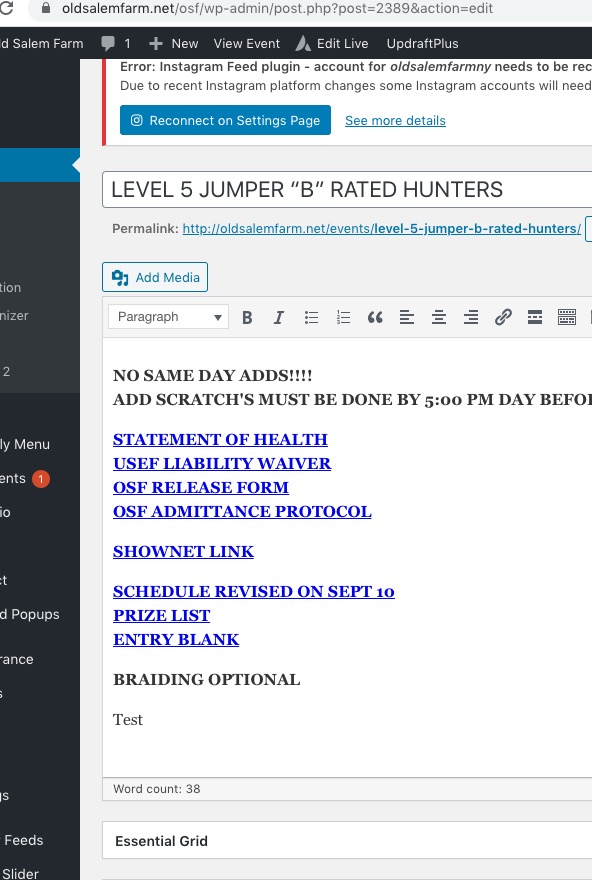
and was able to update the event without issues: https://oldsalemfarm.net/osf/wp-admin/post.php?post=2389&action=edit
Could you try a different browser?
Please also note that Ashish suggested you to try disabling plugins (except EventON) and switch your theme to Twenty Twenty. Could you try this as well?
When I debugged wordpress this error showed up in the debug log:
This is just a regular notice and doesn’t affect functionality.
Hello,
“Custom eventon only time offset value (in minutes)” only affects ICS download time.
Please note that Edit Event > Time > Event timezone doesn’t affect event’s time. This is for informational purposes only.
The issue is that your server’s timezone is set to UTC+0 while your event is EST. Could you go to wp-admin > Settings > change Timezone?
here is the temp pass: #sMEbFG$^zkm0lQqa4IHsXY2
edit.php?post_status=wc-completed&post_type=shop_order&_customer_user=7053
ref url to orders
I am looking at your orders and they are all set to expire so I can not apply credit to a cancelling order. Would a discount coupon for future purchase work?
Hi Ashan
Are you able to read the chain on this email? If not, here is the jist…the site was crashing until I took the calendar off.
I did as was suggested by Support… I removed all plugins except EventON, EventON – Action User and EventON – Full cal. The site still crashed.
The site did run will ALL plugins and EventON (BUT disabling EventON – Action User and EventON – Full cal)
Last night – infotainerdave stopped AJAX from loading so it is now super fast but he has the events limited to 10 a day and Action User and Full cal are disabled.
We need EventON – Action User and EventON – Full cal to work so our calendar fully works.
Here is infotainerdave last response before yours in case you are unable to see it, and also, to answer your question – no, we have not done anything since he touched it late last night:
infotainerdave:
“I stopped all AJAX from loading – so I’m going to have to get Ashan to see if he can get the Full cal and the daily view to load without ajax- there isn’t a setting within the shortcode to load full cal or daily view without ajax
but ajax is the issue
from what I can tell the daily view and the full calendar load via ajax-It didn’t used to but it was way slower
on most sites the ajax loading the calendar section a good thing however not here on your site
what you are seeing is essentially events list- I have alerted Ashan to this and set the ticket to “needs immediate action” Ashan is not on right now- He is USA time- I am Sydney Australia time at 4pm- so he will be on in a few hours- I’ll create an alert if anyone else is on to have a diagnose as well it would be handy to get FTP details I am sure Ashan will need to get into the code to change things”
I did send the FTP details in this chain too. I can resend if needed.
Also, these were the suggestions WP Engine told me to ask that I sent to infotainerdave :
1. “because software updates over time can change the behavior of sites reach our to eventon developers to check on the site for extra code that is not necessary” We have had the calendar on the site for years…many updates have happened. Can you check for extra code that is not necessary?
2. Is there any way to reduce the number of admin-ajax calls your plugin is using? Is there? Please advise
3. WP Engine was to ask “consult with the plugin author and inquire whether this row: evo_tax_meta needs to have autoloading enabled. That row is set to autoload 250285 bytes. If it can be disabled, turning autoload off there may help with performance”
Please let us know if the calendar can be fixed. We generally have many more than 10 events in a day and we are missing our header on the calendar and the ability for people to submit events and our calendar widget in our side bar. Thanks again! We love this calendar and have ad it for years. Maybe that is the issue? Please advise