Thanks for testing.
I have attempted debugging by following the documentation you linked, but still no luck.
I even installed a boilerplate theme (brand new theme) and the issue is still occuring.
When we activate any of the default WordPress themes such as Twenty Twenty-Five etc, it displays correctly. That is because these themes are block themes. We don’t want to be testing on block themes.
I even disabled every plugin (except for EventOn) but no luck.
I removed all custom code which I think could be interferring such as header, footer, functions.php but no luck.
I also checked error logs and there’s nothing I can see related to the location taxonomy.
Can you 100% confirm that you tested on a non-block theme on your end?
I am not sure what else to do here.
Thanks
Event Tickets does not exist. See video: https://www.loom.com/share/09224dfe01ac40c18c60c48d2d68e8df
Which event from October isn’t visible:
https://cleophas.org/wp-admin/edit.php?s&post_status=all&post_type=ajde_events&action=-1&event_date_type=all&event_status=all&ev_month=1727740800-1730419199&filter_action=Filtrer&paged=1&action2=-1
Could you send us a link?
Please update EventON to the latest version. It should fix the issue.
Could you try updating EventON and also DailyView as well?
Are you seeing the same issue on our test site:
https://dev2.myeventon.com/surl/JijYZPBe1fcX
There is no way of making EventON work with Woo’s divi elements, I am afraid.
Could you let us know if your original issue is gone when you use the default WooCommerce’s shortcode?
Hello,
In order to show Sold Out tag you need to go EventON > EventTop > add “Tags”:
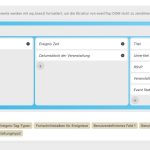
You can manage what to show on EventTop related to RSVP by going to EventON > RSVP > EventTop Data for RSVP.
This page doesn’t show any events:
https://crazy-greider.185-243-11-79.plesk.page/
Where can I check your current calendar with events showing?
Could you also update EventON and RSVP add-on?
To update eventon to latest version: If you are unable to do autoupdate, you can go to codecanyon your account > download and get the latest eventon version as zip file. Then you can go to your website > make sure “Delete eventon settings & data when EventON is uninstalled” is Deslected from eventon settings, delete old eventon, install new one and activate. This link will further explain the process it. Also you can follow us on twitter to get real-time announcements on updates!
To update eventon addons: You can download latest eventon addons from myeventon > my account. Then you can go to your website, deactivate old addon and install new one and activate then delete the old addon. This link will further explain the process. Also you can follow us on twitter to get real-time announcements on updates!
Please remove one of tile_count=”1″ from the shortcode and make sure that the second one is set to 2.
Hello,
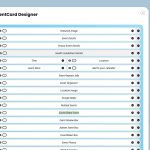
Please go to EventON > Event Card and make sure to add “Social Share Icons”:
If the issue continues, please send us wp-admin access to your site as a private message for us to further assist your situation.
Please take a look at this guide:
https://www.wpbeginner.com/plugins/how-to-restrict-wordpress-pages-by-user-role/