Hello,
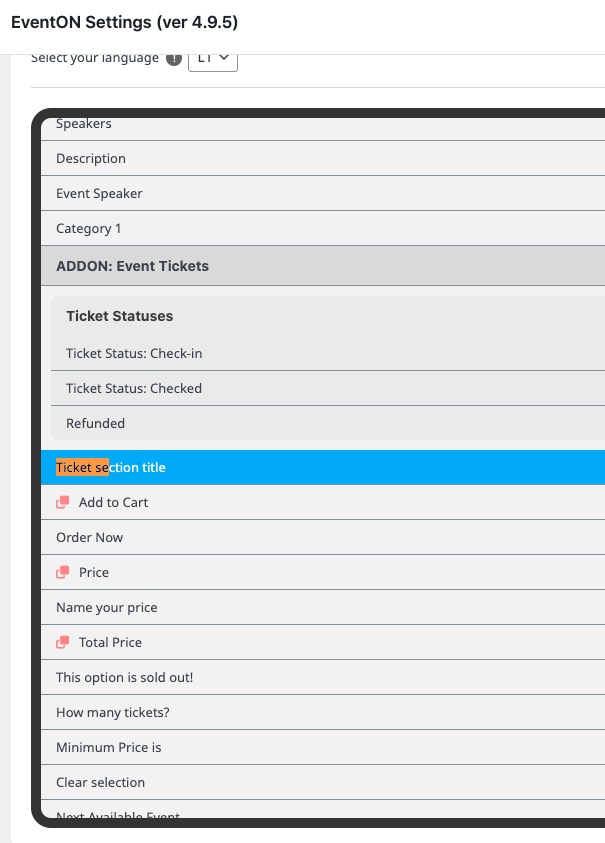
Please go to EventON > Language > look for “Ticket section title“:
To change font families, please go to EventON > Appearance > change Primary/Secondary Calendar Font. If you don’t see any change, EventON > Scripts & Styling > turn off Write dynamic styles to header > save settings > turn on Write dynamic styles to header.
Hello,
There is an incompatibility with other third-party plugins or the theme (they all try to use their own FontAwesome).
Please add this CSS code to EventON > Styles (If you don’t see any change, EventON > Scripts & Styling > turn off Write dynamic styles to header > save settings > turn on Write dynamic styles to header):
.ajde_evcal_calendar .calendar_header .evcal_arrows i, .evo_footer_nav .evcal_arrows i { font-family: var(–fa-style-family, “evo_FontAwesome”); font-weight: 900; }
If the code above doesn’t work because of format:
https://pastebin.com/utiY6Xjp
I tried to switch to Twenty Twenty-Five as well as Four and they both work. What’s “non-block theme”? Could you give us some examples?
If you remove the slider on https://thebeatbali.com/, will the page start loading faster?
I don’t need FTP access for now. Please send us wp-admin login info to access WordPress.
Hello,
Could you please update Variations add-on?
Please also try the instructions mentioned in this documentation to make sure your issue is indeed coming from eventon.
Could you update EventON and Tickets add-on?
To update eventon to latest version: If you are unable to do autoupdate, you can go to codecanyon your account > download and get the latest eventon version as zip file. Then you can go to your website > make sure “Delete eventon settings & data when EventON is uninstalled” is Deslected from eventon settings, delete old eventon, install new one and activate. This link will further explain the process it. Also you can follow us on twitter to get real-time announcements on updates!
To update eventon addons: You can download latest eventon addons from myeventon > my account. Then you can go to your website, deactivate old addon and install new one and activate then delete the old addon. This link will further explain the process. Also you can follow us on twitter to get real-time announcements on updates!
Ashan,
The same on dev2:
https://dev2.myeventon.com/test-919/
Settings:
https://dev2.myeventon.com/wp-admin/options-general.php
Hello,
Thank you for your messages, I am going to assign this ticket to Ashan and he will be able to take it from here and find you a solution. Please allow some time for him to get back to you, we greatly appreciate your patience and thank you for being a eventon customer! Also please disable any IP blocking on your site if there are any.
We are glad your issue is resolved, if you have any further questions or concerns please create a new ticket.
If you have a moment, we would greatly appreciate if you could kindly leave us a review at Codecanyon. By going to your account > Downloads. We are very grateful for your kind review!