Hello Artem and Ahsan, how are you?
I have good news, Flipbook developers did solve the problem.
This what they said:
“We have created a temporary fix for compatibility with eventon plugin ajax calls”
Thanks again for your time and patience!
Alvaro
Thank you so much for the speedy reply. So grateful. Thank you
.evotx_ticket_purchase_section .evovo_variation_types p.evovo_var_types select {
margin-top: -5px !important;
}
That works but I need also to make the selectable part visible as a field (boarders) and the selectable field is way too big in width.
Can you give me also a hand on this? Please?
@Artem, that’s strange. If you review the screenshot of the list we have (https://nimb.ws/3qd2u1) it is ordering the events by when they were published, rather than the date of the Event. This is what we want, but we just want it to also include future months. Any plans to add this feature in?
Hello,
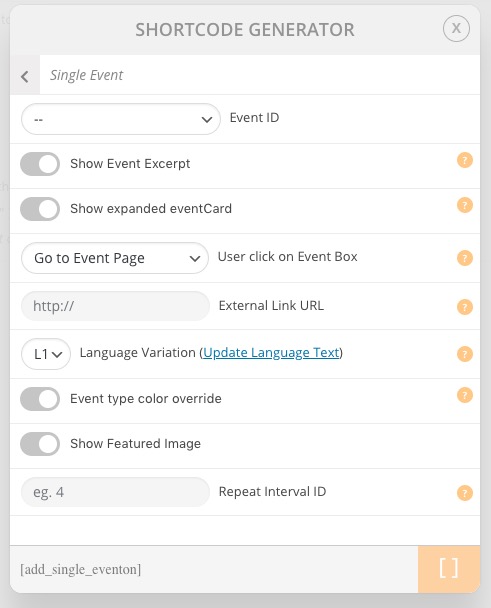
It seems that the best solution is to use Single Event shortcode:
You can also make your event Year Long by going to wp-admin > Events > Time and Date > enable Year Long Event – Show this event for the entire start event Year.
Please check my suggestions and let me know.
Are you referring to “60302296-eventon-wordpress-event-calendar-plugin-license.pdf”? If so then please go to CodeCanyon > Download > EventON > Download Installing Files.
Hello,
There seems to be a problem of incompatibility with the theme. Please add this CSS code to EventON > Styles (If you don’t see any change, EventON > turn off Write styles to header > save settings > turn on Write styles to header):
.evotx_ticket_purchase_section .evovo_variation_types p.evovo_var_types select {
margin-top: -5px !important;
}
And if possible. How can I make it to show instead of 0,00 € “Free”?
Thank you for your great suggestion, at the moment it is not supported. However please create a new ticket and select Feature Request as category so others can vote on your idea and get it moved into development faster. OR You can send us a customization job request by creating a new ticket in here and selecting Customization Request as the category.
Is this the correct version?
Hello,
Could you try this patch fix to resolve the issue:

Make sure to change code where it is circled. should resolve the issue and we will release this in the next update to booking addon.