Thank you your support has been amazing
Two last questions and we can close the ticket
- How can I make the month font smaller
- Can I limit the amount of events shown in a month, our june is very big
Replies for tickets on suppota
Thank you your support has been amazing
Two last questions and we can close the ticket
We are glad your issue is resolved, if you have any further questions or concerns please create a new ticket.
You can use NOT- to exclude certain event types or NOT-all for event type filter values.
[add_eventon_dv event_type=”NOT-1036,”]
Hello,
Could you please check this code and let us know where does it come from?

Please also try the instructions mentioned in this documentation to make sure your issue is indeed coming from eventon.
Could you try updating EventON – RSVP Events to 3.0.9?
To update eventon addons: You can download latest eventon addons from myeventon > my account. Then you can go to your website, deactivate old addon and install new one and activate then delete the old addon. This link will further explain the process. Also you can follow us on twitter to get real-time announcements on updates!
Hello,
Please add this CSS code to EventON > Styles (If you don’t see any change, EventON > Scripts & Styling > turn off Write dynamic styles to header > save settings > turn on Write dynamic styles to header). You can also add this code to wp-admin > Appearance > Customize > Additional CSS.
em.event_location_name { font-size: 20px !important; } em.evcal_time.evo_tz_time { font-size: 20px !important; }
Just make sure remove your custom code that affects Location and EventTime.
Dear Artem, sorry for the late reply. Here is the Info
eventon-support@euth.at
Ku)D6iy9T@SHgk)Q)kbS!F&$on
https://euth.at/admin
Yep the guy at patchstack Darius screw up the version number, thats why you are still getting the error.
We will have to release 4.9.10 so you can stop getting those errors even though the issue was fixed.
Thank you for leting us know of this. Kindly add this CSS code to eventon settings > Styles
..evocard_box.evotx{overflow:visible;}
This should resolve the tooltip getting cut off. we will also implement this in the next version update 🙂
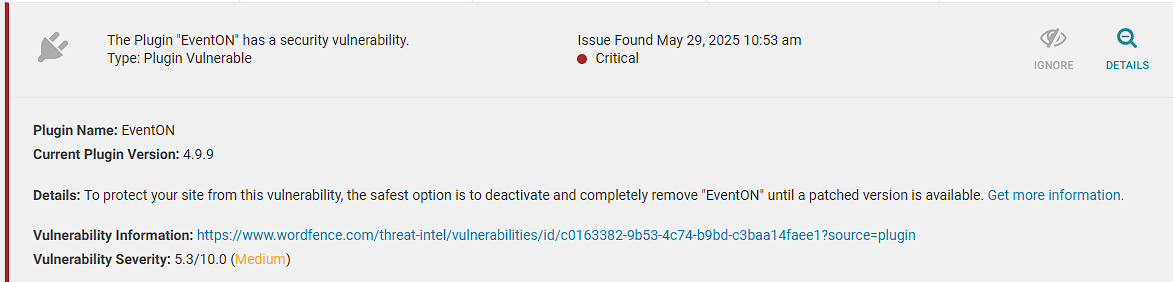
Wordfence is also reporting this issue. I upgraded to 4.9.9 from 4.9.8 just now and it is still showing.