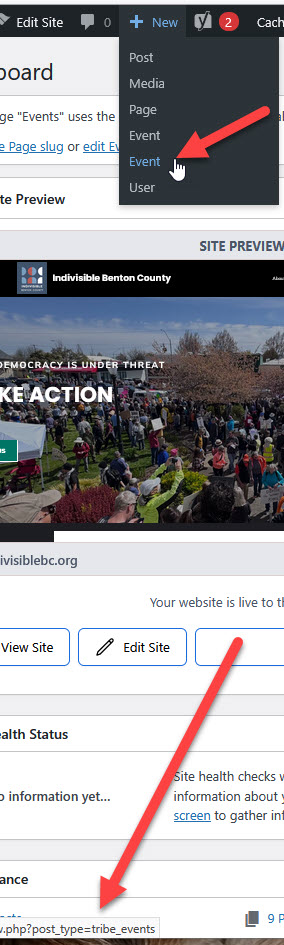
i have fixed the issue – apparently it was a conflict, but it is now overcome. however it still has the oddity of not showing under the dashboard add a new event, it has under the “new” both the eventon choice as well as the the other calendar choice, and to tell which one is which one must look at the custom post type appearing in the lower left corner of the link. if you can help with that ?
and in order to allow the custom post type and to edit the event, there is a code snippet added, otherwise the theme over rides it.
If you can help with those, otherwise close the ticket.
Ah, I see.
How you would suggest we force users to submit in the correct format?
Thanks

Acabo de adquirir este addon, es muy interesante y lo echaba de menos, tengo la versión 1.0.1 y a mi se queda la pagina pensando y no me muestra nada.
Thanks for your help but I removed the addons yesterday and requested a refund via a ticket. I expected these to work out of the box and now I’d be nervous to upgrade my WordPress because of the issues which happened in the 6.8 release. It didn’t work on Mac for me which led me to my decision. Thanks
How and where do I set it to ‘EventON’s timezone”?
I have deactivated all plugins and the slider is still the same
What can I do?
so you have cleared your browser cache right- not just the wordpress cache but your browser cache as well??
if it works for me but not you- then that suggests what browser we are using and not so much the website itself
Could you please try the instructions mentioned in this documentation to make sure your issue is indeed coming from eventon.
you don’t have many plugins so that should take a couple of minutes to see if one of the plugins is causing the issue
you would want to clear your browser cache in between turning on each plugin