Hello,
I cannot see the attached screenshot. Could you upload it somewhere and send us a link?
Replies for tickets on suppota
Hello,
I cannot see the attached screenshot. Could you upload it somewhere and send us a link?
Hello,
Please take a look at this guide:
https://docs.myeventon.com/documentations/confused-event-type-categories/
Also check this guide:
https://docs.myeventon.com/documentations/how-to-use-event-types-to-do-more/
Hello,
Thank you for your messages, I am going to assign this ticket to Ashan and he will be able to take it from here and find you a solution. Please allow some time for him to get back to you, we greatly appreciate your patience and thank you for being a eventon customer! Also please disable any IP blocking on your site if there are any.
We are glad your issue is resolved, if you have any further questions or concerns please create a new ticket.
If you have a moment, we would greatly appreciate if you could kindly leave us a review at EventON WordPress Page OR Codecanyon. Your review helps us a lot in continuing EventON improvements!
Hello,
Still a couple things…
re: #1 – You replied :
In order to show a small featured image on EventTop, please add this to your shortcode:
show_et_ft_img=”yes”
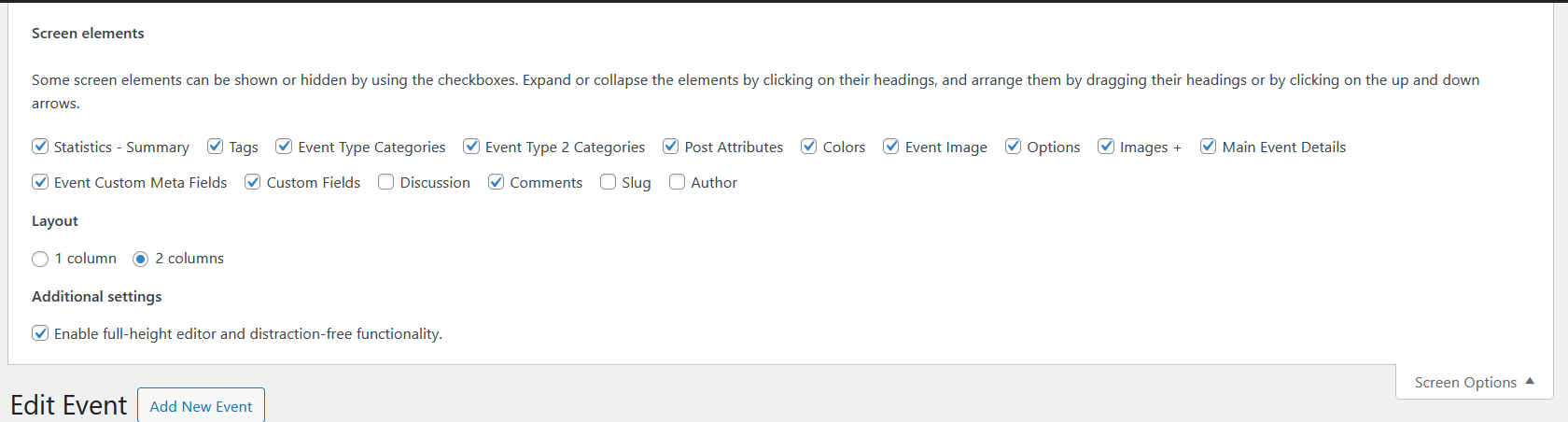
But, I do not have an option to Add a Featured Image?
There used to be a section that said “Featured Image”, but that option is no longer displayed, for some reason. The options that are available currently are “Event Image” and “Images +”…
Is there a way to get the Featured Image section to show again so I can add a Featured Image? (see screenshot of available options)
re: #3A –
You said I can also add this code to wp-admin > Appearance > Customize > Additional CSS.
.evoet_eventtypes.evcal_event_types em.evoetet_val.evoet_dataval {font-size: 20px !important}
(A) This worked! it changed the Size.
(B) Is there a way to change the Color within this CSS code?
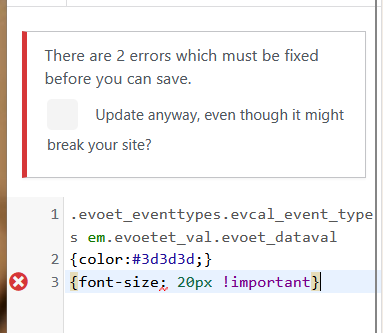
I tried to Add : {color:#3d3d3d;}
into the code (see screenshot) but the system flags errors, so I must not have done something incorrectly…
(C) Also, any way to change the Font Family in this CSS code? (if yes, is there a list of available fonts I can use?)
re: #3B – yes, I know how to change the Icon. I may not have made my question clear.
I am asking if there is a way to change the Icon by Adding My Own Icon to the list? There is nothing in the available list that fits what I need…
Or, possibly, is it possible to add a Graphic in place of the Icon? (again, that I can upload)
Thank you!
Thanks for this really fast fixing. It works, creating and updating events both work again.
I am really impressed and very grateful for this quick and effective work.
Thanks again!
Great – not seen any notification to update ActionUser yet – should this have appeared?
Thank you for your kind words! Ashan will reply you about the cart code ASAP.
Could you please try update Tickets add-on, so we can continue testing the issue?
I was able to access /staging/wp-admin/. Thank you for the login info!