https://vbf2020.wpengine.com/wp-admin/
user = eventon
pass = 8!c6rnveGvAvo4db
Replies for tickets on suppota
Please check how FullCal’s animation supposed to work:
http://dev2.myeventon.com/events/t-2/ (sidebar)
http://dev2.myeventon.com/22074-2/
As you can see animation works great. It seems that your theme or other third-party plugin affects FullCal.
Could you also try updating FullCal to the latest version?
Hello,
Could you try updating EventON to 2.8.10?
To update eventon to latest version: If you are unable to do autoupdate, you can go to codecanyon your account > download and get the latest eventon version as zip file. Then you can go to your website, deactivate old eventon, activate (Do not delete eventon settings & data when EventON is uninstalled) from eventon settings, delete old eventon, install new one and activate. This link will further explain the process it. Also you can follow us on twitter to get real-time announcements on updates!
Could you update Action User to 2.2.1 and Action User Plus to 1.1?
Hello,
Could you follow this guide: https://docs.myeventon.com/documentations/wpml-eventon-front-end/?
1. Please go to Events > Location Event > Edit > Location Link.
2. Kindly use this patch fix to resolve this issue:
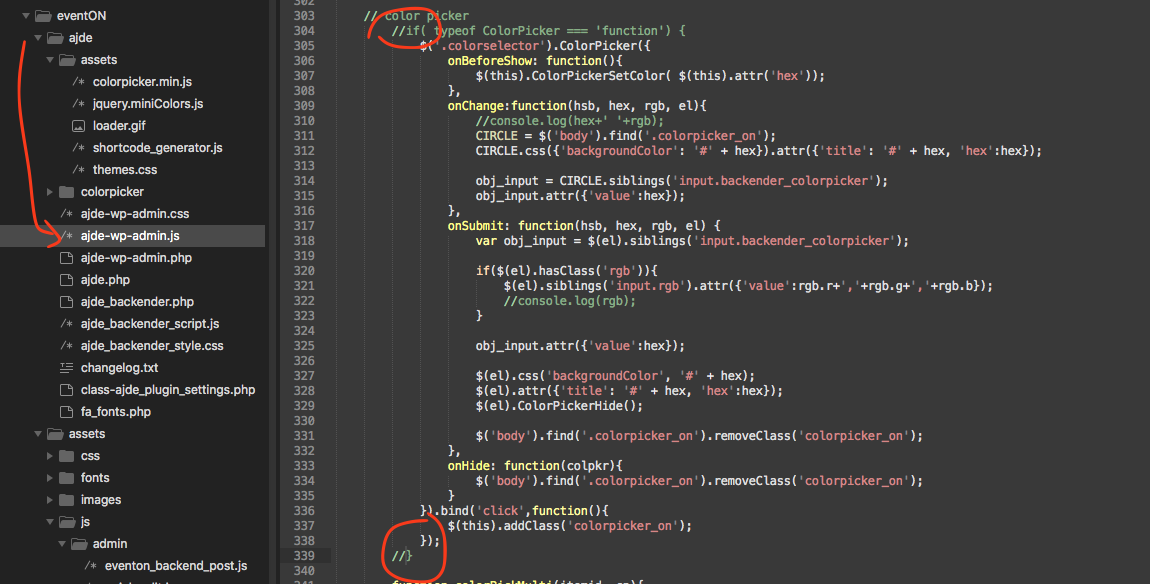
Basically comment out the circle spots in the code.
Hello,
Please check https://docs.myeventon.com/documentations/setup-use-custom-meta-fields-events/. You can create a second field for English or Swedish translation of the description in the same event.
Hi again Artem, as mentioned, due to a GoDaddy screw-up during a hosting plan upgrade my site’s down and I’m still waiting for resolution. As soon as it’s back up I’ll return to you.
Many thanks for your patience and continued support.
Omar
Hi Artem, thanks for responding. I’m pretty sure it has lat long. Would lacking lat long for that location be the reason why the map doesn’t show at first instance?
Yes, I’m having technical issues with GoDaddy these past 3 days while upgrading to a more powerful and quicker server option. My site’s down. Hopefully will be up tomorrow.
I’ll return to you once it’s active again.
Cheers,
Omar
Hello,
Please follow this instruction:
To update eventon to latest version: If you are unable to do autoupdate, you can go to codecanyon your account > download and get the latest eventon version as zip file. Then you can go to your website, deactivate old eventon, activate (Do not delete eventon settings & data when EventON is uninstalled) from eventon settings, delete old eventon, install new one and activate. This link will further explain the process it. Also you can follow us on twitter to get real-time announcements on updates!
!!! Please make sure to backup EventON’s date before the update.