Hey Oliver,
I have worked on the code side of things, can u give me the combinations, so I can create them also?
Thank you
Replies for tickets on suppota
Hey Oliver,
I have worked on the code side of things, can u give me the combinations, so I can create them also?
Thank you
Hey Rachelle,
As this card will not be print, would the following work for you?
1. You have a page for users something like /dashboard
2. They go this page, and they have a subpage called /dashboard/card
3. When an event that they have participated is finished, an image that you have assigned to each event ( stamp ) will be visible to this page.
Does this work out for you?
Oh tanks a lot ! I am stupid… So sorry…
I have an another question… i don’t understand why empty category appear when i filter…
Look this adress : https://zoomup.fr/apprendre-photo-formation-atelier-paris-cours-informations-agenda-conference-en-ligne/
I click on the icon filter : appear a ligne in french with “Filtrer par cours” “Lieu” ans “Professeur”
When i click on “Filtrer par cours” i can :
Tous les cours ->perfect
Conférence en ligne ->this catgory doesn’t exist anymore i don’t want this here in the list
Diaphragme->this catgory doesn’t exist anymore i don’t want this here in the list
Flash… and so on->perfect
Alison Freeman,
Please check https://docs.myeventon.com/documentations/show-additional-custom-data-eventcard/
Hello,
Please go to EventON Settings > EventTop > enable Event Time (to and from).
To change colours please go EventON Settings > Appearance. If you don’t see any change, EventON > turn off Write styles to header > save settings > turn on Write styles to header.
I’m trying to do the same thing. I don’t think it’s an issue to use the “events” slug, but I’m having trouble embedding the event data within the events post template. It would be great to have a php snippet to pull up the single event card within the page template.
Hello,
Could you please try the instructions mentioned in this documentation?
Oh, thank you. I was looking for that everywhere. Now to work on the colors. 😉 So much to learn. 😉
Hello,
1. Please add this CSS code to EventON > Styles (If you don’t see any change, EventON > turn off Write styles to header > save settings > turn on Write styles to header):
.eventon_filter_dropdown, .ajde_evcal_calendar .evo-sort-btn .eventon_sort_line { height: 120px; }
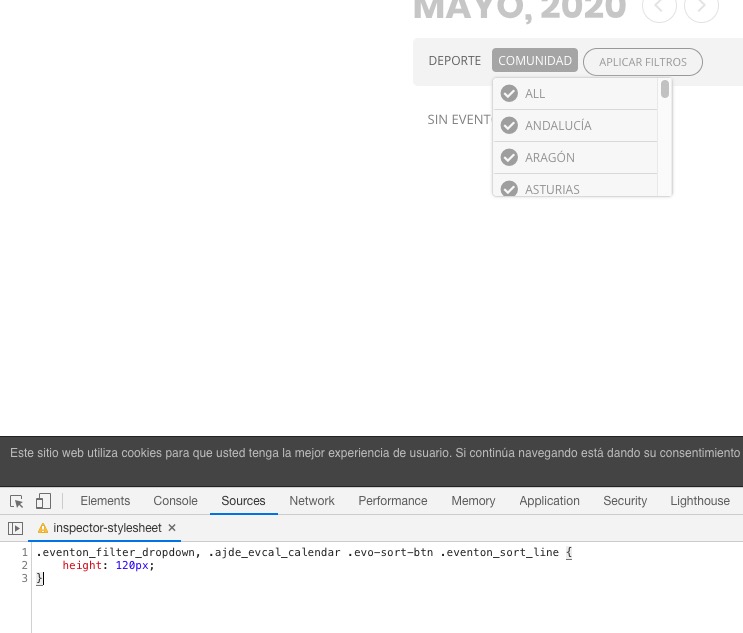
2. Please follow https://docs.myeventon.com/documentations/confused-event-type-categories/ > How to create shortcode calendars to show only those category events?
3. Please follow https://docs.myeventon.com/documentations/how-to-use-event-types-to-do-more/