Hello,
Thank you for your messages, I am going to assign this ticket to Ashan and he will be able to take it from here and find you a solution. Please allow some time for him to get back to you, we greatly appreciate your patience and thank you for being a eventon customer! Also please disable any IP blocking on your site if there are any.
1. show_et_ft_img=’yes’ adds an image to EventTop. The problem is that the image is quite small for your customization, so you can add tiles=”yes” tile_bg=”1″ tile_style=”1″ to the shortcode and then customize now much bigger option:
[add_eventon_list etc_override=”yes” number_of_months=”5″ hide_empty_months=”yes” tiles=”yes” tile_bg=”1″ tile_style=”1″ ]
2. You can add tiles=”yes” tile_bg=”1″ tile_style=”1″ to Main Calendar or Event Lists shortcode. It’ll work for both.
3. & 4. Unfortunately, only the developer who’ll take the job can answer.
Hi Artem,
Thank you for your help! I got in contact with our hosting company support team and they fixed the ajax issue so the page loads properly now.
Hello,
You can check the work. Please note this is still a work in progress.
I’d like you to check it and give feedback.
https://ceramicpronepal.com/events/destination-banda-sea/
Thanks
Great! That worked, thank you!
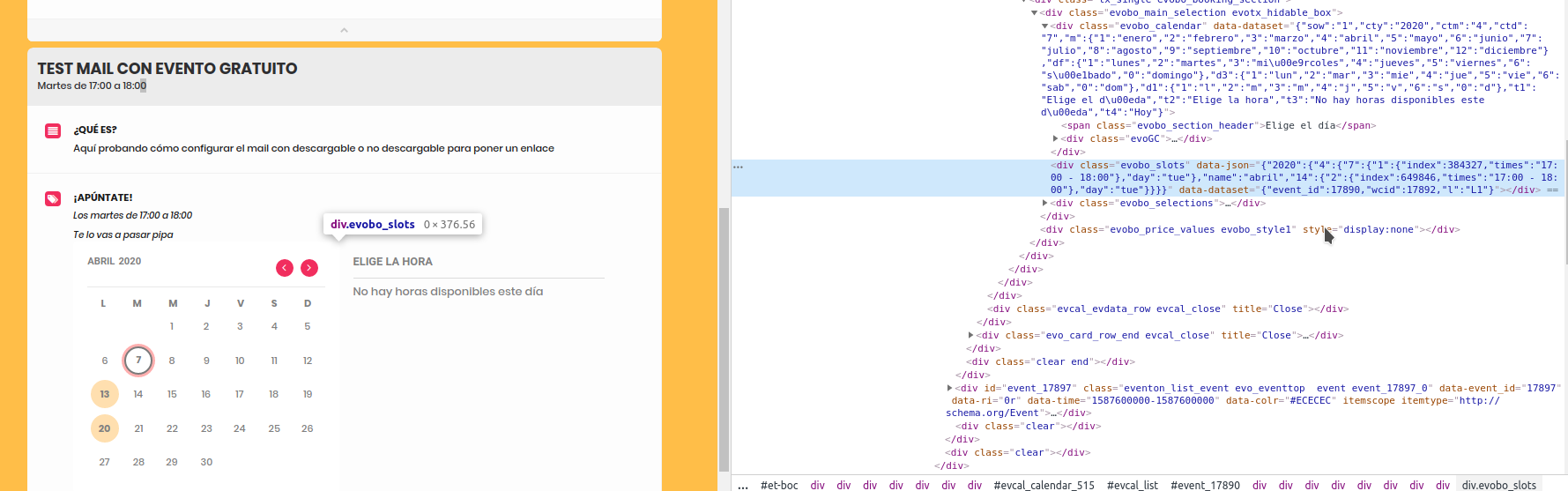
Digging deeper, it seems tha this function of evobo_script.js (eventon-bookings>assets):
function load_evobo_calendar(){
  if($('body').find('.evobo_slots').length>0){
    S = $('body').find('.evobo_slots');
    C = S.siblings('.evobo_calendar');
    B = S.closest('.evobo_booking_section');

    otherData = S.data('json');
    OD = {};
    OD['hasslots'] = otherData;

    console.log(otherData);

    draw_calendar(C, OD);
  }
}
It’s only called once, since it only shows in the browser console (I uncommented the console.log) the evobo_slots of the first event. But looking the evobo_slots of the second event, they are correct.
You can find more screenshots in the same folder: https://drive.google.com/drive/folders/1ukKTDz9v2Gc2KNSURfG3FGPlSRZUZ-7u?usp=sharing