Hello,
Please add this CSS code to EventON > Styles (If you don’t see any change, EventON > turn off Write styles to header > save settings > turn on Write styles to header):
html.evo_overflow { overflow-y: initial !important; }
Replies for tickets on suppota
Hello,
Please add this CSS code to EventON > Styles (If you don’t see any change, EventON > turn off Write styles to header > save settings > turn on Write styles to header):
html.evo_overflow { overflow-y: initial !important; }
Please check Extended License for the main plugin: https://codecanyon.net/licenses/standard. Unfortunately, we don’t offer developer licenses for add-ons.
Hello,
You have 5 available licenses for Event Lists: Ext add-on. Please go to https://www.myeventon.com/my-account/ > License Keys to find them.
Hello,
I followed https://docs.myeventon.com/documentations/what-is-the-calendar-filter/ > http://www.myeventon.com/wp-content/uploads/2017/01/Capture-1.png, so now they should be visible. Please check and let me know.
You can only use NOT-, NOT-all for event type filter values, so “all” isn’t supported. Please try using CSS for this.
Add this to the shortcode where you want to show Organizers filter:
cal_id=”asd”
Now add this CSS code to EventON > Styles (If you don’t see any change, EventON > turn off Write styles to header > save settings > turn on Write styles to header):
.evo_sortList_event_organizer { display: none !important; } #evcal_calendar_asd .evo_sortList_event_organizer { display: inline-block !important; }
First part hides Organizers filter on all calendars and the second shows it on cal_id=”asd”.
Hello,
Please send us wp-admin access to your site as a private message for us to further assist your situation.
On our test server: http://dev2.myeventon.com/21447-2/
Could you or may I please try the instructions mentioned in this documentation to make sure your issue is indeed coming from eventon. Maybe there is a compatibility issue with “members” plugin?
lang=”L1″ and lang=”L2″ is for Language Corresponding Events https://docs.myeventon.com/documentations/setup-language-corresponding-events/ and you can use it as an alternative for WMPL.
Since your default language is Arabic then you need to add wpml_l1=”ar” and wpml_l2=”en”:
[add_eventon_fc grid_ux=”2″ load_fullmonth=”no” event_type=”75″ jumper=”yes” wpml_l1=”ar” wpml_l2=”en” ]
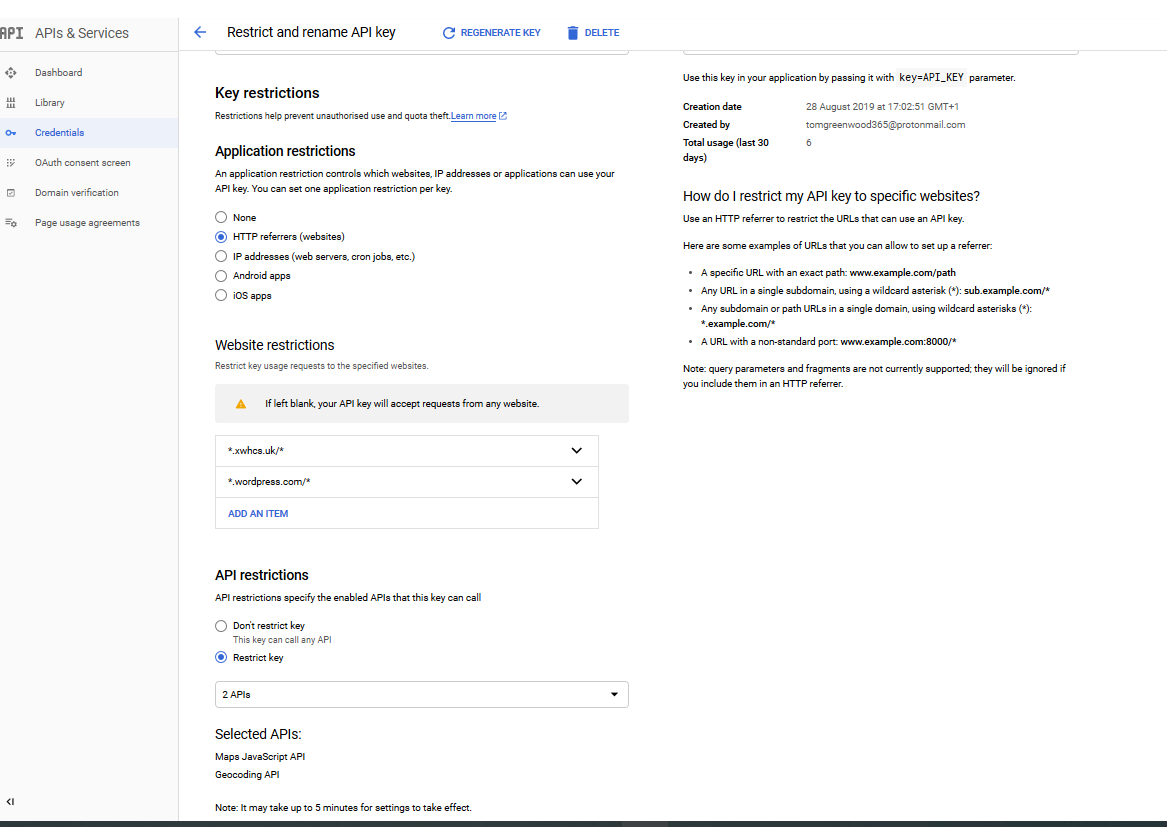
My API settings
That new version worked – thanks! Is this a newer version?
~~
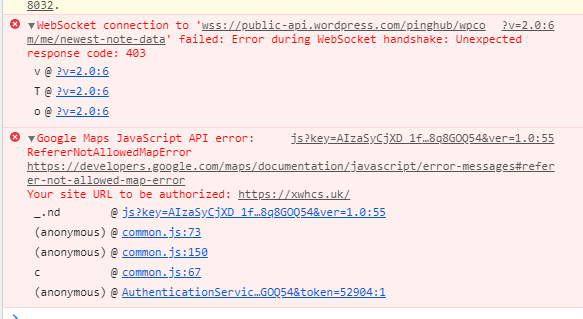
I also have a problem displaying maps – I thought I have set up Maps API correctly on google.. And it has worked before, but recently I am receiving this message:
