I am sorry is this for EventON addon purchase or for another plugin? because those are not valid information for eventON.
Archives: Replies
Replies for tickets on suppota
Reply to: tickets(167904)
Yes thank you very much for catching this issue and reporting to us we will get this sorted out in the next version update Larry!
Reply to: tickets(167210)
Thank you for your great suggestion, at the moment it is not supported. However please create a new ticket and select Feature Request as category so others can vote on your idea and get it moved into development faster. OR You can send us a customization job request by creating a new ticket in here and selecting Customization Request as the category.
Reply to: tickets(167658)
hello samuel, yes we actually removed the left side border with event color to make the tiles look clean in its square shape. Here is the code change you can apply to bring the borders back 🙂
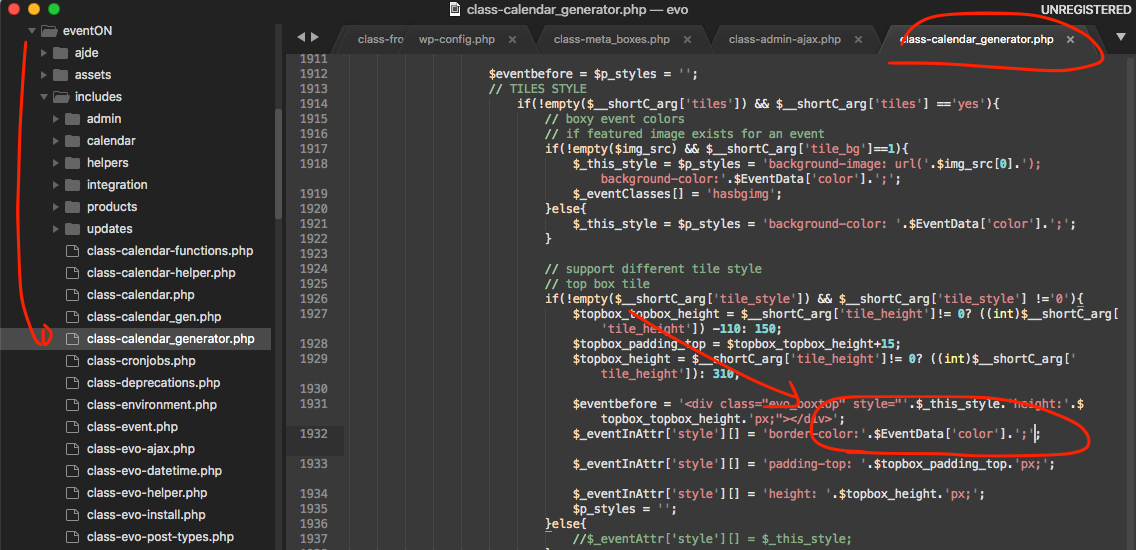
I will do some tweaking to see which would be a better design may be we can provide an option to enable this if a customer desire it over cleaner design 🙂 Anyways above is the code to bring the borders for you for now .
If you have more questions, kindly send us a new ticket and we would be more than happy to help you resolve your issues!
Reply to: tickets(166944)
Thank you for your reply.
I can sacrifice the event jumper in order to use display empty months, however I still require the the event count limit. Can your code not be combined with my original event count limit and show limit etc?
Thank you,
Jon
Reply to: tickets(167792)
Here is my purchase information:
Date: 07 Feb 2020
Golden Ticket
Invoice No: IVIP36402514
Order No: 120059620
Reply to: tickets(166639)
You are welcome!
Let us know if there is anything else we can do for you!
Reply to: tickets(167143)
Hi Oleg,
We have noticed the problem and we have reported as private note to Ashan.
Allow him to review this ticket one more time please.
Reply to: tickets(167883)
Hi Nitzan,
Thank you for your message. This is possible by integrating and using a plugin Like Dokan.
Reply to: tickets(167932)
Here are some screenshots. We cleared the local cache, cleared and put Cloudflare into developer mode and cleared cache on local browsers.
On Safari…
https://prnt.sc/rfg1wv
On Chrome…
https://prnt.sc/rfg2op
On Firefox…
https://prnt.sc/rfg3i5
Here is the full calendar in Safari
https://prnt.sc/rfg3x7