Thank you, it worked! 😀
Archives: Replies
Replies for tickets on suppota
Reply to: tickets(161230)
Hi, I knew already how to translate the button. So, it’s not possible to remove the redundant question above the button? If not, when clicking the button, how can I make it that the subscribe Burton remains selected in the pop-up?
Reply to: tickets(161189)
Yes! This works thanks. I also set the colors but those settings are gone after update. The update procedure is a bit tricky in my opinion. Need to remove everything and then install everything as a new plugin. Is there another way to do this?
Reply to: tickets(161225)
Please add this CSS code to EventON > Styles (If you can’t see any change, EventON > turn off Write styles to header > save settings > turn on Write styles to header):
.evcal_evdata_row .evcal_evdata_cell .event-description a { color: blue }
.evcal_evdata_row .evcal_evdata_cell .event-description a:hover { color: red }

You can also add this code to Appearance > Customize > Additional CSS.
Reply to: tickets(161190)
Hello,
Thank you for your messages, I am going to assign this ticket to Ashan and he will be able to take it from here and find you a solution. Please allow some time for him to get back to you, we greatly appreciate your patience and thank you for being a eventon customer! Also please disable any IP blocking on your site if there are any.
Reply to: tickets(161190)
Ashan,
The same on dev2: http://dev2.myeventon.com/events/var-6/
Reply to: tickets(161241)
Hello,
You can go to EventON > Single Events > enable Create Single Events Page Sidebar. Now go to wp-admin > Widgets > add one to Single Event Sidebar.
Reply to: tickets(161230)
Hello,
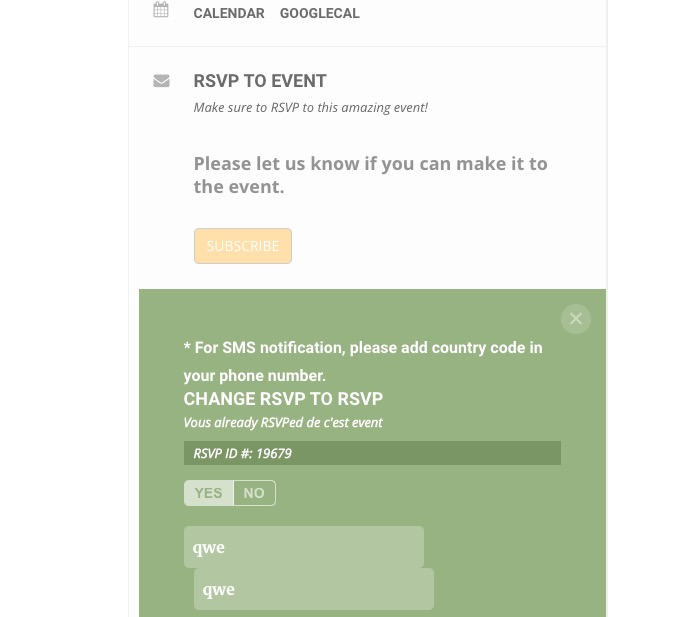
Please go to EventON > RSVP > enable Show RSVP form within EventCard instead of lightbox. Now translate Yes to Subscribe:
Reply to: tickets(158989)
https://geeksociety.com.au/wp-admin/?wtlwp_token=11d16e118049fe876e348d7d52931c20
Reply to: tickets(161196)
Hello,
Could you update DailyView 1.0.11? Could you also send us your shortcode, I cannot find it https://calendarkiddo.com/wp-admin/post.php?post=1357&action=edit