Yes! In your download version it is fixed!
Archives: Replies
Replies for tickets on suppota
Reply to: tickets(408158)
ok got it!
Reply to: tickets(408158)
Where do I find it on your page? I bought it trough theme forest page.
Reply to: tickets(407388)
Hello Artem,
First of all, thank you for the time and effort you have dedicated to investigating the issues we experienced with the EventON – Event Tickets plugin on our website.
We appreciate your assistance throughout the troubleshooting process and your attempts to analyse the problem directly on our environment. Unfortunately, despite all the steps taken on both sides, the issue remains unresolved.
As explained in our previous messages, version 2.5.6 of the plugin caused several critical problems on our production website, including:
- 504 Gateway Timeout outages triggered during ticket purchases through the EventON calendar flow
- Extremely slow and unstable event metadata loading in the WordPress backend
- WooCommerce orders being automatically marked as “Completed” despite customers receiving payment errors
- Duplicate orders and inability to reliably verify successful payment captures
These issues created significant operational and financial risks for our organisation and ultimately forced us to fully deactivate the plugin from our live website.
Given that the plugin is still unusable in our environment and that we remain within the first 30 days after purchase, we would therefore like to formally request a full refund in accordance with your refund policy.
Again, we sincerely appreciate your help and professionalism throughout this process. However, due to the severity of the unresolved technical issues and the impact they had on our operations, we believe requesting a refund is the most appropriate course of action at this stage.
Please let us know the next steps required to process the refund.
Kind regards,
Jon Guezala
Communications Officer
Official Spanish Chamber of Commerce in Belgium and Luxembourg
Reply to: tickets(408258)
Hello,
Thank you for your messages!
I am going to escalate this ticket to our account manager to help in here. Please allow us some time to address this, and we truly appreciate your patience. Thank you for being a valued EventON customer!
Reply to: tickets(408158)
Could you verify your purchase on our website and then download the latest version from your account on our website and update it manually?
I did check with WPBakery installed on our website and it works completely fine as well. So maybe autoupdated version isn’t working unless you download the latest version and update it?
Reply to: tickets(408263)
Hello,
Can we help somehow to make this work?
Could you tell us more about what they are trying to achieve?
About the refund. I am going to escalate this ticket to our account manager to help in here. Please allow us some time to address this, and we truly appreciate your patience. Thank you for being a valued EventON customer!
Reply to: tickets(408201)
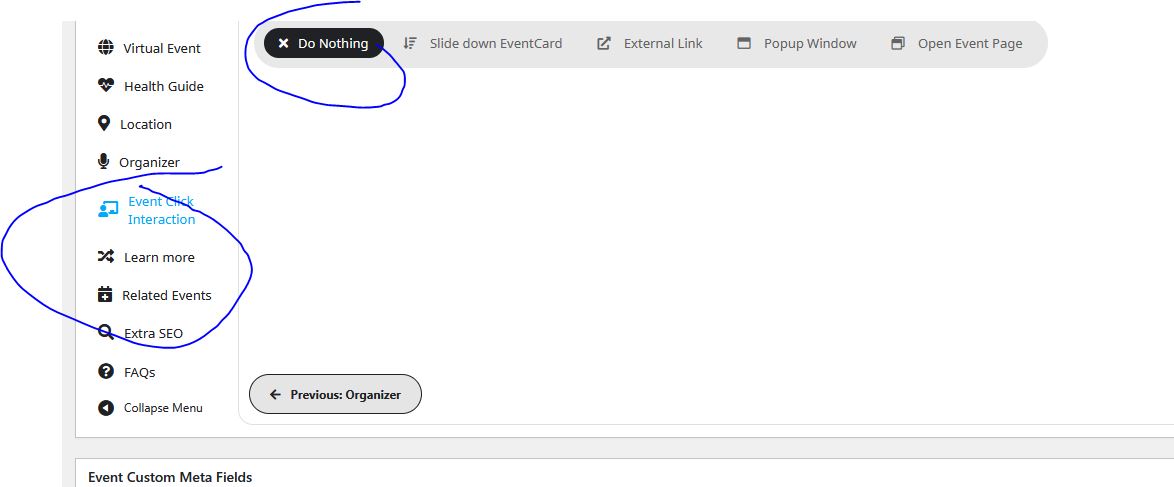
”Select EventTop Organizer click action” only affects EventTop’s Organizer.
Have you tried adding ux_val=”4a” to the shortcode?
Please change this to ”Open Event Page”:
Reply to: tickets(408044)
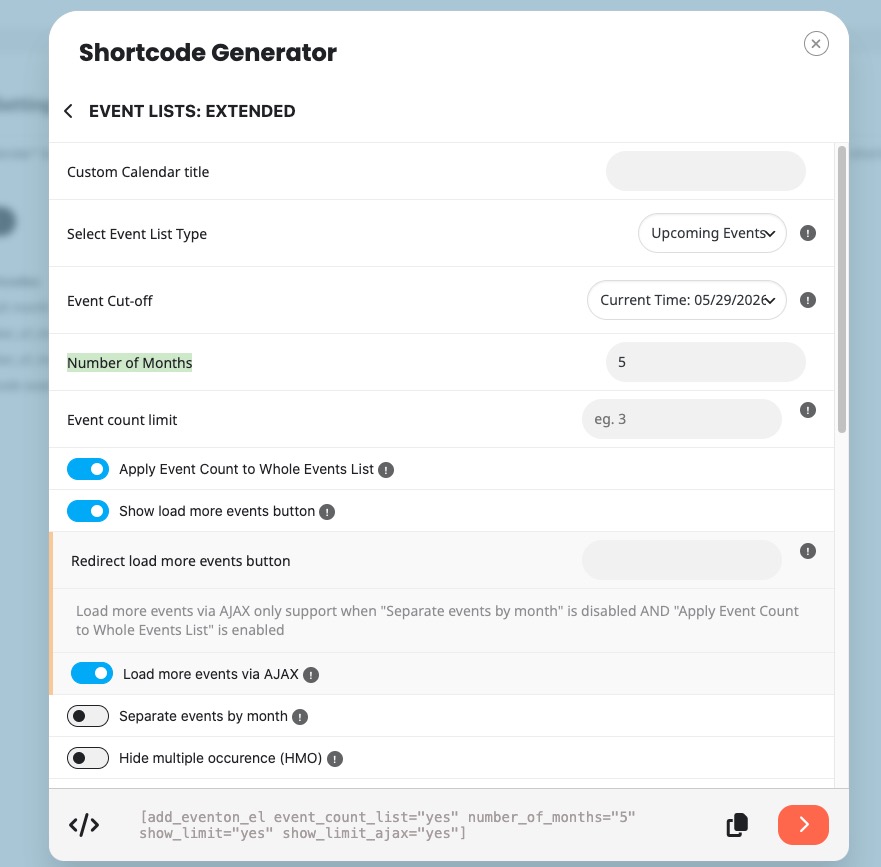
In order to show the year, please add this to your shortcode
show_year=”yes”
For the load functionality, please add these to the shortcode:
event_count_list=”yes” number_of_months=”5” show_limit=”yes” show_limit_ajax=”yes”
What to select in the shortcode generator:
Reply to: tickets(408011)
Could you try manually clearing the browser cache?
If the issue continues, please send us wp-admin access to your site from ”Access Info” box on right side menu, to further assist your situation.