This worked! Thank you!
Archives: Replies
Replies for tickets on suppota
Reply to: tickets(372708)
Following update 0.12 I can enable reminders again. I am closing this ticket and will follow up if any further issues arise. Thank you!
Reply to: tickets(379709)
After changes are you clicking “save ticket settings” and then save for event post?
There is a known issue with when event post is clicked ‘save’ the ticket settings getting reset to previous values.
For the moment try saving ticket settings. And then refresh page and then click save for event post. and see if this fix this issue?
Reply to: tickets(379401)
you don’t need to purchase support again- we will support the main eventon plugin even if expired
only the addons need re-purchase to get support
Reply to: tickets(379418)
the normal on page form works
https://staging2.discoverbuellton.com/adding-your-event-to-the-calendar/
now is it possible to create a pop up with elementor pro and put the basic form inside that pop up? instead of using the eventon pop up? (you would also be able to customize the button better as well
Reply to: tickets(379401)
Thank you, Artem.
Reply to: tickets(379651)
https://www.justleadingsolutions.com/wp-admin
user: artem
pwd: 8#@0EfCwRi1poqJvFf#1wrAu
Reply to: tickets(379719)
woocomerce sells an extension that will do it (of course they wouldn’t include it for free)
there are free versions out there
in the video below I’ll show you how to use this plugin’s free version to do it
https://en-gb.wordpress.org/plugins/woo-conditional-product-fees-for-checkout/
their pro version is like $169 which is a bit steep
I don’t think its exactly what you are after but it might be
volumes a little wonky sorry and theres no simple way to add the fee- but if you set a fee up in the plugin and
create your event then go to the service fee and duplicate and change the product to the new event
create event
configure tickets including adding the line about the service fee
publish
then go to the conditional fee’s section- duplicate an existing fee and change the product to match the new event>save
I guess if you do it enough it will be easier
Reply to: tickets(379418)
Hello, I found out it is the Elementor Pro plugin that is cause the issue. I’m sure how to proceed further. I did turn off all the caching options for staging site but that didn’t resolve the issue.
I created a staging site if t you need to login to review.
https://staging2.discoverbuellton.com/wp-admin/
Thanks for your help with this.
Mike
Reply to: tickets(379534)
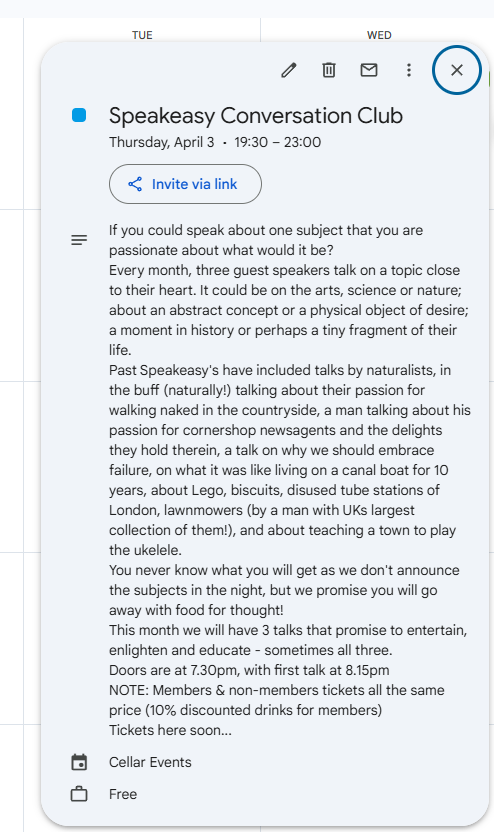
Maybe its an issue with ICS importer from google calendar. It’s moving the event times forward by an hour and I assume it must be to do with the clocks going forward. See screenshot of an event in google calendar