Could you try adding the code to wp-admin > Appearance > Customize > Additional CSS?
Archives: Replies
Replies for tickets on suppota
Reply to: tickets(375276)
Hello. Thanks for the quick reply.
The onclick event that makes the listed event reveal the Event Card is working now. I saw that you had a recent update to the plug in so I installed it. It fixed the issue that I was having.
Regarding the icon fix. I added the code below and toggled the “Write dynamic styles to header” toggle “ON”, SAVED, and then “OFF” and saved and there was no changes to the website the icon still did not appear.
I noticed that when you “toggled” the button and save, it reverts back to being “un-toggled”.
-
.evcal_evdata_row .evcal_evdata_icons i, .evcal_evdata_row .evcal_evdata_custometa_icons i, .eventon_list_event .fa, .evo_lightbox .fa { font-weight: 900 !important; } .evcal_evdata_row .evcal_evdata_icons i:before, .evcal_evdata_row .evcal_evdata_custometa_icons i:before, .eventon_list_event .fa:before, .evo_lightbox .fa:before { content: var(–fa) !important; }
Reply to: tickets(375123)
Please make sure to click on this to show your shortcode: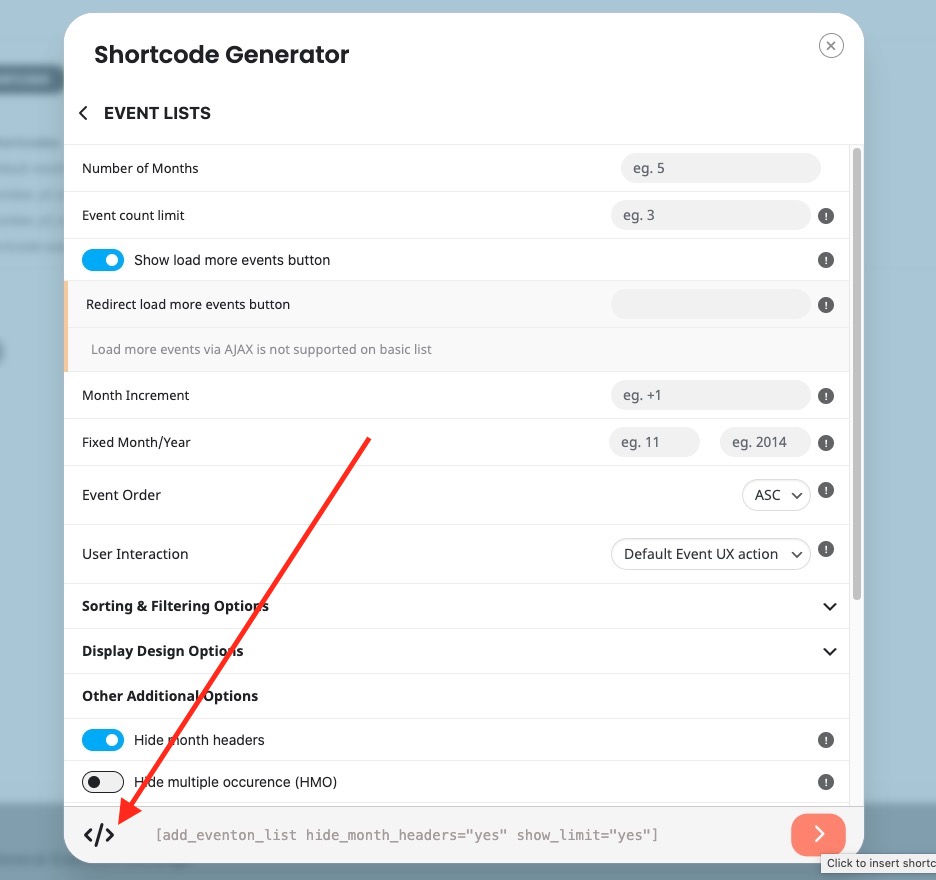
Reply to: tickets(375293)
It seems that you need to customize WP Event Aggregator. Unfortunately, we don’t know how the plugin works, so couldn’t help.
If you have any further questions or concerns please create a new ticket.
Reply to: tickets(375246)
We are glad your issue is resolved, if you have any further questions or concerns please create a new ticket. If you have a moment, we would greatly appreciate if you could kindly leave us a review at Codecanyon. By going to your account > Downloads. We are very grateful for your kind review!
Reply to: tickets(375123)
Thanks, but my shortcode generator is not working using either method. I go through building it and click save and I don’t see any shortcode anywhere. While I’m building it or when I save it.
Please help.
Thank you
Reply to: tickets(375293)
I got help elsewhere, and it is very possible to do this. Here is how:
“We have just removed the hyperlink function. you can remove the below link in the “class-wp-event-aggregator-ical_parser.php” file.
Remove this line : $post_description = $importevents->common->wpea_convert_text_to_hyperlink( $post_description );
The file path : plugins/wp-event-aggregator/includes/class-wp-event-aggregator-ical_parser.php
The code source code : https://github.com/xylusthemes/wp-event-aggregator/blob/master/includes/class-wp-event-aggregator-ical_parser.php#L332
Thanks & Regards,
Xylus Themes”
Reply to: tickets(375312)
Thank you…
Reply to: tickets(375310)
Thanks for the reply. How do I make this available to website visitors who wish to download the ICS file please?
Thanks
Peter
Reply to: tickets(374429)
Hi Artem,
please use the following admin user login credentials:
capercomms@protonmail.com
G9vM3Z!O&&H2My9#0hmk#T%q
thanks