Well, that works, but I don’t want to have to do that every time I update the plug-in. That’s when this issue occurs, whenever the plug-in is updated.
Archives: Replies
Replies for tickets on suppota
Reply to: tickets(375367)
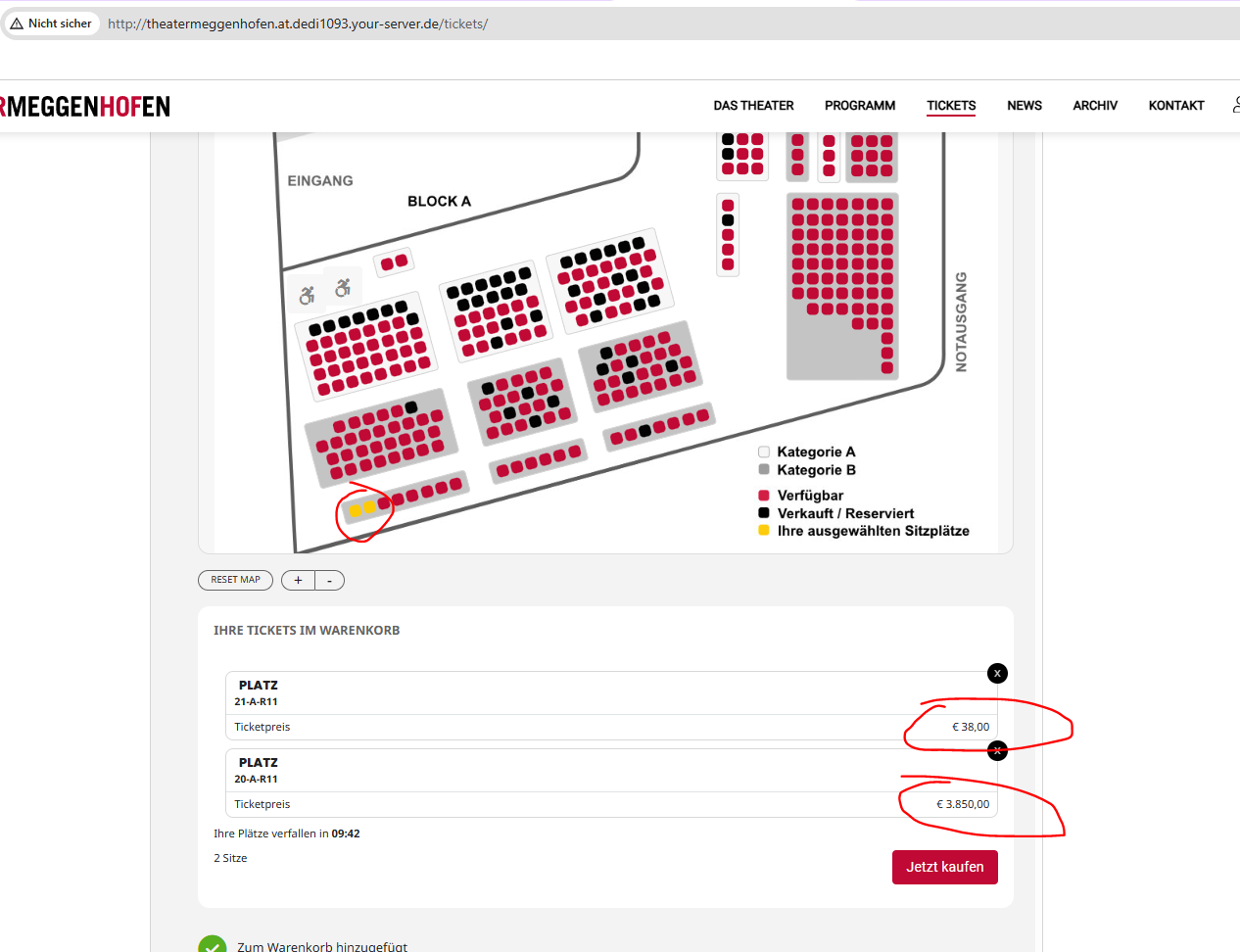
You can use this event for testing:
http://theatermeggenhofen.at.dedi1093.your-server.de/wp-admin/post.php?post=5207&action=edit
I have set the price of the seat 20-A-R11 to “38.50” and the price of seat 21-A-R11 to “38,50” (both are on the bottom left in the seatmap).
Both prices are displayed wrong in the frontend (see screenshot).
Thanks for your help!
Reply to: tickets(375246)
Thank you I will pop it on as a feature request. I have found in the event itself I can hide in calendar one event at a time tucked in there so I can do it manually for now
Reply to: tickets(371634)
This is not possible, I am afraid.
When you hide past event fully, then a new only should come up in the calendar with future dates.
Added hide_mult_occur=”yes” only shows one repeat and hides the rest of them. So if you hide the one on 7th, then 21st should replace it.
Please check and let me know.
Reply to: tickets(375271)
Hello,
Location City, State and so on are for admins only and not visible on the front-end and also cannot be enabled on Action User’s form.
Customers should fill in Location Address fully with Street, City, State, Postal Code.
Reply to: tickets(375276)
Hello,
Could you send us your .csv file you used to import the events?
There are no locations on your new website:
https://medassist.org/wp-admin/edit-tags.php?taxonomy=event_location&post_type=ajde_events
Also this section doesn’t exist, correct?

In order to fix the icons please add this CSS code to EventON > Styles (If you don’t see any change, EventON > Scripts & Styling > turn off Write dynamic styles to header > save settings > turn on Write dynamic styles to header):
https://pastebin.com/s7y0mc7j
Reply to: tickets(375293)
Hello,
This is not possible, I am afraid. Not from EventON’s side at least.
Reply to: tickets(167671)
Could you try EventON > Scripts & Styling > turn off Write dynamic styles to header > save settings > turn on Write dynamic styles to header?
The flush the cache.
Reply to: tickets(375323)
Hello,
Thank you for your messages, I am going to assign this ticket to Ashan and he will be able to take it from here and find you a solution. Please allow some time for him to get back to you, we greatly appreciate your patience and thank you for being a eventon customer!
Reply to: tickets(375336)
Ashan,
Confirmed on customer’s website:
https://eventos.flad.pt/wp-admin/admin.php?page=eventon#evcal_010
It doesn’t save enabled “Activate Event Type Category #3”.