It means that if there is a recurring event that happens 4 times, the user doesn’t need to buy 4 tickets but just 1, and they will have access to all 4 events. We need that when a ticket is purchased, the user has access to all 4 events, so logically, the 4 dates should appear on the ticket, the cart page, and the checkout. Is this possible?
Archives: Replies
Replies for tickets on suppota
Reply to: tickets(376071)
PS: the website is in production so better not to do any test that could impact the live pages.
https://cmcm.qc.ca/wp-admin/
u: info@myeventon.com
p: HiBDsS(CUES)EQe@f*FstWM3
url: https://cmcm.qc.ca/formations/ateliers-grand-public/
Reply to: tickets(376325)
Hello Artem,
thank you. I already got this code snippet inside of my shortcode list:
[add_eventon_list number_of_months=”12″ event_count=”99″ hide_month_headers=”yes”]
[add_eventon_list ux_val=”1″ hide_empty_months=”yes” hide_mult_occur=”yes”]
The month still appears. Any other suggestions?
Reply to: tickets(376146)
HI
I have made sure all the plugin are up to date.
Access to the website is
https://theatreexpress.co.uk/wp-admin/
Username – Eventon
Password – R$dcqTLB0MH%fkTQJ6zEukaK
Reply to: tickets(376298)
Yes its working now. Can I change the page with elementor?
Reply to: tickets(376238)
Sorry, I forgoto to tell you.
https://www.saterhonatherm.com/sate-admin
Reply to: tickets(375297)
Thank you very much. I will try this tomorrow
Reply to: tickets(373298)
We are sorry for the delay. Ashan will check this ASAP.
Reply to: tickets(375297)
What you need is:
$td[‘oD’][‘seat_number’]
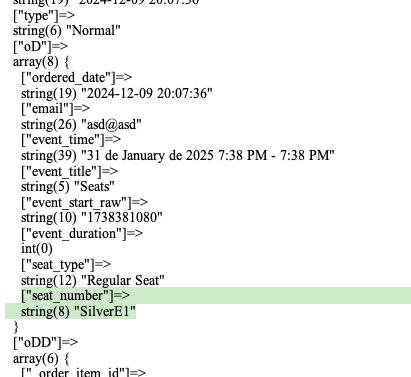
Please try this code:
add_filter(‘evotx_csv_row’, ‘evotx_add_row’,10,4);
function evotx_add_row( $array, $tn, $td, $EVENT){
$array[‘seat_number’] = $td[‘oD’][‘seat_number’];
return $array;
}
Reply to: tickets(376298)
Hello,
I fixed Single Event Page not working by refreshing Permalinks. Could you check and let us know if the issue has been fixed?