We are glad your issue is resolved, if you have any further questions or concerns please create a new ticket. If you have a moment, we would greatly appreciate if you could kindly leave us a review at Codecanyon. By going to your account > Downloads. We are very grateful for your kind review!
Archives: Replies
Replies for tickets on suppota
Reply to: tickets(375123)
Thanks, but my shortcode generator is not working using either method. I go through building it and click save and I don’t see any shortcode anywhere. While I’m building it or when I save it.
Please help.
Thank you
Reply to: tickets(375293)
I got help elsewhere, and it is very possible to do this. Here is how:
“We have just removed the hyperlink function. you can remove the below link in the “class-wp-event-aggregator-ical_parser.php” file.
Remove this line : $post_description = $importevents->common->wpea_convert_text_to_hyperlink( $post_description );
The file path : plugins/wp-event-aggregator/includes/class-wp-event-aggregator-ical_parser.php
The code source code : https://github.com/xylusthemes/wp-event-aggregator/blob/master/includes/class-wp-event-aggregator-ical_parser.php#L332
Thanks & Regards,
Xylus Themes”
Reply to: tickets(375312)
Thank you…
Reply to: tickets(375310)
Thanks for the reply. How do I make this available to website visitors who wish to download the ICS file please?
Thanks
Peter
Reply to: tickets(374429)
Hi Artem,
please use the following admin user login credentials:
capercomms@protonmail.com
G9vM3Z!O&&H2My9#0hmk#T%q
thanks
Reply to: tickets(167671)
Well, that works, but I don’t want to have to do that every time I update the plug-in. That’s when this issue occurs, whenever the plug-in is updated.
Reply to: tickets(375367)
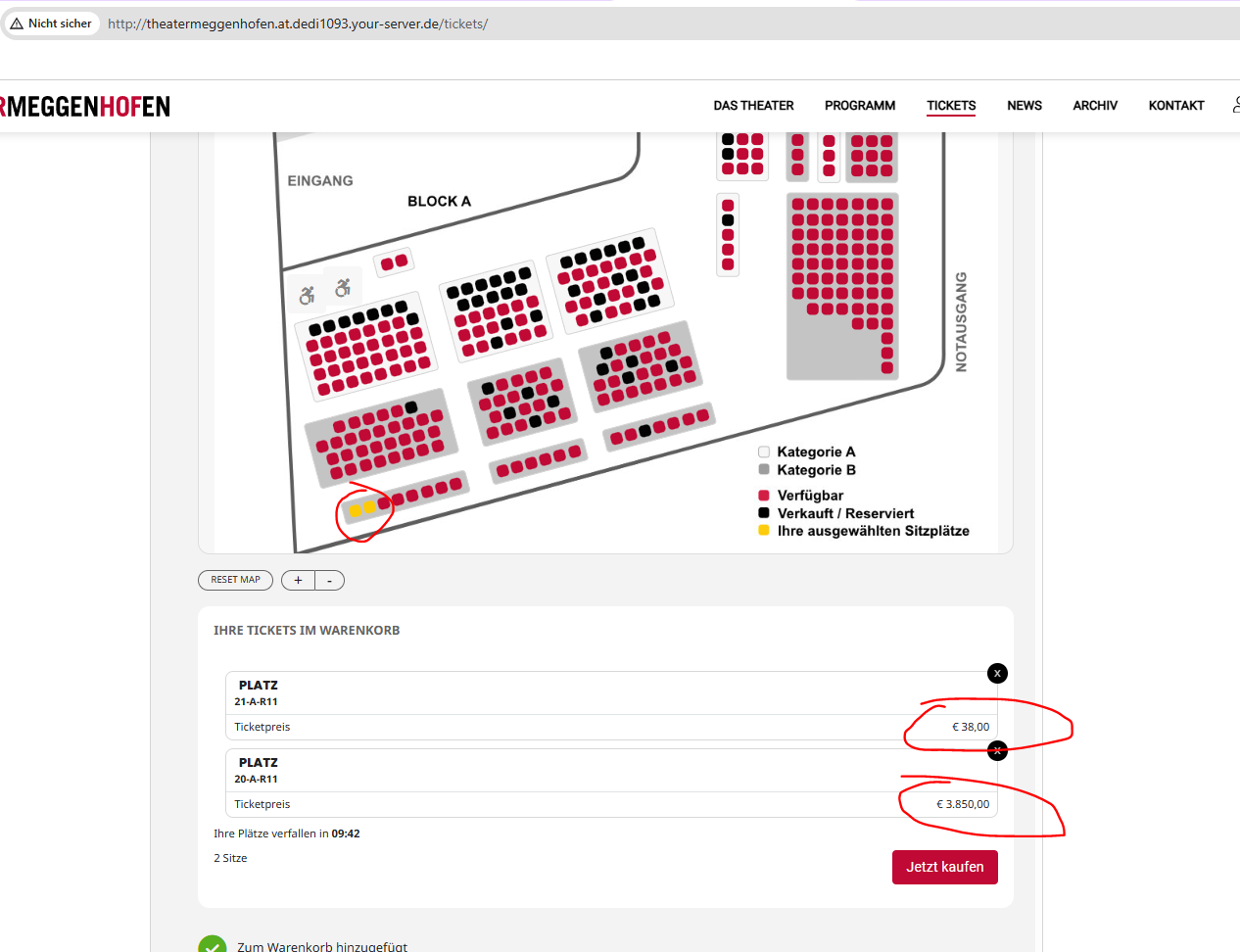
You can use this event for testing:
http://theatermeggenhofen.at.dedi1093.your-server.de/wp-admin/post.php?post=5207&action=edit
I have set the price of the seat 20-A-R11 to “38.50” and the price of seat 21-A-R11 to “38,50” (both are on the bottom left in the seatmap).
Both prices are displayed wrong in the frontend (see screenshot).
Thanks for your help!
Reply to: tickets(375246)
Thank you I will pop it on as a feature request. I have found in the event itself I can hide in calendar one event at a time tucked in there so I can do it manually for now
Reply to: tickets(371634)
This is not possible, I am afraid.
When you hide past event fully, then a new only should come up in the calendar with future dates.
Added hide_mult_occur=”yes” only shows one repeat and hides the rest of them. So if you hide the one on 7th, then 21st should replace it.
Please check and let me know.