Ashan,
They had this issue like in other ticket:
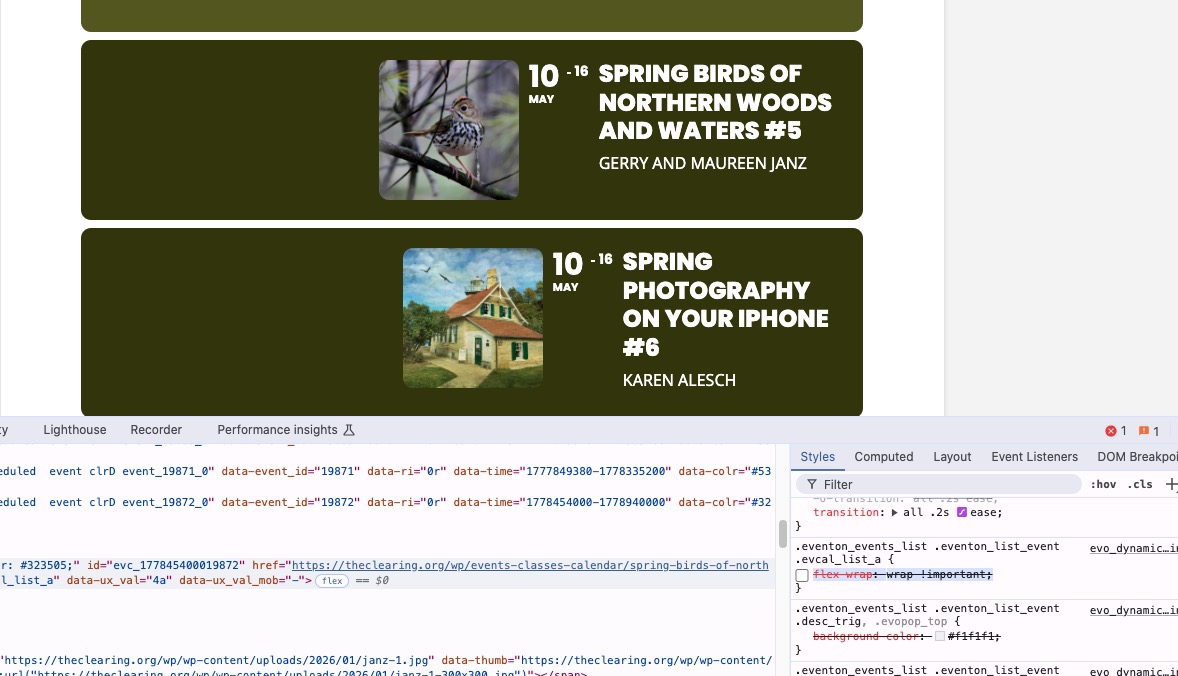
So I gave them this CSS code:
.eventon_events_list .eventon_list_event .evcal_list_a{flex-wrap:wrap !important;}
Replies for tickets on suppota
Ashan,
They had this issue like in other ticket:
So I gave them this CSS code:
.eventon_events_list .eventon_list_event .evcal_list_a{flex-wrap:wrap !important;}
Thank you for your messages!
I am going to escalate this ticket to development to help in here. Please allow us some time to address this, and we truly appreciate your patience. Thank you for being a valued EventON customer!
I have changed the ticket setting you suggested and saw this: ”Update WC ticket product name upon event update from now on”
Are you referring to ”Always redirect individual WC ticket Product page to event page on frontend”?
Could you send us a screenshot of the message?
Here’s the issue:
[26-Jan-2026 10:27:19 UTC] PHP Fatal error: Uncaught WC_Data_Exception: Invalid or duplicated SKU. in /home/customer/www/tamaraskitchen.com/public_html/wp-content/plugins/woocommerce/includes/abstracts/abstract-wc-data.php:945
Stack trace:
#0 /home/customer/www/tamaraskitchen.com/public_html/wp-content/plugins/woocommerce/includes/abstracts/abstract-wc-product.php(861): WC_Data->error(’product_invalid…’, ’Invalid or dupl…’, 400, Array)
#1 /home/customer/www/tamaraskitchen.com/public_html/wp-content/plugins/eventon-tickets/includes/class-event_ticket.php(685): WC_Product->set_sku(’sku_3037’)
#2 /home/customer/www/tamaraskitchen.com/public_html/wp-content/plugins/eventon-tickets/includes/class-event_ticket.php(631): EVOTX_Event->set_wc_product_meta(Object(WC_Product_Simple), Array, false)
#3 /home/customer/www/tamaraskitchen.com/public_html/wp-content/plugins/eventon-tickets/includes/admin/class-admin-ajax.php(125): EVOTX_Event->update_wc_product(558524, Array)
#4 /home/customer/www/tamaraskitchen.com/public_html/wp-includes/class-wp-hook.php(341): evotx_admin_ajax->save_event_settings(’’)
#5 /home/customer/www/tamaraskitchen.com/public_html/wp-includes/class-wp-hook.php(365): WP_Hook->apply_filters(’’, Array)
#6 /home/customer/www/tamaraskitchen.com/public_html/wp-includes/plugin.php(522): WP_Hook->do_action(Array)
#7 /home/customer/www/tamaraskitchen.com/public_html/wp-admin/admin-ajax.php(192): do_action(’wp_ajax_evotx_s…’)
#8 {main}
thrown in /home/customer/www/tamaraskitchen.com/public_html/wp-content/plugins/woocommerce/includes/abstracts/abstract-wc-data.php on line 945
It seems that there are a lot of products with the same SKU:
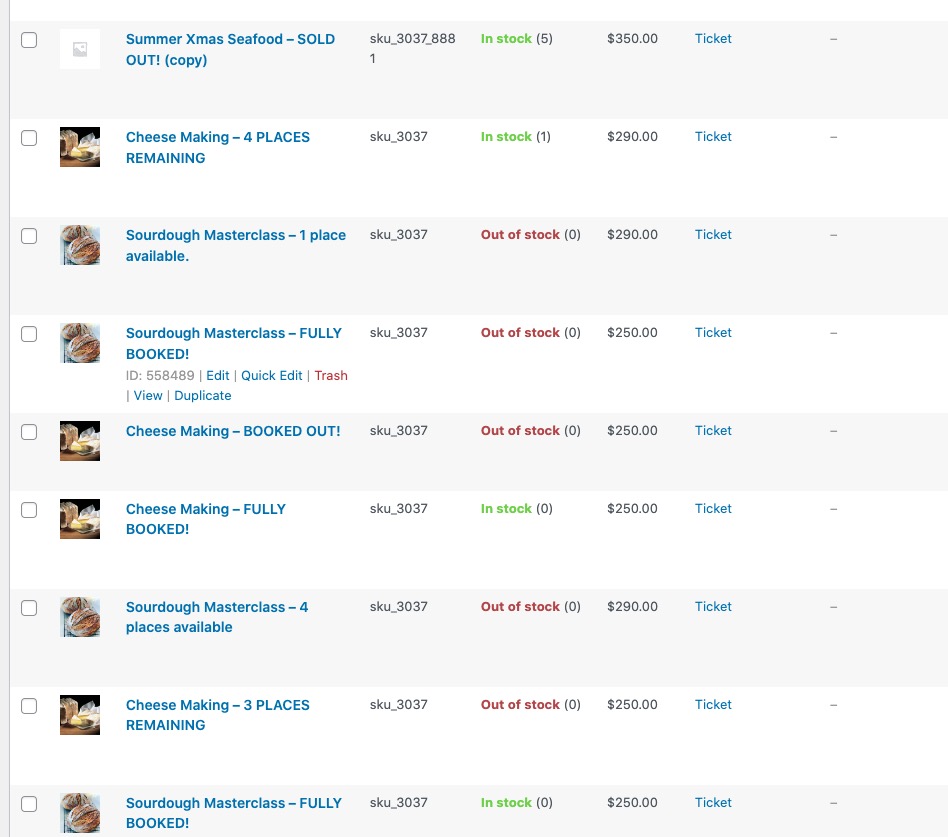
Could you tell us how do you create duplicates of events? Do you go to wp-admin > Events > click Duplicate or can also go to wp-admin > Products and click Duplicate there and then assigned duplicated product to an event?
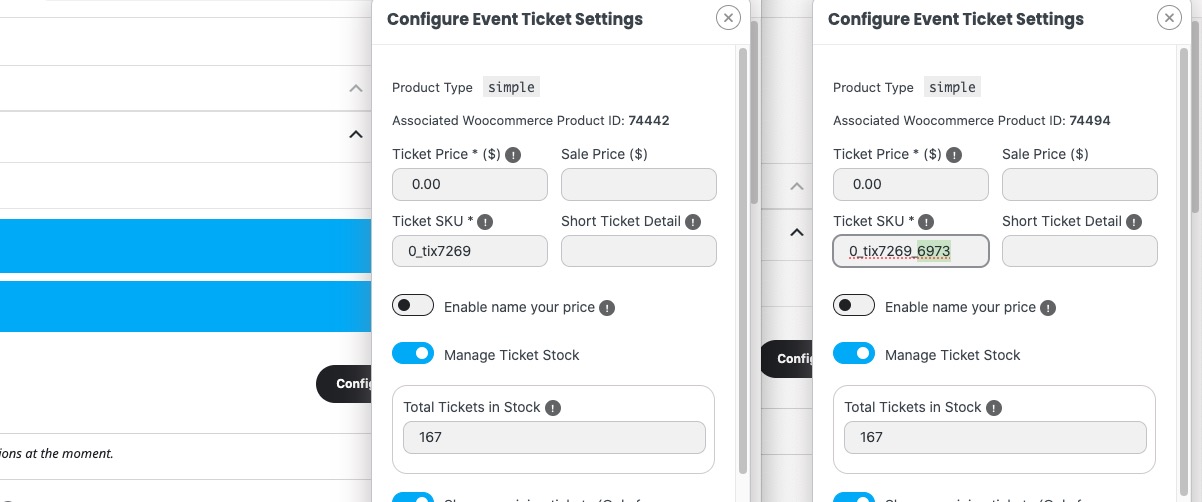
Because when an event is duplicated a random number is added to SKU:
Bonjour,
le problème est que je n’ai pas de compte myeventon puisque j’ai acheter le plugin sur code canyon.
je ne peux donc pas accéder aux mise à jours des modules complémentaires
Merci
Please go to EventON > Language > ADDON: Action User > change ”Event Organizer”.
Now please go to
https://www.myeventon.com/my-account/
Login and find available updated versions of add-ons in
https://www.myeventon.com/my-account/downloads/
Then follow
https://docs.myeventon.com/documentations/can-download-addon-updates/
Hello,
You can add checkout fields by following this guide:
https://docs.myeventon.com/documentations/how-to-add-additional-fields-at-checkout/
Checkout page is fully handled by WooCommerce, so please check this guide on how to edit the fields:
https://woocommerce.com/posts/customize-checkout-fields-woocommerce/
Also try using this or similar plugin to edit the fields:
https://wordpress.org/plugins/woo-checkout-field-editor-pro/
I’ve updated EventOn to 5.0.6 and verified all add-ons are up-to-date. We are still not receiving notifications. I tested by changing the ”To” field to my sladestyle@gmail.com address, turned on/off the smtp.