David, you do not have the plugin editor enabled. We are going to release this update next week the latest. That should resolve the issue with event top colors 🙂
Archives: Replies
Replies for tickets on suppota
Reply to: tickets(372849)
Hello Milk, that was a job created over 3 years ago. And it seems it was done by Ashish, who has not been working with us for quite some time now.
We can not go fix this custom work because it would take a long time.
We can implement this in our next update to RSVP addon since it seems like a proper way to implement the custom fields.
Reply to: tickets(372965)
Thank you for your assistance. However, the calendar page is now blank and I cannot load the page to edit it via Elementor. Yesterday, it was displaying just fine. The shortcode that we’re using is:
[add_eventon_list number_of_months=”12″ ux_val=”1″ show_et_ft_img=”yes” hide_empty_months=”yes” show_year=”yes”]
I tried creating a new calendar page (/calendar2 or /calendar3) and adding the short code and the calendar doesn’t show up and the page then become in-editable once published.
The only thing the client did was to make some minor modifications to the different ticket types and price variations.
Please advise. Thanks!
Reply to: tickets(364800)
website is back online and in monitoring mode 😉
please continue in event troubleshooting
Reply to: tickets(372733)
That works. Can you explain why it works so I can understand?
Reply to: tickets(372541)
I am able to adjust the event capacity and have it show properly without updating the event manually. However, this does not account for when I don’t update the event manually the event capacity is removed. Do you think the two are correlated?
Also, how long can I estimate for this issue to be resolved?
Reply to: tickets(372354)
I dont waant to make your website go off line again if I made a mistake in the code and using that file manager method I will wait for you to send the login info and will proceed with the debuging via that.
Reply to: tickets(372354)
Thank you for sending that information, however it is missing the SFTP host address. 🙂
Reply to: tickets(372788)
The emails are coming from WooCommerce itself.
Here’s how they look on out test site: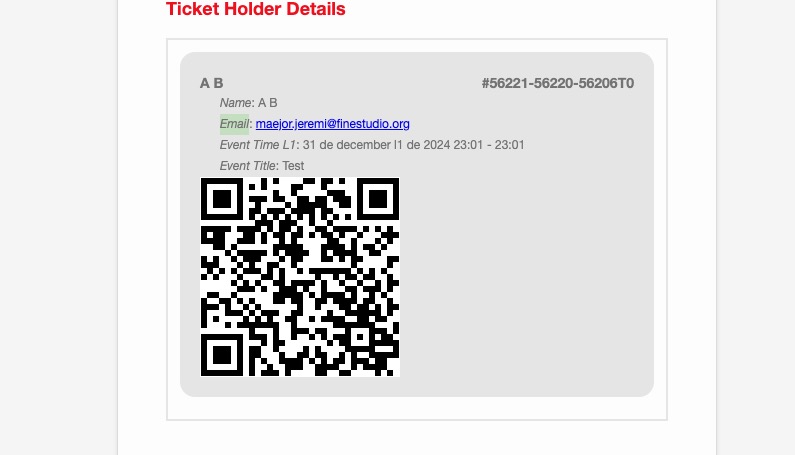
Instead of the email itself, it simply shows “Email”.
Are there any customizations that you applied to Woo’s emails?
Reply to: tickets(371634)
I am sorry, but I don’t understand the issue at all.
You have three repeats: 5.12, 12.12, 19.12. When you open 5.12 event it shows 12.12 and 19.12 as “future repeating instances of this event on event card”. Could you tell us why this is wrong?