Yes, of course. Thank you for attending to this. I can see this same issue on both my iMac and Macbook. Both running MacOS Sequia 15.7.4.
Archives: Replies
Replies for tickets on suppota
Reply to: tickets(406852)
We are glad your issue is resolved, if you have any further questions or concerns please create a new ticket.
Reply to: tickets(407053)
Hello,
This happens because of selected EventON > Tickets > Upon add to cart redirect customer to: Do not redirect.
I changed it to ”Upon add to cart redirect customer to: Do not redirect, allow adding more tickets to cart”, so now it should work much better.
Please check and let me know.
Reply to: tickets(407022)
Could you try updating EventON and add=ons?
To update eventon to latest version: (If auto update works, please try that from with your website plugins page)
1. If you purchased eventON from codecanyon > Go to EventON Full page and verify your purchase to get a free copy of eventON latest version and move your purchase over to myeventon.com.
2. If you already purchased eventON from myeventon.com go to My Account > Downloads and get the latest version copy.
Once you have the latest version zip file. Then you can go to your website > make sure ”Delete eventon settings & data when EventON is uninstalled” is De-slected from eventon settings, delete old eventon, install new one and activate. This link will further explain the process it. Follow us on X to get real-time announcements on updates!
To update eventon addons: You can download latest eventon addons from myeventon > my account. Then you can go to your website, deactivate old addon and install new one and activate then delete the old addon. This link will further explain the process. Also you can follow us on twitter to get real-time announcements on updates!
Reply to: tickets(407059)
Hello,
What’s your current shortcode? Could you send it here?
Reply to: tickets(407060)
Hello,
It seems that this styling changes all headers to white:
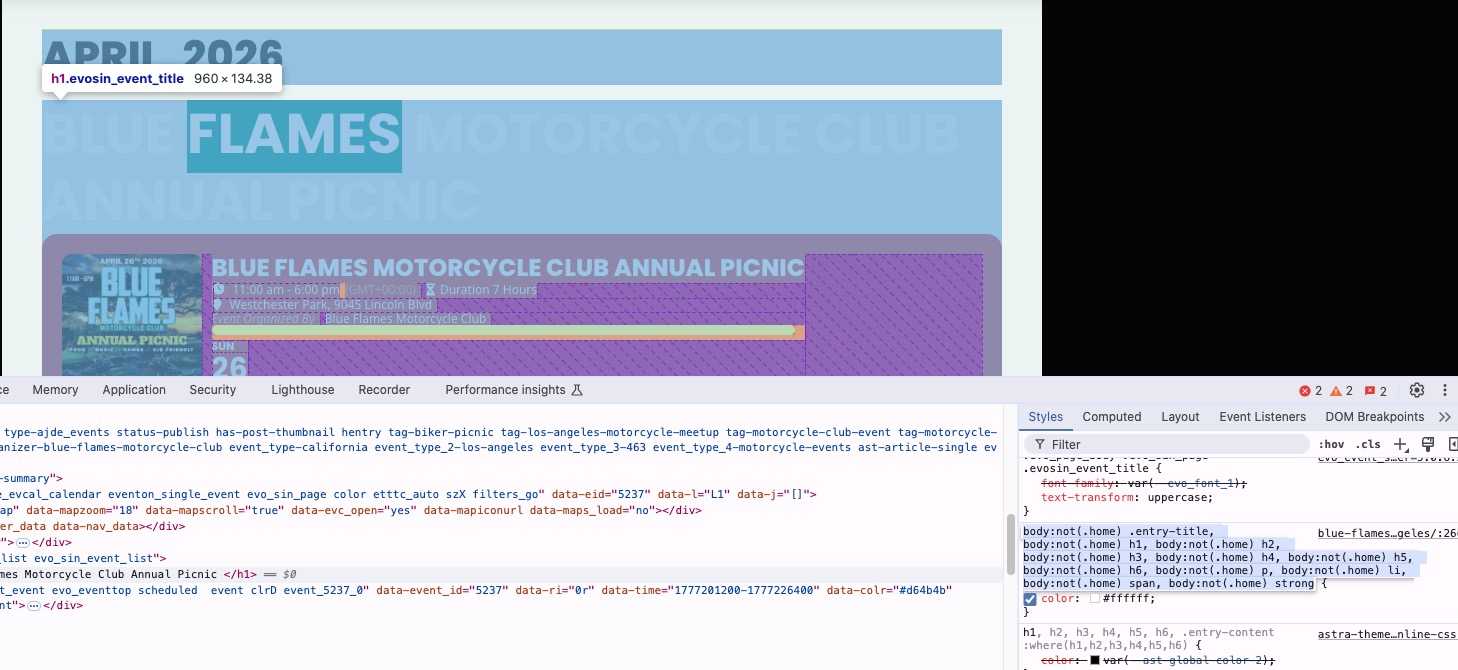
Please add this CSS code to EventON > Styles (If you don’t see any change, EventON > Scripts & Styling > turn off Write dynamic styles to header > save settings > turn on Write dynamic styles to header).
You can also add this code to wp-admin > Appearance > Customize > Additional CSS.
.evo_page_body .evo_sin_page .evosin_event_title { color: #000 !important; }
Reply to: tickets(391895)
Could you please try the instructions mentioned in this documentation?
Do you have any other plugins that can also use /events slug?
Reply to: tickets(391895)
I’ve refreshed permalinks. I’m still having the same issue. (If I go to https://vetstownhall.org/events/one-event/1359/0/ for example, it doesn’t give me a specific event but an index page.
Reply to: tickets(406932)
If you look closely at the CSV column name, Variation is showing as the ”ticket type” it does not show variation options. For WC based variations, there has never been code to show selected variation types, if you use our Variations and Options addon ––
those variation options will show in the CSV file properly.
We will pass this over to get this feature developed in the future updates — to support variation values for WC based variations.
Reply to: tickets(406933)
We are looking into this, as we are not able to 100% replicate this issue on firefix, the corners of tiles are showing correctly as curved in firefox for us. Please allow us sometime to discover what is going on and get an update /fix for you.