2 de dezembro de 2024j de F de Y
Archives: Replies
Replies for tickets on suppota
Reply to: tickets(371464)
when i select a date from picker, it changes and lost date format. i’ve setted to WP format to try to fix but doenst work
When you select it from wp-admin > Edit Event? Could you go to wp-admin > Settings > make sure that Date Format isn’t empty?
>>> It is correct. Brazilian format is not supported in actual version of eventon.
Reply to: tickets(371531)
Hi,
Can we get an update on this please. The issue is preventing cutomers from booking.
Thnaks.
Reply to: tickets(371919)
It seems to be the overall save button that is causing the issues, it’s Changing the SKU and changing the status to not manage stock.
It would be great to get a solution as soon as possible.
Thanks
Helen
Reply to: tickets(371889)
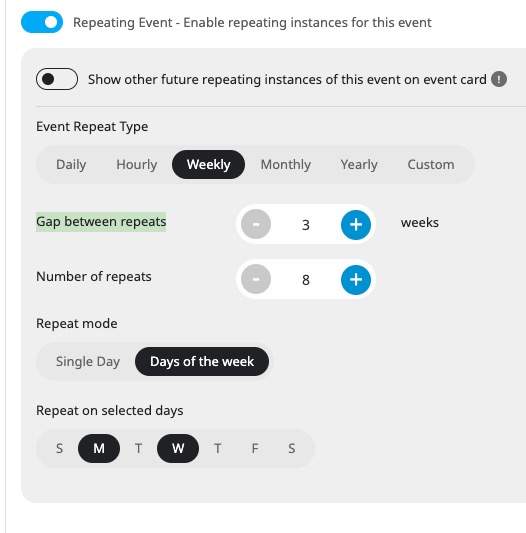
Is it possible to use “Gap between repeats” to set it to Monday or Wednesday every three weeks?
Reply to: tickets(371500)
1. Please add this CSS code to EventON > Styles (If you don’t see any change, EventON > Scripts & Styling > turn off Write dynamic styles to header > save settings > turn on Write dynamic styles to header):
.evotax_term_card .evo_card_wrapper { width: auto !important; max-width: 1240px; padding-left: 24px; padding-right: 24px; } .wrap.evotax_term_card.evo_location_card.alignwide .evo_sidebar {display: none !important}
2. Try adding this code:
.evo_gal_main_img { background-size: contain; background-repeat: no-repeat; }
3. Please go to EventON > EventCard > try a different Feature image display style.
Reply to: tickets(371948)
Hello,
Could you try updating Tickets add-on? Make sure to backup your server before.
To update eventon addons: You can download latest eventon addons from myeventon > my account. Then you can go to your website, deactivate old addon and install new one and activate then delete the old addon. This link will further explain the process. Also you can follow us on twitter to get real-time announcements on updates!
Reply to: tickets(371889)
Hi Artem,
Ok so that is a NO, it cannot be done then 🙁
Going in afterwards and manually deleting every event, other than the required day or days in the month, is an extremely tedious option. This option would take many hours to complete, not really a suitable option to explain to a client, let a long getting them to understand how to implement it!
FYI, this option of recurring event is available natively in Google Calendar, so I am surprised it is unavailable in a PAID plugin.
Reply to: tickets(371912)
Hello,
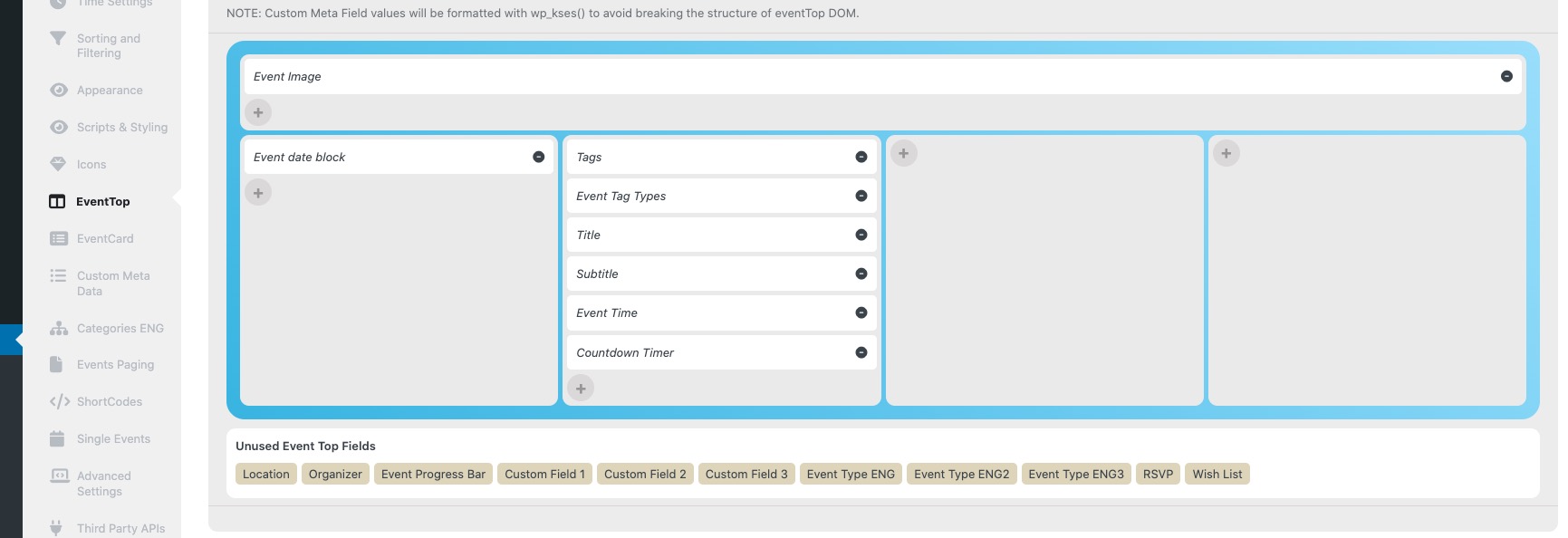
I believe that arranging fields in EventON > EventTop should put all the data under the image:
Or also, a 1 column tile design or to make the event full in tile design if there’s only one.
Thank you for your great suggestion, at the moment it is not supported. However please create a new ticket and select Feature Request as category so others can vote on your idea and get it moved into development faster.
Reply to: tickets(371464)
Sorry for the delay.
Does this impact on site speed?
With the current performance even on mobiles, I doubt that CSS has any affect on how fast the website is working.
when i select a date from picker, it changes and lost date format. i’ve setted to WP format to try to fix but doenst work
When you select it from wp-admin > Edit Event? Could you go to wp-admin > Settings > make sure that Date Format isn’t empty?
So, i write some functions to date wrong format, but none of them worked.
Unfortunately, we unable to help with customizations, since it’s against CodeCanyon’s Support Policy.