Hello,
Please go to EventON > EventCard > open Designer and save > now save EventON Settings.
Replies for tickets on suppota
Hello,
Please go to EventON > EventCard > open Designer and save > now save EventON Settings.
Thank you for your great suggestion. However please create a new ticket and select Feature Request as category so others can vote on your idea and get it moved into development faster.
Also, is there a way to remove the white background?
Please add this CSS code to EventON > Styles (If you don’t see any change, EventON > Scripts & Styling > turn off Write dynamic styles to header > save settings > turn on Write dynamic styles to header):
.evo_eventon_live_now_section .evo_eventon_now_next { background: none !important; padding: 0 !important; }
We are glad your issue is resolved, if you have any further questions or concerns please create a new ticket.
If you have a moment, we would greatly appreciate if you could kindly leave us a review at Codecanyon. By going to your account > Downloads. We are very grateful for your kind review!
Could you check Console on the “Macbook Air” test and send us a screenshot? Is it possible?
What’s your current version of EventON?
Hello,
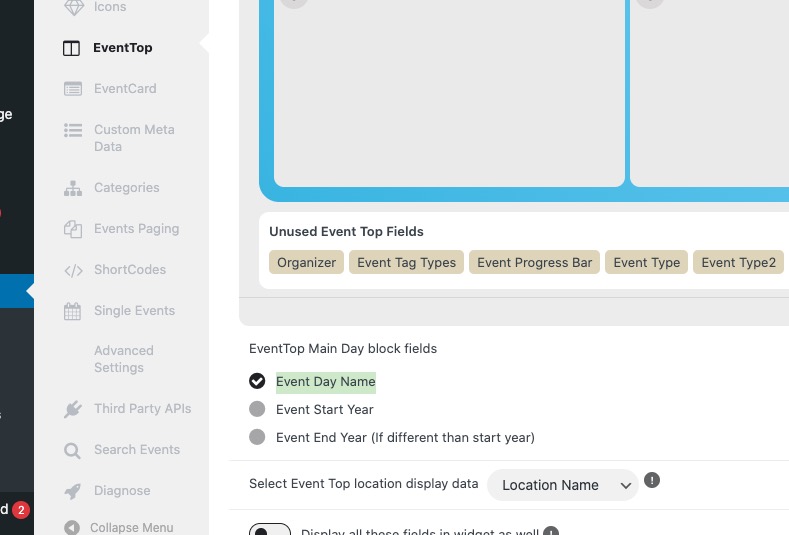
I enabled Day Name here:
the time (GMT-11.00) now appears in gray alongside the normal time
Please add this CSS code to EventON > Styles (If you don’t see any change, EventON > Scripts & Styling > turn off Write dynamic styles to header > save settings > turn on Write dynamic styles to header):
.eventon_list_event .evcal_evdata_cell .evo_tz, .eventon_list_event .evo_tz_time .evo_tz, .eventon_events_list .eventon_list_event .evcal_desc span.evo_tz { opacity: 1; color: #001589; }
…the bar is quite bold…
Could you send us a screenshot?
On the Concert Calendar page, the arrows next to the month are now slanted, whereas they used to be straight and thinner (it looks a bit odd).
Can you please send us a direct link to where the actual issue is happening?
Ashan,
Please take a look at the original message and also Reply to: 371747
Could you test this with iPhone, if you have one?
Thank you for your messages, I am going to assign this ticket to Ashan and he will be able to take it from here and find you a solution. Please allow some time for him to get back to you, we greatly appreciate your patience and thank you for being a eventon customer! Also please disable any IP blocking on your site if there are any.
Hello,
This file doesn’t load:
https://symbiose.comete.com/wp-content/plugins/eventon-full-cal/assets/fc_script.js?ver=2.1.2
Did you install the add-on or uploaded the unzipped archive to the server folder?
Hi,
Actually it is worse because it does not change month at all and the the events do not load at all, all we we see is the events trying to load (grey boxes).
This happens on both iPhone or Android.