Perfect! Please keep us updated.
Archives: Replies
Replies for tickets on suppota
Reply to: tickets(370481)
Closed as duplicate.
Reply to: tickets(370482)
Hello,
Please add this CSS code to EventON > Styles (If you don’t see any change, EventON > Scripts & Styling > turn off Write dynamic styles to header > save settings > turn on Write dynamic styles to header):
.ajde_evcal_calendar.color #evcal_list .eventon_list_event a:hover { border-left-width: 0px !important; }
Reply to: tickets(369971)
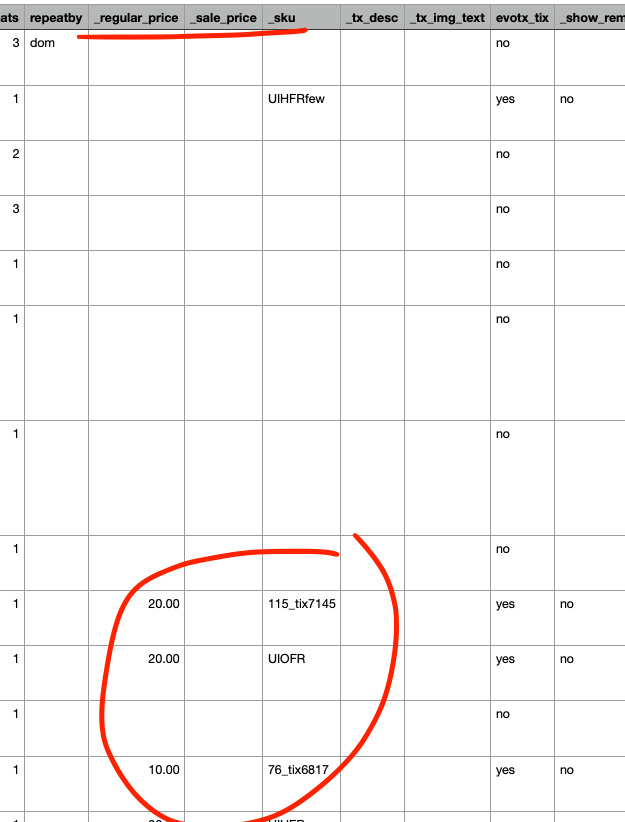
Just need to clarify, Do you EXPORT the CSV of all events from eventON settings at all?
Are you only having the issue with _sku and _regular_price fields
Because export all events as CSV from eventON settings should have _sku and _regular_price fields populated if you have the tickets addon.
This is who it looks on our end.
Reply to: tickets(369453)
In the confirmation screen I showed above, if you click the event name it takes me to the imported event in your website.
This is the link to the event post that was imported
https://waupc.com/wp-admin/post.php?post=9573&action=edit
Is it possible to send me a recorded video of what is happening for you? please upload the video and share link to it.
Reply to: tickets(370341)
If you have more questions, kindly send us a new ticket and we would be more than happy to help you resolve your issues!
Reply to: tickets(365851)
That login is not wokring my friend. Also make sure you are running the latest version of eventON 4.7.3 with slider 2.1
Reply to: tickets(369258)
You are adding some custom styles in here to hide these. So as I pointed out before. Please open console in google and make sure in your custom CSS styles you are targeting the correct div element to apply display:none property.
Reply to: tickets(369924)
here you go
so the question is do you want the standard social share icons or are you trying to add new/different social icons from the ones we have? as the documentation you linked to is for adding new ones we have not added
Reply to: tickets(369968)
Can you please try the latest version of RSVP addon 3.0.3, because in this version we are not able to replicate this issue. waitlist attendees are correctly granted access. And in our tests the rsvp capacity is not increased either.
So really not sure why it is doing this in your case. Only thing I can think is updating to latest version.