funktioniert leider nicht
Archives: Replies
Replies for tickets on suppota
Reply to: tickets(370007)
We had to deactivate Eventon Ticket until solution reachable.
Reply to: tickets(370003)
here is where the ICS file is:
https://www.dropbox.com/scl/fi/5wfgiucqffvnpkfbyrvpx/OCM_oaklandcountymomstech-gmail.com.ics?rlkey=fo3m7m2ytrq51knddpy5e8d4r&st=dp5mb924&dl=0
Reply to: tickets(369453)
Hello, Ashan. Has there been any progress on this issue?
Reply to: tickets(367752)
Namaskar Ashan!
Yes, the Change RSVP status. But prior to recent updates that email was going out and correctly delivered.
Thanks,
Cristiano
Reply to: tickets(369882)
Same URL as mentioned above, then click on the image between “Be the first to RSVP” and “Event Details ENG”. Something weird is also that below the image ‘undefined’ is shown.
Thank you for the info! We are going to fix this in 4.7.3.
To update eventon to latest version: If you are unable to do autoupdate, you can go to codecanyon your account > download and get the latest eventon version as zip file. Then you can go to your website > make sure “Delete eventon settings & data when EventON is uninstalled” is Deslected from eventon settings, delete old eventon, install new one and activate. This link will further explain the process it. Also you can follow us on twitter to get real-time announcements on updates!
Reply to: tickets(369864)
If I will update the event page that will change some of the repeating events ticket capacity to zero.
You just save Edit Event pages and it sets “Manage capacity seperate for each repeating event” to 0?
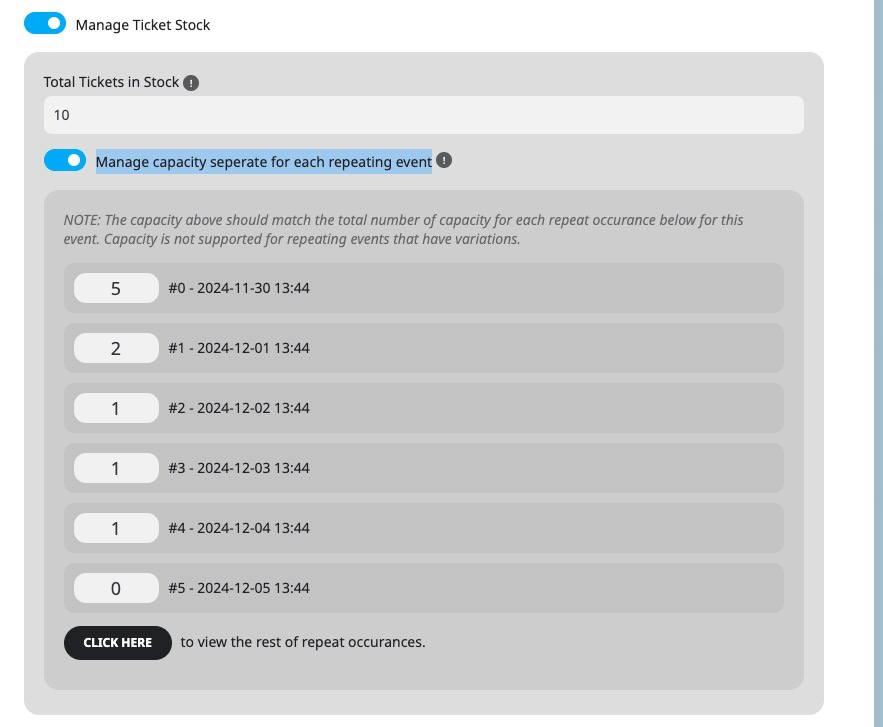
Could you elaborate? I just tried on our test site and it saves everything correctly.
You can also send us wp-admin access to your site as a private message for us to further assist your situation.
Reply to: tickets(369967)
A way to deactive this via CSS:
.evocard_box.ftimage {
pointer-events: none !important;
cursor: default;
}
Reply to: tickets(369768)
I enabled WP_DEBUG, but it doesn’t create debug.log file. What’s your server? If you are using Apache, could you follow
https://wordpress.stackexchange.com/a/301298
Reply to: tickets(369953)
Hello,
Perfect! Iif you have any further questions or concerns please create a new ticket.