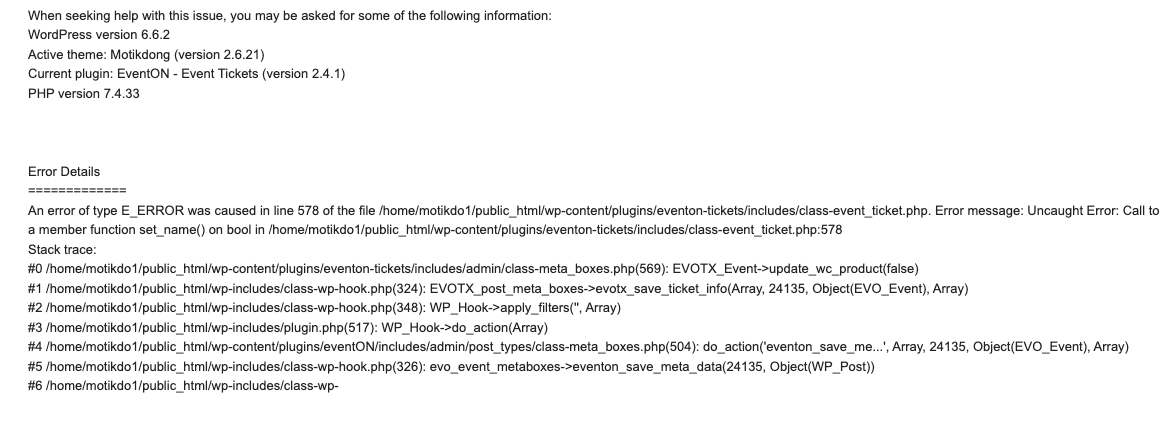
Hello,
Yes, we using DIVI Page Builder.
Yesterday, we have changed the Default Event Timezone (for GMT Europe/Paris) and now, we have a new problem with Eventon.
The calendar dates return correctly when there is an external link, (like 17/11 for the walk), but when we want to open the date to specify 2 different locations, it doesn’t open, even though the parameters are entered correctly and they opened correctly last week…
Apart from the default event timezone and the white display on the calendar page (see below), we didn’t make any other changes.
[add_eventon_list event_type=”409″ eventtop_style=”0″ fixed_month=”11″ fixed_year=”2024″] instead of
instead of :
[add_eventon_list event_type=”409″ fixed_month=”11″ fixed_year=”2024″].
And even coming back with an earlier backup doesn’t help.
It’s getting to be a pain, especially since it’s hard to get accurate answers when we ask you questions.
What’s more, we’re not bilingual and we’re not web developers, which necessarily complicates our task and yours.
We’re wondering if we shouldn’t just go back to Eventon Lite and ask for a refund of Eventon and the license, since we can’t use Eventon under good conditions without constantly asking you for help (or finding other support).
Thanks again for your help.