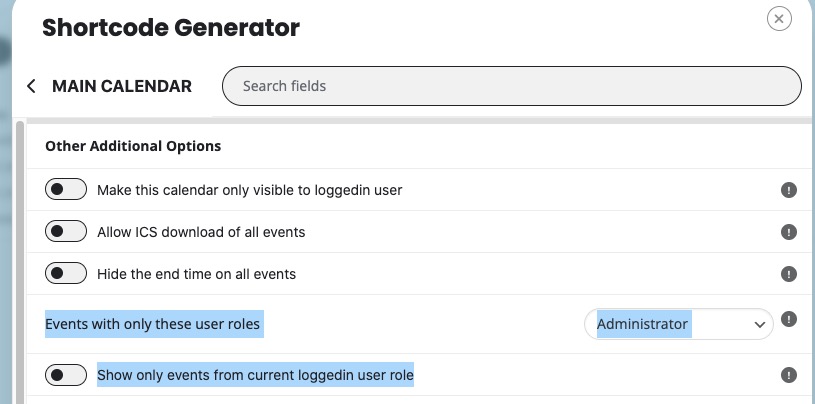
Hello,
With Action User and Plus add-ons you can use these options:
https://www.myeventon.com/addons/action-user/
https://www.myeventon.com/addons/action-user-plus/
Try on https://dev.myeventon.com/wp-admin/
For single event pages, you can use EventON > Single Events > Restrict single event pages to logged-in users only.
We are glad your issue is resolved, if you have any further questions or concerns please create a new ticket.
If you have a moment, we would greatly appreciate if you could kindly leave us a review at Codecanyon. By going to your account > Downloads. We are very grateful for your kind review!
The reply is empty. Could you send it again?
Hello,
I don’t have access to EventON Setting and Plugins pages as well as Events. Could you give us more access?
Hello,
Could you update EventON manually to 4.7.1? From the newest version the autoupdate should be working.
To update eventon to latest version: If you are unable to do autoupdate, you can go to codecanyon your account > download and get the latest eventon version as zip file. Then you can go to your website > make sure “Delete eventon settings & data when EventON is uninstalled” is Deslected from eventon settings, delete old eventon, install new one and activate. This link will further explain the process it. Also you can follow us on twitter to get real-time announcements on updates!
Hello,
Thank you for your great suggestion, at the moment it is not supported. However please create a new ticket and select Feature Request as category so others can vote on your idea and get it moved into development faster.
However, please take a look at
https://docs.myeventon.com/documentations/show-additional-custom-data-eventcard/
You should be able to add the functionality by customizing the code.
Hello,
The latest version is still 2.1.10:
https://docs.myeventon.com/documentations/changelog-dailyview/
We are still working on the autoupdate feature, so please check latest versions from
https://www.myeventon.com/addons/
Or your account.
JSON file: https://drive.google.com/file/d/1OckP_jFGfG2GE8ZOT9x95qQGUsJT9RPT/view?usp=sharing
Events CSV: https://www.cildrc.org/wp-content/uploads/2024/10/Eventon_events_30-10-24.csv
I have updated the plugin according to your directions, and it is still not working.
- In order to protect YEARS of data, I downloaded a CSV of events and a JSON file of settings.
- I had to PURCHASE a plugin to maintain my data which would have otherwise been destroyed because of your software bug. I did not need the $30 plugin for anything else BUT this, and would like a refund.
- Furthermore, it did not work properly. Some events were duplicated, some would not upload at all. Very buggy and ill-functioning plugin.
- The JSON file would not work. It just said “Processing” indefinitely.
- The scrolling feature on the calendar is still not working.
- Scrolling forward to future months does NOT show the calendar.
- Scrolling back to previous months, the forward to the current month, does NOT update the calendar. It changes the words (i.e., “October 2024), but not the dates (the dates still reflect a previous month’s days).
- None of the event descriptions display (event cards) when the event is clicked on. A thin line appears below the event, but no content is displayed.
The site is now more broken than when I first reached out to you, and I have wasted $30 and several hours trying to repair it. What is going on? Why is this plugin so expensive yet NOT working?
I’m attaching the JSON file and CSV file in the hopes that you can somehow fix this menagerie.