Hi,
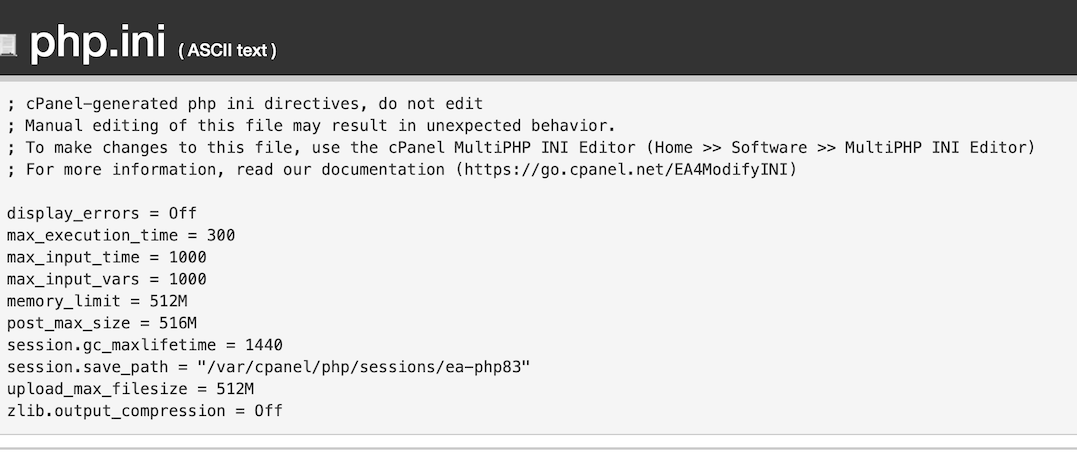
But this has been done for a long time in WP-Config, php.ini and .htaccess. See attached images and, below, text copies of php.ini and .htaccess
php.ini
; cPanel-generated php ini directives, do not edit
; Manual editing of this file may result in unexpected behavior.
; To make changes to this file, use the cPanel MultiPHP INI Editor (Home >> Software >> MultiPHP INI Editor)
; For more information, read our documentation (https://go.cpanel.net/EA4ModifyINI)

display_errors = Off
max_execution_time = 300
max_input_time = 1000
max_input_vars = 1000
memory_limit = 512M
post_max_size = 516M
session.gc_maxlifetime = 1440
session.save_path = "/var/cpanel/php/sessions/ea-php83"
upload_max_filesize = 512M
zlib.output_compression = Off
.htaccess
# END WP-HUMMINGBIRD-CACHING

# BEGIN cPanel-generated php ini directives, do not edit
# Manual editing of this file may result in unexpected behavior.
# To make changes to this file, use the cPanel MultiPHP INI Editor (Home >> Software >> MultiPHP INI Editor)
# For more information, read our documentation (https://go.cpanel.net/EA4ModifyINI)
<IfModule php8_module>
   php_flag display_errors Off
   php_value max_execution_time 300
   php_value max_input_time 1000
   php_value max_input_vars 1000
   php_value memory_limit 512M
   php_value post_max_size 516M
   php_value session.gc_maxlifetime 1440
   php_value session.save_path "/var/cpanel/php/sessions/ea-php83"
   php_value upload_max_filesize 512M
   php_flag zlib.output_compression Off
</IfModule>
<IfModule lsapi_module>
   php_flag display_errors Off
   php_value max_execution_time 300
   php_value max_input_time 1000
   php_value max_input_vars 1000
   php_value memory_limit 512M
   php_value post_max_size 516M
   php_value session.gc_maxlifetime 1440
   php_value session.save_path "/var/cpanel/php/sessions/ea-php83"
   php_value upload_max_filesize 512M
   php_flag zlib.output_compression Off
</IfModule>
So you are a magician. And it looks like a long time magician. Are you still doing that, or not able to?
I must say parts of your website are very fast. Crazy fast. But I see the eventon plugin is about the same speed as the beat – most probably as fast as it gets!
Okay, is that something we could hand in as a feature request? Is there any workaround with other views to create something similar to this?
Best regards
By other hand, is possible to close automatically the actual opened Event card when other is opened (we want maximum one opened all the time).
Greetings!!
Tahnk you very much!
I don’t know why, but now works.
Just selected Show full description in Other EventCard Settings and ok.
Seems to be resolved.
Thanx
Okey,
i checked again, it didnt work because it was a fictional email. Please use marketing@euth.at and use the same Passwort.
Best wises
Dave
Hello,
In this order
https://www.foodsorcery.co.uk/wp-admin/post.php?post=135730&action=edit
the class time is “21 July 2024 6:15 PM – 9:30 PM”, but the ticket itself is “17 June 2024 9:44 AM – 9:44 AM”:
https://www.foodsorcery.co.uk/wp-admin/post.php?post=135731&action=edit
Correct?
….not showing on our system…
Where do you check the info?
Here’s the error:
[22-Jul-2024 23:54:46 UTC] PHP Fatal error: Allowed memory size of 536870912 bytes exhausted (tried to allocate 266240 bytes) in /home4/passel22/public_html/wp-includes/class-wp-term-query.php on line 888
Please try increasing the memory limit:
https://docs.myeventon.com/documentations/increasing-wordpress-memory-limit/
Please install Advanced Cron Manager:
https://wordpress.org/plugins/advanced-cron-manager/
Then go to the plugin and find https://helpdeskx.s3.amazonaws.com/wp-content/uploads/2024/07/01142051/Screenshot-2024-07-01-at-23.20.24.jpg
Click on Execute Now.
Do you need YearlyView but only show months june to august? Unfortunately, not possible to hide certain months.