Yes, Thomas purchased the ticket(s) and added his wife Abigail as an additional attendee. He added her name and also her email. It all looked fine before the administrator changed tot he new event. Everything looks fine in the database. It just doesn’t show the correct name on the new event
Can you tell me how an administrator is supposed to move an attendee from one event to another?
You are correct, only on the front end the waitlist space offer action is run, at the moment. We will implement this on backend change as well in the next update to waitlist addon.
I would also recommend using chatGPT to get help pertaining to your situation.
https://chatgpt.com/
These errors are coming from the PHP 8.2 please allow us sometime we will release the next version of RSS plugin that will resolve these.
Hello Katrin,
We are currently working on open maps API and see if we can implement them in eventON in similar capacity. Its a work in progress.
To be honest, I am not too familiar with google’s various API settings, Any chance you can reach out to their support as you are paying for using the maps API, you should be able to get support from them.
Here is a link to their support page; https://developers.google.com/maps/support
So many other clients are able to use google maps with eventON, so it has to be some restrictions with your website and/or your country or your web host that is creating this road block.
Your original purchase was on July last year. At the checkout page, we have very clear acknowledgement statement saying auto renewal is on by default unless cancelled it will auto renew in 1 year.
Anyways Jason, no need to go on about this. Humans make mistakes, they over look things in hurry and then wonder how it happened.
We will go ahead and refund your auto renewal and will cancel the subscription so it will no longer be charged.
And please pay attention for fine terms in the future when you click those buttons 🙂
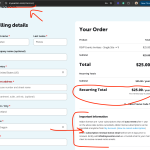
You mentioned “both of the addons” but your order only shows one actionuser addon. Please make sure you have logged into myeventon.com using the correct email address as in the order.
That might be the only reason to not see that download.
Order is refunded now. and subscription cancelled.
If you have more questions, kindly send us a new ticket and we would be more than happy to help you resolve your issues!
This move attendee to a different class is not a feature supported within the ticket addon. It must be a customized feature. If you can locate that to cause the issue, you will need to contact the person developed that and check in the process to make sure it is moving the attendee correctly.
I am not able to replicate this issue on my end.
So what I am guessing is Thomas purchased the both tickets and he only used Abigail’s email in the additional ticket holder information, and not her name.