Please update to the new version we just released. 1.0.3 for tickets waitlist and tickets 2.5.4 — should have those missing translations.
Archives: Replies
Replies for tickets on suppota
Reply to: tickets(405553)
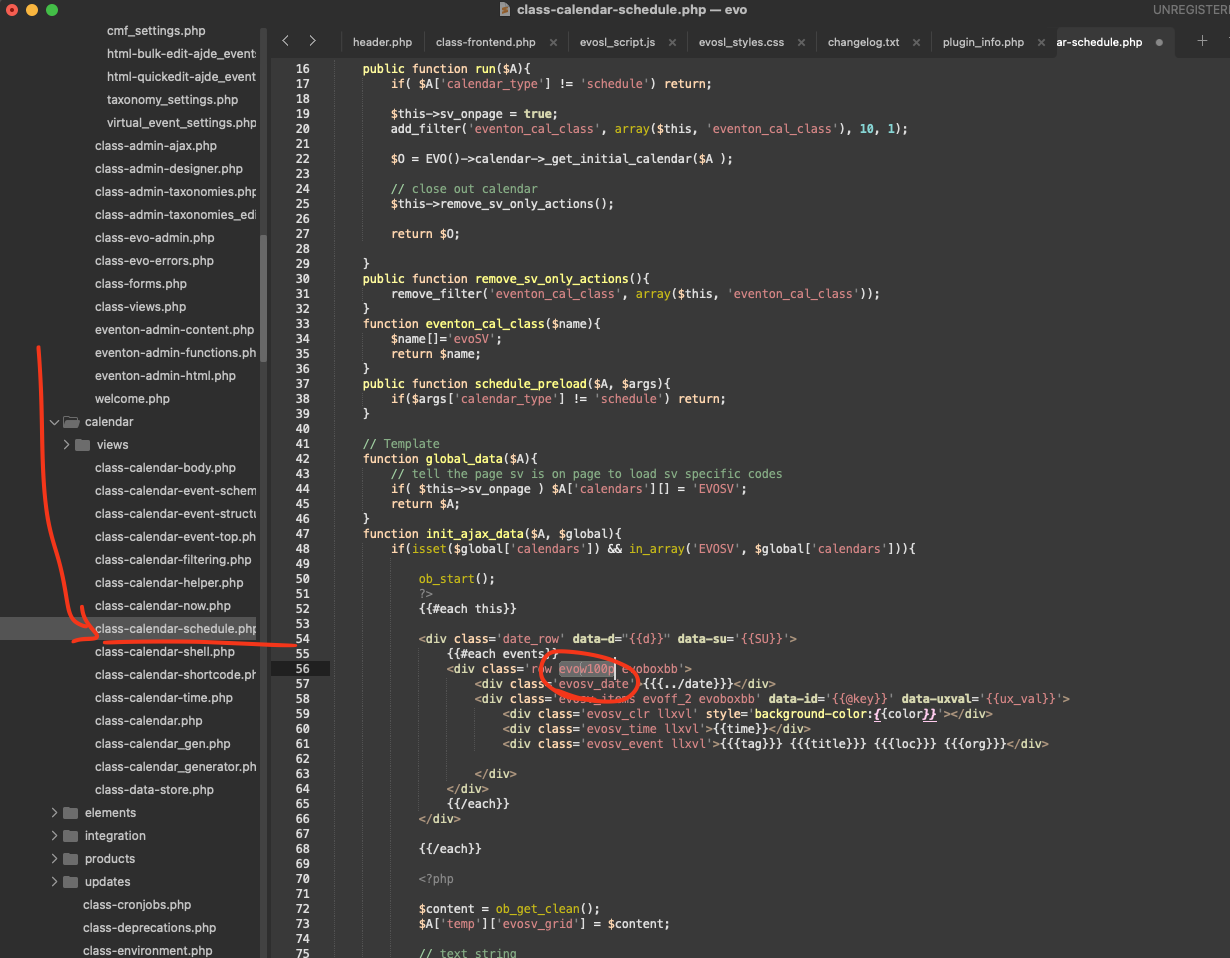
please apply this patch fix to the eventON code in your website and that will resolve this.
file: eventon/includes/calendar/class-calendar-schedule.php line 56. Remove the code evo100p
We will be including this code change in the next version of EventON update.
Reply to: tickets(405496)
Kindly update to the latest version of slider addon 2.1.7 —
this should resolve the issue.
Reply to: tickets(404690)
Hello Florian, Sorry just still trying to figure out what we even need to be looking for.
Looking back at your messages, you are saying ”CSV Exports” do not have that information for old ones, but for new items they exists.
So if we look at the event ticket itself. eg. https://rmt.sandboxpro.de/wp-admin/post.php?post=263122&action=edit
That data is missing in there, that is why it is not getting exported to CSV. Perhaps it was never collected? Do you know if that value was collected in old version?
Reply to: tickets(405442)
Just wanted to update you we have released the new eventON Tickets version 2.5.3 which will resolve this issue of everything getting moved to auto complete. If you still see this issue with new version kindly send us a message in here.
Reply to: tickets(405493)
>>because it tries to load via http instead of https.<<
What is trying to load? because filters plus does not load any assets to page like css or js files. We are curious what is not getting load correctly.
Once you install the filters addon, you will need to add the shortcode parameters to include filters plus with the calendar. Shortcode generator will have more filter plus specific option you can customize on.
Reply to: tickets(405513)
Thank you very much for your assistance. I’ll reach out if I have any more questions.
Thank you,
Kirk
Reply to: tickets(405594)
Hello,
That did the trick when I scroll down and stop scrolling, I can confirm that it does not auto scroll at the bottom of the page.
It does now though auto scroll out of the event when I scroll down to see the list of participants and stop scrolling, it auto scrolls way down to another event.
To reproduce it, scroll down to an event, open it and scroll down to the attendees list and stop scrolling, you will see that it will auto scroll on it’s own.
Thanks in advance
Reply to: tickets(405595)
Hello,
I did try that and when I create the order they don’t appear in the guest list under the event.
Am I missing something?
Reply to: tickets(405453)
Ashan,
Do you see similar issue on your mobile when you check their website?
In order to be able to see the website as a guest, please go to
https://sandbox.ibiza-heute.de/wp-admin/admin.php?page=my_private_site_tab_site_privacy
Disable ” Enable login privacy”.