We are glad your issue is resolved, if you have any further questions or concerns please create a new ticket.
If you have a moment, we would greatly appreciate if you could kindly leave us a review at Codecanyon. By going to your account > Downloads. We are very grateful for your kind review!
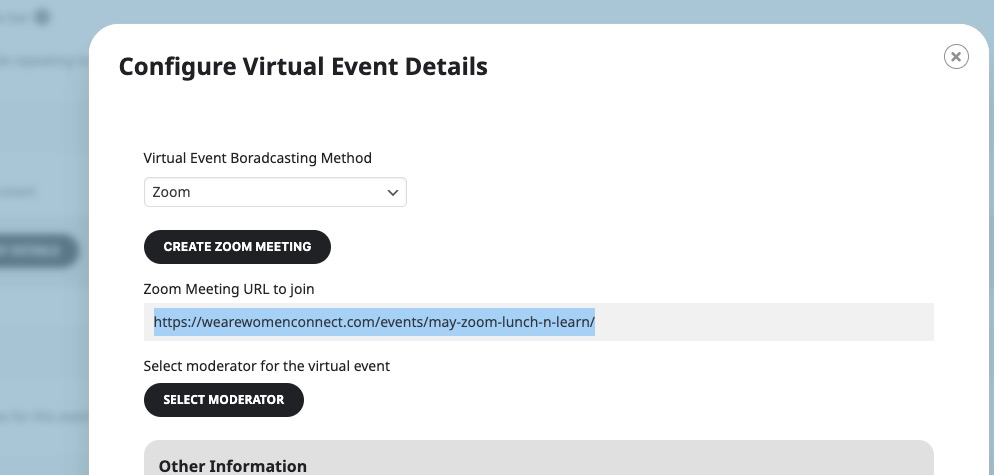
It seems that “Zoom Meeting URL to join” has event’s URL:
So that’s why it redirects to the event itself. Could you check and let us know?
Hello,
Thank you for your messages, I am going to assign this ticket to Ashan and he will be able to take it from here and find you a solution. Please allow some time for him to get back to you, we greatly appreciate your patience and thank you for being a eventon customer! Also please disable any IP blocking on your site if there are any.
Please wait some time and let us know if the same issue happens again.
Hello,
Please add this CSS code to EventON > Styles (If you don’t see any change, EventON > Scripts & Styling > turn off Write dynamic styles to header > save settings > turn on Write dynamic styles to header):
.ajde_evcal_calendar .calendar_header .evo_j_dates .legend a.set { color: white; }
Hello,
Thank you for your messages, I am going to assign this ticket to Ashan and he will be able to take it from here and find you a solution. Please allow some time for him to get back to you, we greatly appreciate your patience and thank you for being a eventon customer!
Please also note that you can just start using them unactivated, while we are checking the issue.
https://stuartseminars.com/stuartlogin/
user: eventonartem
pw: O7D9vnhg7C(crb9zBbQMYPvh
Hello,
Thank you for letting us know! We are going to implement this.
If you have any further questions or concerns please create a new ticket.
Hello,
You can create variations with
https://www.myeventon.com/addons/ticket-variations-options/
Or create different booking blocks with
https://www.myeventon.com/addons/bookings/
Try on https://dev.myeventon.com/wp-admin/