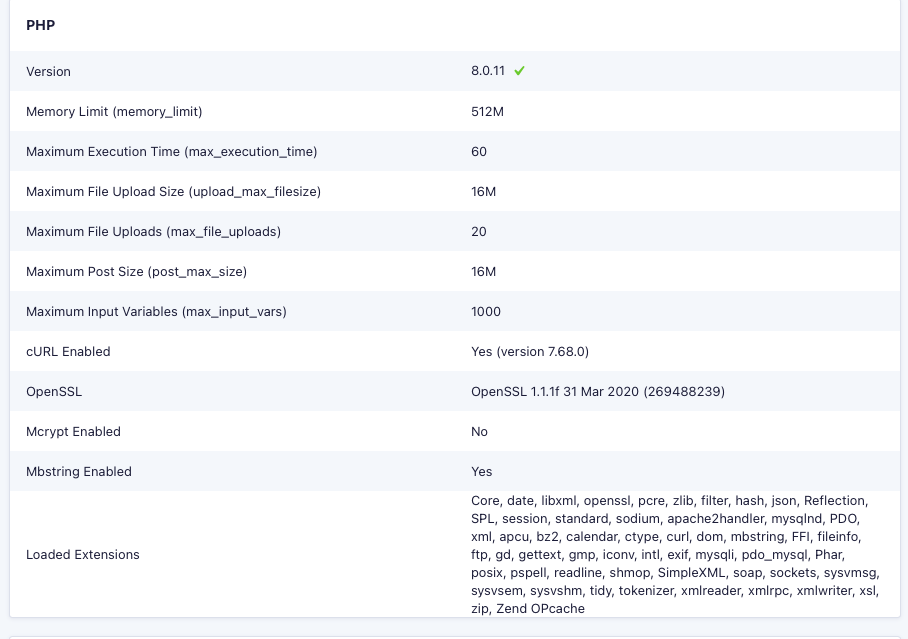
Well, I’ve tried all these things and set the memory limit to 512 via all three ways and that seems to have worked for setting the memory (see attached).
The log is only showing this (after reloading the page, repeatedly):
[11-Apr-2024 16:48:14 UTC] PHP Warning: Constant WP_MEMORY_LIMIT already defined in /var/www/html/wp-config.php on line 177
[11-Apr-2024 16:48:14 UTC] PHP Warning: Constant WP_MEMORY_LIMIT already defined in /var/www/html/wp-config.php on line 177
[11-Apr-2024 16:48:20 UTC] PHP Warning: Constant WP_MEMORY_LIMIT already defined in /var/www/html/wp-config.php on line 177
[11-Apr-2024 16:48:26 UTC] PHP Warning: Constant WP_MEMORY_LIMIT already defined in /var/www/html/wp-config.php on line 177
[11-Apr-2024 16:48:28 UTC] PHP Warning: Constant WP_MEMORY_LIMIT already defined in /var/www/html/wp-config.php on line 177
[11-Apr-2024 16:48:28 UTC] PHP Warning: Constant WP_MEMORY_LIMIT already defined in /var/www/html/wp-config.php on line 177
[11-Apr-2024 16:48:57 UTC] PHP Warning: Constant WP_MEMORY_LIMIT already defined in /var/www/html/wp-config.php on line 177
[11-Apr-2024 16:48:59 UTC] PHP Warning: Constant WP_MEMORY_LIMIT already defined in /var/www/html/wp-config.php on line 177
[11-Apr-2024 16:48:59 UTC] PHP Warning: Constant WP_MEMORY_LIMIT already defined in /var/www/html/wp-config.php on line 177
I see the footer isn’t loading on this page, either. Any other ideas? Thanks.
arg the frame is not good sorry 🙂 the link of video :
ok i have tested my cache is on on my server and no update of litepspeed recently
I already tried to deactivate the lite speed plug in to see if it caused a problem, no change.
Do you want me to test what exactly to deactivate certain plug-ins? I didn’t understand it well (my English is not perfect) even with a translator
Do you want full admin access if not?
thanks in advance
you can see for my part my site is speed on the other page only on event page is slow
<div style=”padding:54.17% 0 0 0;position:relative;”><iframe src=”https://player.vimeo.com/video/933355069?badge=0&autopause=0&player_id=0&app_id=58479″ frameborder=”0″ allow=”autoplay; fullscreen; picture-in-picture; clipboard-write” style=”position:absolute;top:0;left:0;width:100%;height:100%;” title=”CONTACT – EXPL’OR NATURE – Google Chrome 2024-04-11 18-30-34″></iframe></div><script src=”https://player.vimeo.com/api/player.js”></script>
Have a look now
I see the second event from the top has an image that is showing
the top event on the 7th does not have an image
I added the cal_init_nonajax=”yes” back into the first calendar BUT the entire website is slow even the pages without eventon (before adding the code)
see video:
https://vimeo.com/933345019
I would look at your lightspeed cache plugin and any plugins your host has- as seen in the video even a 70kb image takes a while to load on a non eventon page
I would also turn off auto updates on wordpress, your theme and plugins as that can update your site without you knowing and then things stop working- plugin developers only learn about the updates when they happen we don’t get warned 3 weeks before hand to update out plugins so an auto update of a theme can make certain plugins not work
and then get back to us with any info
I forgot to mention that I already removed that Single Event Page.
Thank you so much for your support.
I already sent that screenshot to the Porto team to have a look.
I also turned on the Debug but no debug file is being created. Debug option is still on, if you want to test.
I am using WM MAIL SMTP for email delivery and that is not even showing any activity when someone RSVPs an event. The RSVP is already stored in the list of RSVPs but no email is being sent.
Hello, anybody available? We need an update! This has taken too long!
hello, I’m coming back to you because since the beginning of the week the slowness on my calendar has returned, however, I have not modified the shortcode or made any updates, I have tried deactivating certain plug-ins, no change, I have removed cal_init_nonajax=”yes” of the shortcode no change either
if infotainerdave goes through here can you see if I forgot something because I don’t understand if the problem comes from me in advance thank you
access to the site: https://www.explor-nature.fr/wp-admin
id: eventon
pass:
9lm6tLheL88Tsoci0mVxqQ0$Ev
as a reminder, the page concerned by the slowness is: https://www.explor-nature.fr/calendrier/ and to check https://www.explor-nature.fr/calendrier/calendrier-mensuel/
Hello,
We cannot provide access to the live environment, we can potentially provide access to a staging environment but setting it up involves significant effort. Can you please let us know what we can check as the only issue seems to be with the ‘Event Type’ attribute on the EventTop which was working fine until the BST time change so I assume that field somehow might be using a different timezone logic to display the time.