Thank you for the idea Jamie, Yes we are working on adding a great preload animation for the images. 🙂
Archives: Replies
Replies for tickets on suppota
Reply to: tickets(349493)
Went ahead and refunded you for the addon. Subscription is also cancelled
Reply to: tickets(348900)
Can you please send me the styles for the background color of small boxes that show the number of people attending and the remaining spots? I just want to change these to a lighter color. I have all the text black now. Please advise.
Reply to: tickets(349051)
Sorry I am disturbing but even the RSVP form, when someone sends RSVP, the form stays still and nothing happens.
Also, attendees do not receive any email confirmation.
Can you help? There is a lot of stress on me. It has been working fine and I don’t know what to do.
Reply to: tickets(349046)
Apologies, yes, it’s working. Was just confirming, thanks again!
Reply to: tickets(349673)
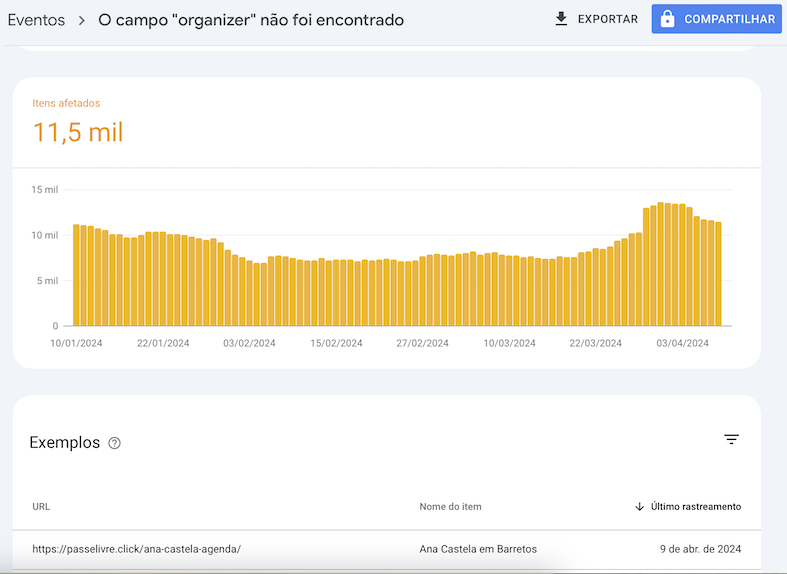
Hi,
1- When you don’t assign an organizer Google checks it and doesn’t …
R – Yes, I see no errors on Shema.org when I test an event url. But see attached image of Google Search Console pointing out errors in more than 11 thousand events
2 – “no data”…
R – There is no organizer
3 – You can remove the assigned organizer from Edit Event.
R – It could be interesting to be able to disable the organizer function in all events in a single action, especially for me.
Thank for your attention
Vitor Louzado
Reply to: tickets(348822)
Put 0.00 as it’s price and purchase the same way as you do in other events.
Reply to: tickets(348822)
Hi, thanks for your reply, ok I have duplicated the ticket to 10 repeats now how do I make it for sale so that I can buy it and see if it works?
Thank you
Reply to: tickets(341748)
We are sorry for the delay. Are you still having the issue with EventON 4.6.2?
Reply to: tickets(342090)
We are sorry for the delay. Since there is no direct compatibility with Polylang the options are
https://docs.myeventon.com/documentations/wpml-eventon-front-end/
https://docs.myeventon.com/documentations/setup-language-corresponding-events/