But we want to fetch different event start date and end date of the specific event in the banner. Suppose our event start on April 6th and end at April 14th. So I want to fetch these dates in the banner but I don’t want a custom interval of April 6th to Aril 14th as I don’t have event on days like April 10th & 11th. What shall be done in such scenarios as custom interval of start and end date are automatically generated whenever we update the event.
Hello,
There is a new version of RSVP add-on available. Could you update?
Please also note that to make sure this works, your server’s and EventON’s timezones should be the same. But first make sure to update RSVP add-on.
To update eventon addons: You can download latest eventon addons from myeventon > my account. Then you can go to your website, deactivate old addon and install new one and activate then delete the old addon. This link will further explain the process. Also you can follow us on twitter to get real-time announcements on updates!
Hello,
The only available option is EventON > Tickets > Structure of ticket product title.
Supports: {sku}, {event_name}, {event_start_date}, {event_end_date}
EventON as well as add-ons are outdated. Could you update?
To update eventon to latest version: If you are unable to do autoupdate, you can go to codecanyon your account > download and get the latest eventon version as zip file. Then you can go to your website > make sure “Delete eventon settings & data when EventON is uninstalled” is Deslected from eventon settings, delete old eventon, install new one and activate. This link will further explain the process it. Also you can follow us on twitter to get real-time announcements on updates!
!!! Please make sure
WARNING! – When updating from EventON version 2.6.6 & 2.6.7 you must leave the above settings to NO (due to code error)! – If you are on EventON v2.6.8 or up (until 4+) this setting must be set to YES in order to keep already created events. From 4.0 you need to set this option to YES only if you want to delete EventON Settings and Events.
To update eventon addons: You can download latest eventon addons from myeventon > my account. Then you can go to your website, deactivate old addon and install new one and activate then delete the old addon. This link will further explain the process. Also you can follow us on twitter to get real-time announcements on updates!
Ok perfect! Ashan will check this ASAP.
Somehow this ticket got closed 4 hours ago … do not know why …
I modified /plugins/eventon-tickets/includes/class-integration-woocommerce.php directly and got the desired results but I am now stranded with the need to update this file / make the desired modification with every update.
Is there another way? Are you willing to offer some hooks / some functionality in the plugin itself?
Is it already there and i just do not see it?
On my side it looks like this:
Could you check in Incognito Mode?
Hello,
Thank you for your messages, I am going to assign this ticket to Ashan and he will be able to take it from here and find you a solution. Please allow some time for him to get back to you, we greatly appreciate your patience and thank you for being a eventon customer! Also please disable any IP blocking on your site if there are any.
Ah sorry, please remove this custom CSS to fix the issue: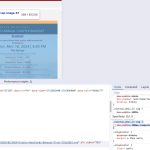
You can find it in style.css of your theme.
Hello,
Please send us wp-admin access to your site as a private message for us to further assist your situation.
Also note that this is more of a hack:
https://docs.myeventon.com/documentations/set-variable-prices-tickets/
We have a separate add-on to work with variations:
https://www.myeventon.com/addons/ticket-variations-options/
Try on
https://dev.myeventon.com/wp-admin/