for an immediate resolution to this. please go to eventON settings > styles and add this css code in there > save changes and clear cache to apply those styles.
CSS code:
@media (max-width: 600px){.evoFC_nextto.evoFC .eventon_fc_days .evo_fc_day{min-height: 60px;} }
We will be sure to include this in the next version update.
here is a general guide on how to apply patch fixes:
How To Apply A Patch Fix
Here is a patch fix that will resolve this issue, until we get a official new version released.
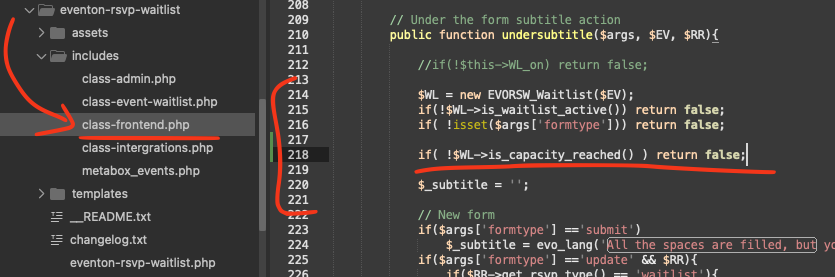
code: if( !$WL->is_capacity_reached() ) return false;
location: /includes/class-frontend.php line 218
You can see our updated dev site with slider.
Test 177
I added several styles to your website but because of the cache it is not reflecting on the frontend. How can we clear cache to load updated slider styles css file?
Apologies for the multiple messages, but wanted to follow up on this issue as it is a high priority for me.
Thank you , I look forward to your reply.
Hi,
When you say that you can now add custom repeats and don’t see any issues, did you perform those tests directly on my live website using the admin access I provided?
I am asking because the issue still persists for me, and I want to be sure if you were able to replicate it in my environment or if you were testing on a separate staging site. If you managed to make it work on my web, could you please tell me which specific event you tested or if you changed any settings to fix it?
I look forward to your confirmation.
Best regards,
You are referring to an annual view, which I assume is related to Yearlyview addon. But the order ID provided is for fullCal and ICS importer. Is this the correct items you need refunded for?
Hello Tom we are looking into this issue for you now! Much appreciate your patience!
Ok found the issue and it is resolved with a new update to countdown addon please update to the latest version 1.2.1 Changelog:
Changelog Countdown
This should resolve the incorrect countdown time.